
API Design & Integration
Diagrams
Concepts
What is an API?
An API (Application Programming Interface) is a contract between two pieces of software. It defines how they communicate: what requests are valid, what responses to expect, and what errors can occur.
APIs exist at every level: library functions, operating system calls, inter-service communication, and public-facing web APIs. This topic focuses on web APIs — the primary mechanism for services to communicate over the network.
REST (Representational State Transfer)
REST is an architectural style for designing web APIs around resources — things that have identity and state.
Core principles:
- Resources are identified by URLs:
/users/123,/orders/456/items - HTTP methods map to operations: GET (read), POST (create), PUT (replace), PATCH (update), DELETE (remove)
- Stateless — Each request contains all information needed to process it. No server-side sessions between requests.
- Representations — Resources can have multiple representations (JSON, XML, HTML). Clients specify preference via
Acceptheader.
Designing resources:
# Good — nouns, hierarchical
GET    /users                    # List users
GET    /users/123                # Get user 123
POST   /users                    # Create a user
PATCH  /users/123                # Update user 123
DELETE /users/123                # Delete user 123
GET    /users/123/orders         # List orders for user 123
GET    /users/123/orders/456     # Get order 456 for user 123

# Bad — verbs, RPC-style
POST   /getUser                  # Not RESTful
POST   /createUser               # The HTTP method already says "create"
GET    /getUserOrders?userId=123  # Hierarchy not reflected in URL
HTTP status codes — use them correctly:
| Code | Meaning | When to use | |------|---------|-------------| | 200 | OK | Successful GET, PATCH, DELETE | | 201 | Created | Successful POST that created a resource | | 204 | No Content | Successful DELETE with no response body | | 400 | Bad Request | Invalid input, validation failure | | 401 | Unauthorized | Missing or invalid authentication | | 403 | Forbidden | Authenticated but not authorized | | 404 | Not Found | Resource doesn't exist | | 409 | Conflict | Duplicate resource, state conflict | | 422 | Unprocessable Entity | Valid syntax but semantic errors | | 429 | Too Many Requests | Rate limit exceeded | | 500 | Internal Server Error | Unexpected server failure |
Pagination:
Never return unbounded lists. Common pagination approaches:
# Offset-based (simple, but slow for large offsets)
GET /users?page=3&per_page=20

# Cursor-based (performant, recommended for large datasets)
GET /users?after=cursor_abc123&limit=20

# Response includes navigation:
{
  "data": [...],
  "pagination": {
    "next_cursor": "cursor_def456",
    "has_more": true
  }
}
Filtering, sorting, and field selection:
GET /orders?status=pending&sort=-created_at&fields=id,total,status
GraphQL
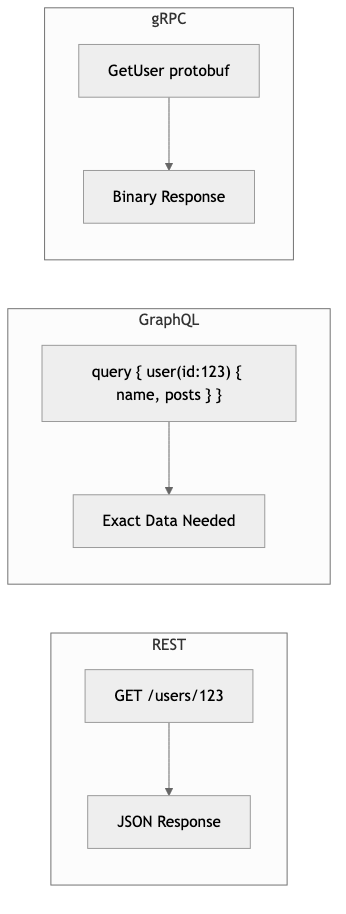
GraphQL (created by Facebook, 2015) lets clients request exactly the data they need — no more, no less.
The problem GraphQL solves: REST APIs often return too much data (over-fetching) or require multiple requests to assemble a view (under-fetching).
# REST: 3 requests to build a user profile page
GET /users/123          → { id, name, email, avatar_url, ... }
GET /users/123/posts    → [{ id, title, created_at, ... }, ...]
GET /users/123/followers → [{ id, name, ... }, ...]

# GraphQL: 1 request
query {
  user(id: 123) {
    name
    avatarUrl
    posts(first: 5) {
      title
      createdAt
    }
    followersCount
  }
}
Schema definition:
type User {
  id: ID!
  name: String!
  email: String!
  posts(first: Int, after: String): PostConnection!
  followersCount: Int!
}

type Post {
  id: ID!
  title: String!
  content: String!
  author: User!
  createdAt: DateTime!
}

type Query {
  user(id: ID!): User
  posts(filter: PostFilter): PostConnection!
}

type Mutation {
  createPost(input: CreatePostInput!): Post!
  updateUser(id: ID!, input: UpdateUserInput!): User!
}
The N+1 problem:
If a query requests users { posts { ... } }, a naive implementation queries the database once for users, then once per user for posts — N+1 queries. Solution: use a DataLoader that batches and deduplicates queries.
When to use GraphQL vs REST:
| Scenario | REST | GraphQL | |----------|------|---------| | Simple CRUD API | ✅ Simple, well-understood | Overkill | | Mobile apps with varying data needs | Multiple endpoints or custom ones | ✅ Clients request exactly what they need | | Public API for external developers | ✅ Familiar, easy to cache | Steeper learning curve for consumers | | Complex, deeply nested data | Multiple round trips | ✅ Single query | | File uploads | ✅ Native multipart support | Awkward (requires separate endpoint) | | Real-time subscriptions | Requires WebSockets separately | ✅ Built-in subscription support |
gRPC & Protocol Buffers
gRPC (Google Remote Procedure Call) uses Protocol Buffers for serialization and HTTP/2 for transport. It's designed for efficient, typed, service-to-service communication.
Protocol Buffer definition:
syntax = "proto3";

package order;

service OrderService {
  rpc CreateOrder(CreateOrderRequest) returns (Order);
  rpc GetOrder(GetOrderRequest) returns (Order);
  rpc ListOrders(ListOrdersRequest) returns (stream Order);  // Server streaming
}

message CreateOrderRequest {
  string user_id = 1;
  repeated OrderItem items = 2;
}

message Order {
  string id = 1;
  string user_id = 2;
  repeated OrderItem items = 3;
  OrderStatus status = 4;
  google.protobuf.Timestamp created_at = 5;
}

enum OrderStatus {
  ORDER_STATUS_UNSPECIFIED = 0;
  ORDER_STATUS_PENDING = 1;
  ORDER_STATUS_CONFIRMED = 2;
  ORDER_STATUS_SHIPPED = 3;
}
Using tonic in Rust:
// Generated from .proto file

STRUCTURE MyOrderService (default)

IMPLEMENT OrderService FOR MyOrderService:
    PROCEDURE CREATE_ORDER(request):
        req ← EXTRACT inner data FROM request
        // Process order...
        RETURN Response(order)
When to use gRPC:
- Internal service-to-service communication (not browser-facing)
- High-throughput, low-latency requirements
- Streaming data (server-side, client-side, or bidirectional)
- When type safety and code generation save development time
- Polyglot environments (generate clients in any language from .proto)
API Versioning
APIs evolve. Versioning ensures existing clients don't break when you make changes.
Strategies:
| Strategy | Example | Pros | Cons |
|----------|---------|------|------|
| URL path | /v1/users, /v2/users | Explicit, easy to route | URL pollution, hard to deprecate |
| Header | Accept: application/vnd.api+json;version=2 | Clean URLs | Hidden, easy to forget |
| Query param | /users?version=2 | Explicit, easy to test | Pollutes query string |
| No versioning (evolve carefully) | Add fields, never remove | Simplest | Requires discipline, limits changes |
The pragmatic approach (used by Stripe):
- Never remove or rename fields in a response
- New fields are added as optional
- Breaking changes get a new API version
- Old versions are supported for years with clear deprecation timelines
Rate Limiting & Throttling
Rate limiting protects your API from abuse and ensures fair resource distribution.
Common algorithms:
| Algorithm | How it works | Best for | |-----------|-------------|----------| | Token bucket | Tokens refill at a fixed rate. Each request costs a token. Allows bursts. | Most APIs — balances burst tolerance with sustained rate control | | Sliding window | Count requests in a rolling time window | Simple rate limits (100 req/minute) | | Fixed window | Count requests in fixed intervals | Simple but allows burst at window boundaries | | Leaky bucket | Requests queue and drain at a fixed rate | Smoothing bursty traffic |
Response headers for rate limiting:
HTTP/1.1 200 OK
X-RateLimit-Limit: 100
X-RateLimit-Remaining: 73
X-RateLimit-Reset: 1710500000

# When rate limited:
HTTP/1.1 429 Too Many Requests
Retry-After: 30
Backpressure
When a service can't keep up with incoming requests, it needs to signal callers to slow down — that's backpressure.
Backpressure mechanisms:
- HTTP 429 — Tell the client to back off
- Load shedding — Reject excess requests immediately (fail fast)
- Queue with bounded size — Accept requests into a queue, reject when full
- Streaming flow control — gRPC/HTTP2 built-in flow control
Without backpressure: The service queues requests unboundedly → memory grows → latency increases for everyone → system crashes.
With backpressure: Excess requests are rejected fast → callers retry with backoff → the service stays healthy for requests it can handle.
API Documentation (OpenAPI)
OpenAPI (formerly Swagger) is the standard for describing REST APIs in a machine-readable format.
From an OpenAPI spec, you can generate:
- Interactive documentation (Swagger UI, Redoc)
- Client SDKs in any language
- Server stubs
- Mock servers for testing
- API conformance tests
Best practices:
- Write the spec first, then implement (design-first)
- Include realistic examples in every endpoint
- Document all error responses, not just the happy path
- Keep the spec in the repo, version it with the code
Webhooks & Event-Driven APIs
Webhooks invert the request direction: instead of clients polling for updates, your service calls the client when something happens.
How webhooks work:
1. Client registers a webhook URL: POST /webhooks { url: "https://client.com/events" }
2. Event occurs in your system (order shipped)
3. Your service POSTs to the registered URL:
   POST https://client.com/events
   {
     "event": "order.shipped",
     "data": { "order_id": "123", "tracking": "ABC456" }
   }
4. Client processes the event
Webhook reliability patterns:
- Retry with backoff — If the client returns a non-2xx, retry with exponential backoff
- Idempotency — Include an event ID so clients can deduplicate
- Signatures — Sign payloads with HMAC so clients can verify authenticity
- Event log — Store all sent events so clients can replay missed ones
Business Value
- Developer adoption: A well-designed API is the primary driver of platform adoption. Stripe, Twilio, and Algolia built billion-dollar businesses partly because their APIs are excellent.
- Integration speed: Clean API design reduces integration time from weeks to days. For B2B products, this is the difference between winning and losing deals.
- Reduced support costs: Good error messages, consistent patterns, and clear documentation mean fewer support tickets.
- Partner ecosystem: APIs enable third-party integrations, creating a platform effect that multiplies the product's value without additional engineering.
- Internal velocity: Well-designed internal APIs let teams work independently. A clear contract between teams eliminates blocking dependencies.
Real-World Examples
Stripe's API Design
Stripe's API is the gold standard. Key design decisions: consistent naming (snake_case everywhere), predictable URL structure, every response includes an id, objects are expandable (?expand[]=customer), and idempotency keys for safe retries. They version their API by date (2024-03-15) and maintain years of backward compatibility. Their API design guide is publicly available and widely studied.
GitHub's REST + GraphQL Approach
GitHub offers both REST (v3) and GraphQL (v4) APIs. REST is used for simple CRUD operations and is familiar to most developers. GraphQL is available for complex queries (e.g., fetching a repository with its issues, pull requests, and contributors in one request). This dual approach serves different client needs without forcing one paradigm.
Slack's Real-Time Messaging API
Slack uses a combination of REST (for CRUD operations on messages, channels, users), WebSockets (for real-time events), and webhooks (for incoming integrations). Their Events API uses webhooks with a verification handshake, retry mechanism, and rate limiting — demonstrating a mature event-driven API design.
Google's API Design Guide
Google published their API Design Guide which is used across all Google Cloud APIs. It standardizes resource naming, error handling, pagination, and versioning. This consistency across hundreds of APIs means developers who learn one Google API can use any of them.
Common Mistakes & Pitfalls
-
Inconsistent naming — Mixing
camelCaseandsnake_case, oruserIdin one endpoint anduser_idin another. Pick one convention and enforce it everywhere. -
Using POST for everything — Treating the API as RPC (Remote Procedure Call) instead of REST. Use the right HTTP method for the right operation.
-
Leaking internal implementation — Exposing database column names, internal IDs, or implementation details in the API. The API is a public contract — design it for consumers, not your database schema.
-
No pagination — Returning all records in a list endpoint. This works with 10 records, crashes with 10 million. Always paginate.
-
Poor error messages —
{ "error": "Bad Request" }tells the client nothing. Provide specific, actionable error messages:{ "error": "validation_error", "field": "email", "message": "Invalid email format" }. -
No rate limiting — A single misbehaving client can take down your API. Always implement rate limiting, even on internal APIs.
-
Breaking changes without versioning — Removing or renaming a field breaks all existing clients. Either version the API or only make additive changes.
Trade-offs
| Approach | Pros | Cons | |----------|------|------| | REST | Simple, widely understood, cacheable | Over/under-fetching, multiple round trips | | GraphQL | Flexible queries, single endpoint | Complex server implementation, caching is harder | | gRPC | Fast, typed, streaming, code generation | Not browser-native, less human-readable | | Webhooks | Real-time, server-initiated | Reliability complexity, debugging harder | | Strict versioning | Clear contracts, backward compatible | Maintenance burden of multiple versions | | Evolve-only (no versions) | Simple, one codebase | Limits the changes you can make |
When to Use / When Not to Use
REST — use for:
- Public-facing APIs consumed by external developers
- Simple CRUD operations
- When cacheability matters (CDNs, browser caching)
- When the team and consumers are most familiar with REST
GraphQL — use for:
- Mobile apps with varying screen sizes and data needs
- Dashboard UIs that aggregate data from many sources
- When over-fetching or under-fetching is a real problem
gRPC — use for:
- Internal service-to-service communication
- High-throughput, low-latency requirements
- Streaming use cases (real-time feeds, file transfers)
- Polyglot environments where code generation saves time
Webhooks — use for:
- Notifying external systems of events
- When polling would be wasteful
- Integration platforms and automation workflows
Key Takeaways
- Design APIs around resources (nouns), not actions (verbs). Let HTTP methods express the action.
- Use HTTP status codes correctly. They're part of the API contract — not just decoration.
- Always paginate list endpoints. Cursor-based pagination scales better than offset-based.
- REST, GraphQL, and gRPC aren't competing — they serve different use cases. Many systems use multiple protocols.
- API versioning is cheaper than breaking existing clients. Stripe's date-based versioning is a proven approach.
- Rate limiting is not optional. Every API needs it — even internal ones.
- Webhooks need the same engineering rigor as APIs: retries, idempotency, signatures, and event logs.
Further Reading
-
Books:
- Designing Web APIs — Brenda Jin, Saurabh Sahni, Amir Shevat (2018) — Practical API design from Slack engineers
- API Design Patterns — JJ Geewax (2021) — Design patterns for building web APIs
-
Papers & Articles:
- Google API Design Guide — Comprehensive API design standards
- Stripe API Design — Study the gold standard
- GraphQL Best Practices — Official GraphQL guidance
- gRPC Documentation — Getting started with gRPC
-
Crates:
- axum — Ergonomic REST API framework for Rust
- async-graphql — GraphQL server library for Rust
- tonic — gRPC framework for Rust
- utoipa — Auto-generate OpenAPI docs from Rust code