
Cloud Engineering & Infrastructure
Diagrams
Concepts
Cloud-Native Design
Cloud-native design means building applications that fully exploit cloud computing advantages: elasticity, distributed systems, managed services, and automation. It is not simply "running on a server in the cloud" -- it requires rethinking how software is structured, deployed, and operated.
The Twelve-Factor App principles (adapted for cloud-native):
- Codebase -- One codebase tracked in version control, many deploys
- Dependencies -- Explicitly declare and isolate dependencies (
Cargo.toml) - Config -- Store config in environment variables, not in code
- Backing services -- Treat databases, queues, caches as attached resources
- Build, release, run -- Strictly separate build and run stages
- Processes -- Execute the app as stateless processes
- Port binding -- Export services via port binding
- Concurrency -- Scale out via the process model
- Disposability -- Maximize robustness with fast startup and graceful shutdown
- Dev/prod parity -- Keep development, staging, and production as similar as possible
- Logs -- Treat logs as event streams (stdout, not log files)
- Admin processes -- Run admin/management tasks as one-off processes
Traditional Architecture:
  [Monolith] → [Single DB] → [Single Server]
       |
  Everything coupled, vertical scaling only

Cloud-Native Architecture:
  [API Gateway]
       |
  +---------+---------+---------+
  |         |         |         |
[Svc A]  [Svc B]  [Svc C]  [Svc D]
  |         |         |         |
[DB A]  [Queue]   [Cache]  [DB D]
  |         |         |         |
  +----[Object Storage]--------+
       |
  [CDN / Edge]
Designing for failure is central to cloud-native thinking. Every network call can fail, every instance can be terminated, every region can go down. Your application must handle all of these gracefully.
Treating backing services as attached resources (principle #4) means your code interacts with cloud services through SDKs and configuration, not hardcoded paths or local file systems. Here is a Rust example using Amazon S3 as an object store:
// Example: S3 client for upload and download
// Dependencies: aws-config, aws-sdk-s3, async runtime

PROCEDURE CREATE_S3_CLIENT() → client
    // Loads credentials and region from environment variables,
    // IAM roles, or config files -- never hardcode credentials
    config ← LOAD_AWS_DEFAULTS()
    client ← NEW S3Client(config)
    RETURN client

PROCEDURE UPLOAD_OBJECT(client, bucket, key, file_path) → Result
    body ← READ_FILE_AS_STREAM(file_path)

    client.PUT_OBJECT(bucket, key, body)

    PRINT "Uploaded " + file_path + " to s3://" + bucket + "/" + key
    RETURN Ok

PROCEDURE DOWNLOAD_OBJECT(client, bucket, key) → Result<bytes>
    response ← client.GET_OBJECT(bucket, key)

    bytes ← COLLECT_RESPONSE_BODY(response)
    PRINT "Downloaded " + LENGTH(bytes) + " bytes from s3://" + bucket + "/" + key
    RETURN Ok(bytes)

PROCEDURE MAIN() → Result
    client ← CREATE_S3_CLIENT()

    // The bucket name comes from config/environment -- not hardcoded
    bucket ← GET_ENV_VAR("STORAGE_BUCKET")
    IF bucket IS NOT SET THEN FAIL "STORAGE_BUCKET environment variable required"

    UPLOAD_OBJECT(client, bucket, "reports/2026-q1.csv", "report.csv")
    data ← DOWNLOAD_OBJECT(client, bucket, "reports/2026-q1.csv")

    PRINT "Retrieved " + LENGTH(data) + " bytes"
    RETURN Ok
Notice how the bucket name comes from an environment variable (principle #3), the credentials are resolved automatically via the SDK (IAM roles in production, local config in development), and S3 is treated as an interchangeable backing service -- you could swap it for MinIO or another S3-compatible store without changing application logic.
Serverless Architecture
Serverless does not mean "no servers" -- it means you do not manage or think about servers. The cloud provider handles provisioning, scaling, patching, and availability.
Function-as-a-Service (FaaS) -- AWS Lambda, Google Cloud Functions, Azure Functions:
// Example: An AWS Lambda handler

STRUCTURE Request
    order_id : String

STRUCTURE Response
    message : String
    status_code : Integer

PROCEDURE HANDLER(event) → Result<Response>
    order_id ← event.payload.order_id

    // Process the order -- no server management, scales to zero
    result ← PROCESS_ORDER(order_id)

    RETURN Ok(Response {
        message ← "Order " + order_id + " processed: " + result,
        status_code ← 200
    })

PROCEDURE MAIN() → Result
    RUN_LAMBDA(HANDLER)
A more complete pattern handles API Gateway events, extracts path parameters, and returns structured HTTP responses. This is the most common real-world Lambda deployment:
// Example: API Gateway HTTP handler

STRUCTURE ApiResponse
    message : String
    item_id : String

PROCEDURE HANDLER(event) → Result<Response>
    // Extract path parameters from the API Gateway event
    path ← event.URI().PATH()
    item_id ← LAST_SEGMENT(SPLIT(path, "/")) OR "unknown"

    // Business logic goes here -- the function is stateless,
    // so any state lives in a backing service (DynamoDB, RDS, etc.)
    response_body ← ApiResponse {
        message ← "Retrieved item " + item_id,
        item_id ← item_id
    }

    response ← BUILD_RESPONSE(
        status ← 200,
        header "content-type" ← "application/json",
        body ← TO_JSON(response_body)
    )

    RETURN Ok(response)

PROCEDURE MAIN() → Result
    // Initialize shared resources here (DB connections, SDK clients).
    // This code runs once per cold start, not per invocation.
    // Reusing connections across invocations is critical for performance.
    RUN_LAMBDA_HTTP(HANDLER)
Serverless trade-offs:
| Aspect | Serverless | Containers | VMs | |--------|-----------|------------|-----| | Cold start | 10ms-10s | Seconds | Minutes | | Max execution time | 15 min (Lambda) | Unlimited | Unlimited | | Scaling | Automatic, per-request | Automatic with config | Manual or auto-scaling groups | | Cost model | Per invocation | Per second running | Per hour running | | State | Stateless | Stateful possible | Fully stateful | | Operational overhead | Minimal | Medium | High |
Managed Services vs Self-Hosted
One of the most consequential decisions in cloud engineering is whether to use a managed service or run your own.
Managed service -- The cloud provider operates the software (e.g., Amazon RDS, Google Cloud SQL, Azure Cosmos DB). You configure it; they patch it, back it up, handle failover.
Self-hosted -- You deploy and operate the software yourself on cloud VMs or containers (e.g., running PostgreSQL on EC2, Kafka on Kubernetes).
Decision Framework:

Is this a core differentiator for your business?
  |
  +-- YES → Consider self-hosting (you need deep control)
  |
  +-- NO → Use managed service
         |
         Is the managed service cost-prohibitive at your scale?
           |
           +-- YES → Evaluate self-hosted with automation
           |
           +-- NO → Use managed service (default choice)
Example cost comparison for PostgreSQL (monthly estimate):
| Approach | Instance | Storage | Ops Cost | Total | |----------|----------|---------|----------|-------| | RDS db.r6g.xlarge | 115 (1TB) | ~665 | | Self-hosted EC2 r6g.xlarge | 100 (EBS) | ~2,490 |
The self-hosted option looks cheaper on compute but costs significantly more when you factor in the engineer time required for patching, backups, failover configuration, monitoring, and on-call.
Multi-Cloud Strategies
Multi-cloud means using services from more than one cloud provider. This is distinct from hybrid cloud (cloud + on-premises).
Types of multi-cloud:
- Workload isolation -- Different workloads on different clouds (analytics on GCP, web services on AWS)
- Redundancy -- Same workload deployed across multiple clouds for disaster recovery
- Best-of-breed -- Using each provider's strongest offerings (GCP BigQuery, AWS Lambda, Azure AD)
- Negotiation leverage -- Ability to move workloads reduces vendor lock-in risk
The reality: True multi-cloud (same workload, multiple providers) is expensive and complex. Most organizations practice "multi-cloud by accident" -- different teams chose different providers over time.
Pragmatic Multi-Cloud:

[Frontend CDN: CloudFlare]
        |
[API: AWS EKS]  ←→  [ML Pipeline: GCP Vertex AI]
        |                    |
[Primary DB: AWS RDS]  [Data Warehouse: GCP BigQuery]
        |
[Auth: Azure AD / Entra ID]
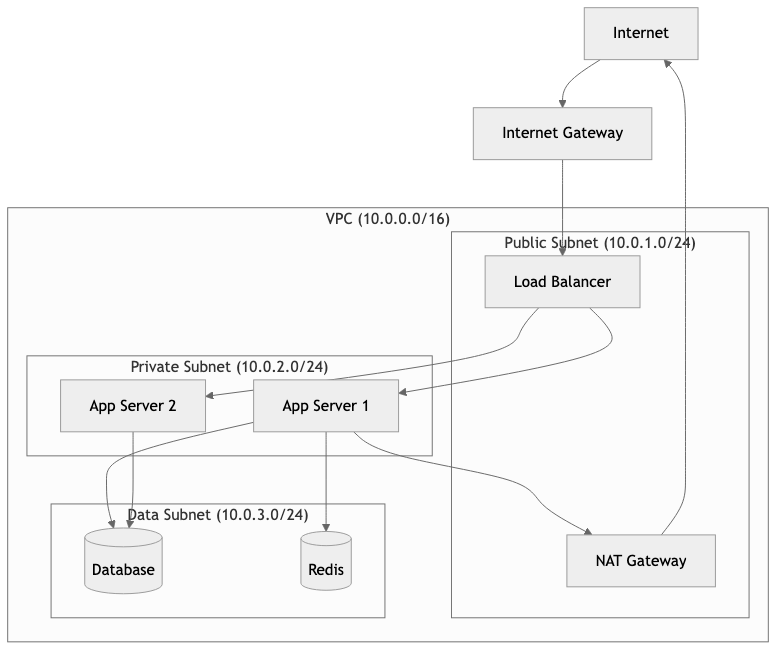
Networking: VPC, Subnets, and Security Groups
Cloud networking is one of the most critical and least understood areas of cloud engineering. Getting it wrong creates security vulnerabilities and operational nightmares.
Virtual Private Cloud (VPC) -- A logically isolated network within the cloud provider. Think of it as your own private data center network.
Subnets -- Subdivisions of a VPC, each associated with an availability zone.
- Public subnet -- Has a route to an internet gateway. Resources here can have public IPs.
- Private subnet -- No direct internet access. Resources communicate via NAT gateway or VPC endpoints.
Security Groups -- Virtual firewalls that control inbound and outbound traffic at the instance level. They are stateful: if you allow inbound traffic, the response is automatically allowed.
VPC: 10.0.0.0/16
|
+-- Public Subnet A (10.0.1.0/24) -- AZ us-east-1a
|   +-- [ALB] (Application Load Balancer)
|   +-- [NAT Gateway]
|
+-- Public Subnet B (10.0.2.0/24) -- AZ us-east-1b
|   +-- [ALB] (redundant)
|
+-- Private Subnet A (10.0.10.0/24) -- AZ us-east-1a
|   +-- [App Server 1]
|   +-- [App Server 2]
|
+-- Private Subnet B (10.0.11.0/24) -- AZ us-east-1b
|   +-- [App Server 3]
|   +-- [App Server 4]
|
+-- Data Subnet A (10.0.20.0/24) -- AZ us-east-1a
|   +-- [RDS Primary]
|
+-- Data Subnet B (10.0.21.0/24) -- AZ us-east-1b
    +-- [RDS Standby]

Security Group Rules:
  ALB SG:       Inbound 443 from 0.0.0.0/0
  App SG:       Inbound 8080 from ALB SG only
  DB SG:        Inbound 5432 from App SG only
The principle of least privilege applies to networking: only open the ports that are required, only to the sources that need them.
Infrastructure as Code (IaC)
IaC means defining your infrastructure in declarative configuration files, versioned in git, reviewed in pull requests, and applied through automation. No clicking in consoles.
Terraform (HashiCorp) -- The most widely adopted IaC tool. Uses HCL (HashiCorp Configuration Language). Provider-agnostic.
# Terraform example: VPC + ECS Fargate service
resource "aws_vpc" "main" {
  cidr_block           = "10.0.0.0/16"
  enable_dns_hostnames = true

  tags = {
    Name        = "production-vpc"
    Environment = "production"
    ManagedBy   = "terraform"
  }
}

resource "aws_ecs_service" "api" {
  name            = "api-service"
  cluster         = aws_ecs_cluster.main.id
  task_definition = aws_ecs_task_definition.api.arn
  desired_count   = 3
  launch_type     = "FARGATE"

  network_configuration {
    subnets         = aws_subnet.private[*].id
    security_groups = [aws_security_group.api.id]
  }

  load_balancer {
    target_group_arn = aws_lb_target_group.api.arn
    container_name   = "api"
    container_port   = 8080
  }
}
Pulumi -- IaC using real programming languages (TypeScript, Python, Go, and others). Allows loops, conditionals, and abstractions that HCL struggles with.
When to use which:
| Criteria | Terraform | Pulumi | |----------|-----------|--------| | Team skill set | Ops-heavy teams | Dev-heavy teams | | Ecosystem maturity | Very mature, huge provider library | Growing, good but smaller | | State management | Remote backends (S3, Terraform Cloud) | Pulumi Cloud or self-managed | | Testing | Limited (terratest) | Native unit testing in your language | | Learning curve | New language (HCL) | Use languages you know |
Cost Optimization
Cloud bills grow silently. Without active management, costs can increase 30-50% year over year with no increase in traffic.
Key strategies:
- Right-sizing -- Most instances are over-provisioned. Monitor CPU/memory utilization and downsize.
- Reserved Instances / Savings Plans -- Commit to 1-3 year usage for 30-72% discounts on stable workloads.
- Spot Instances -- Use interruptible capacity for batch jobs, CI/CD, and stateless workers (60-90% savings).
- Auto-scaling -- Scale to actual demand, not peak capacity.
- Storage tiering -- Move infrequently accessed data to cheaper storage classes (S3 Glacier, Infrequent Access).
- Eliminate waste -- Shut down unused resources, delete unattached EBS volumes, remove idle load balancers.
// Example: A service that reads cost tags and reports untagged resources

PROCEDURE FIND_UNTAGGED_RESOURCES(client) → Result<List<String>>
    untagged ← EMPTY LIST

    response ← client.GET_RESOURCES(
        tag_filters ← [TagFilter(key ← "Environment")]
    )

    // Resources without the "Environment" tag are candidates for cleanup
    FOR EACH mapping IN response.resource_tag_mapping_list DO
        tags ← mapping.tags
        has_env ← ANY tag IN tags WHERE tag.key = "Environment"
        IF NOT has_env THEN
            IF mapping.resource_arn IS NOT NULL THEN
                APPEND mapping.resource_arn TO untagged
            END IF
        END IF
    END FOR

    RETURN Ok(untagged)
Tagging strategy is essential. Every resource should have at minimum:
Environment(production, staging, development)Team(the owning team)Service(the application or service name)CostCenter(for billing allocation)
Business Value
Cloud engineering directly impacts a company's ability to move fast, scale efficiently, and control costs.
Speed to market -- Infrastructure provisioning drops from weeks (data center) to minutes (IaC + cloud). A new microservice can go from code to production in hours, not months.
Elastic economics -- Pay only for what you use. A startup can run on $50/month and scale to handle millions of users without re-architecting. This was impossible in the data center era.
Operational efficiency -- Managed services eliminate entire categories of operational work. A team of 3 engineers can operate infrastructure that would have required 15 in a data center model.
Global reach -- Deploy to 30+ regions worldwide without building or leasing a single data center. Serve users from the edge with low latency.
Risk reduction -- Multi-AZ deployments, automated backups, and disaster recovery are built into managed services. Achieving the same resilience on-premises requires massive capital investment.
Quantified impact:
- Companies migrating to cloud report 20-30% reduction in total cost of ownership (Gartner, 2024)
- Mean time to provision infrastructure drops from 14 days to under 1 hour
- Incident recovery time improves 50-70% with cloud-native auto-healing
Real-World Examples
Netflix -- All-In on AWS
Netflix completed its migration from on-premises data centers to AWS in 2016 after a seven-year effort. They serve 250+ million subscribers across 190 countries.
Key decisions:
- Built entirely on AWS (single-cloud strategy, deep integration)
- Created the Chaos Engineering discipline (Chaos Monkey) because cloud instances are inherently ephemeral
- Open-sourced their cloud tooling: Eureka (service discovery), Zuul (API gateway), Hystrix (circuit breaker)
- Use over 100,000 EC2 instances during peak hours, scaling down significantly off-peak
Lesson: Going all-in on one cloud provider enabled Netflix to build deep expertise and leverage provider-specific optimizations. The trade-off is vendor lock-in, but they decided speed of execution mattered more.
Airbnb -- Cloud Cost Engineering at Scale
Airbnb runs primarily on AWS and faced a common problem: cloud costs growing faster than revenue. Their response was to build an internal cost engineering practice.
What they did:
- Built internal tooling to attribute cloud costs to specific teams and services
- Implemented automated right-sizing recommendations
- Created "cost budgets" per team with alerts when spending exceeded thresholds
- Moved batch workloads to spot instances, saving millions annually
- Shifted to Kubernetes (EKS) for better bin-packing of workloads
Lesson: Cloud cost optimization is not a one-time project. It requires continuous tooling, cultural change (teams own their costs), and executive sponsorship.
Capital One -- Cloud-First in Regulated Industry
Capital One became the first US bank to go all-in on public cloud (AWS), closing all its data centers by 2020.
Key decisions:
- Built a custom cloud governance platform to enforce compliance automatically
- Used IaC (Terraform + custom tooling) to ensure every resource met security baselines
- Implemented encryption everywhere -- at rest, in transit, in processing
- Created "guardrails, not gates" -- developers can move fast within pre-approved patterns
Lesson: Even heavily regulated industries can adopt public cloud. The key is automating compliance rather than relying on manual approval processes.
Spotify -- Multi-Cloud Migration to GCP
Spotify migrated from on-premises data centers to Google Cloud Platform, completing the migration in 2018.
What they did:
- Chose GCP primarily for its data and machine learning capabilities (BigQuery, TensorFlow)
- Migrated 1,200+ microservices over two years
- Built Backstage, an internal developer portal (now open-source and a CNCF project) to manage the complexity
- Used Kubernetes extensively for workload orchestration
Lesson: The choice of cloud provider should align with your technical differentiation. Spotify's core value comes from recommendation algorithms, and GCP's ML infrastructure was a natural fit.
Common Mistakes & Pitfalls
1. Lifting and Shifting Without Re-Architecting
Taking a monolith running on bare metal and deploying it unchanged to an EC2 instance. You get all the costs of cloud with none of the benefits (elasticity, managed services, auto-scaling). This is the most expensive way to use the cloud.
Fix: Treat cloud migration as an opportunity to modernize. At minimum, externalize configuration, use managed databases, and enable auto-scaling.
2. No Infrastructure as Code from Day One
Clicking through the AWS console to create resources is fast initially but creates "snowflake infrastructure" that no one can reproduce, audit, or understand. When the person who clicked the buttons leaves, institutional knowledge leaves with them.
Fix: Adopt Terraform or Pulumi from the first resource. Even a simple main.tf is better than nothing. Put it in version control and require pull request reviews.
3. Ignoring the Blast Radius
Putting all services in a single VPC, a single account, or a single region. When something goes wrong, everything goes wrong simultaneously.
Fix: Use AWS Organizations (or equivalent) to create separate accounts per environment. Isolate production from staging. Deploy across multiple availability zones. For critical services, consider multi-region.
BAD:  Single AWS Account
      +-- Production services
      +-- Staging services
      +-- Developer sandboxes
      +-- CI/CD pipelines
      (One IAM misconfiguration affects everything)

GOOD: AWS Organization
      +-- Management Account (billing, governance)
      +-- Production Account (locked down, limited access)
      +-- Staging Account (mirrors production)
      +-- Development Account (more permissive)
      +-- Shared Services Account (CI/CD, artifact repos)
4. Over-Engineering for Scale You Do Not Have
Building a multi-region, multi-cloud Kubernetes cluster with service mesh, event sourcing, and CQRS -- for an application serving 100 requests per minute. This wastes months of engineering time and creates massive operational complexity.
Fix: Start simple. A single region, a managed container service (ECS Fargate or Cloud Run), and a managed database will handle far more traffic than most applications ever see. Scale the architecture when the numbers demand it.
5. Neglecting Cloud Security Basics
Hardcoding AWS credentials in source code, using root accounts for daily operations, leaving S3 buckets public, or granting overly permissive IAM policies ("Action": "*", "Resource": "*").
Fix: Use IAM roles (not access keys) wherever possible. Enable MFA on all human accounts. Apply the principle of least privilege. Use tools like AWS Access Analyzer and CloudTrail to audit access patterns.
6. No Cost Monitoring or Alerts
Discovering a $47,000 monthly bill three months after someone left a GPU cluster running. This happens more often than anyone admits.
Fix: Set up billing alerts on day one. Use AWS Budgets, GCP Budget Alerts, or Azure Cost Management. Tag every resource. Review costs weekly. Automate shutdown of non-production resources outside business hours.
Trade-offs
Compute Options
| Approach | Startup Time | Max Control | Operational Burden | Cost Efficiency | Best For | |----------|-------------|-------------|-------------------|----------------|----------| | Bare Metal (Dedicated Hosts) | Hours | Full | Very High | Low (always on) | Compliance, licensing, HPC | | Virtual Machines (EC2/GCE) | Minutes | High | High | Medium | Legacy apps, stateful workloads | | Containers (ECS/EKS/GKE) | Seconds | Medium-High | Medium | High (bin-packing) | Microservices, portability | | Serverless (Lambda/Cloud Run) | Milliseconds* | Low | Very Low | Very High (pay-per-use) | Event-driven, variable traffic |
*After warm-up; cold starts can be seconds.
IaC Tool Comparison
| Criteria | Terraform | Pulumi | CloudFormation | CDK |
|----------|-----------|--------|---------------|-----|
| Multi-cloud | Yes | Yes | AWS only | AWS only |
| Language | HCL | TypeScript, Python, Go, etc. | JSON/YAML | TypeScript, Python, etc. |
| State management | Remote backends | Pulumi Cloud / self-hosted | Managed by AWS | Managed by AWS |
| Community | Massive | Growing | Large (AWS-only) | Growing |
| Drift detection | terraform plan | pulumi preview | Drift detection | Via CloudFormation |
| Learning curve | Medium | Low (if you know the language) | Medium-High | Medium |
Managed vs Self-Hosted
| Factor | Managed Service | Self-Hosted | |--------|----------------|-------------| | Initial setup time | Minutes to hours | Days to weeks | | Ongoing maintenance | Provider handles it | Your team handles it | | Customization | Limited to provider options | Full control | | Cost at low scale | Higher per-unit | Lower per-unit, higher ops cost | | Cost at high scale | Can become expensive | Potentially cheaper | | Compliance | Shared responsibility | Full responsibility | | Vendor lock-in | Higher | Lower |
When to Use / When Not to Use
Use Cloud-Native / Serverless When:
- Traffic is unpredictable -- Serverless auto-scales to zero and to peak without configuration
- Time to market matters -- Managed services eliminate weeks of setup and operations work
- Your team is small -- A 5-person team cannot afford to manage Kubernetes, databases, and networking manually
- You are building new greenfield services -- No legacy constraints, design for the cloud from the start
- Your workloads are stateless or event-driven -- Ideal fit for FaaS and container orchestration
Use Self-Hosted / On-Premises When:
- Data sovereignty requires it -- Some regulations mandate data stays in specific physical locations you control
- Latency requirements are extreme -- Sub-millisecond latency to specialized hardware (GPU clusters, FPGA)
- Costs are provably lower at your scale -- Very large, predictable workloads (e.g., Dropbox saved $75M over two years by moving off AWS to custom infrastructure)
- You have deep operational expertise -- Running your own Kafka or PostgreSQL cluster is viable if you have dedicated database/infrastructure engineers
- The managed service does not exist -- Niche software with no managed equivalent
Avoid Multi-Cloud When:
- Your team is small -- Multi-cloud doubles operational complexity; a small team should go deep on one provider
- You do not have a concrete business reason -- "Avoiding vendor lock-in" is often theoretical; the cost of multi-cloud is very real
- Your services are tightly coupled to provider-specific features -- Abstracting away DynamoDB or BigQuery negates their value
Adopt Multi-Cloud When:
- Regulatory requirements demand it -- Some industries require data redundancy across independent providers
- Specific provider strengths justify it -- GCP for ML, AWS for breadth, Azure for enterprise integration
- Acquisition brought different stacks -- Pragmatically run both rather than forcing an immediate migration
Key Takeaways
-
Cloud-native is an architecture philosophy, not a hosting decision. Running a monolith on EC2 is not cloud-native. Designing for elasticity, statelessness, and failure tolerance is.
-
Default to managed services. Unless you have a specific, defensible reason to self-host, use the managed option. The operational cost of running your own database, message queue, or search engine is almost always higher than the managed service premium.
-
Infrastructure as Code is non-negotiable. Every piece of infrastructure should be defined in code, versioned in git, and deployed through automation. Console-clicking is for exploration only, never for production.
-
Cost optimization is a continuous practice, not a one-time project. Tag everything, monitor spending weekly, right-size aggressively, and use reserved/spot instances for predictable and interruptible workloads respectively.
-
Network security follows the principle of least privilege. Every security group rule should have a documented reason. Default deny, explicitly allow. Separate public-facing resources from internal resources using subnet tiers.
-
Start simple, scale deliberately. A single region with two availability zones, a managed container service, and a managed database handles more traffic than 95% of applications will ever see. Add complexity only when metrics prove it is necessary.
-
Cloud provider choice matters less than depth of expertise. AWS, GCP, and Azure are all capable platforms. Picking one and going deep will serve you better than spreading thin across multiple providers.
Further Reading
Books
- "Cloud Native Patterns" by Cornelia Davis -- Practical patterns for building cloud-native applications, with clear explanations of why each pattern exists
- "Terraform: Up & Running" by Yevgeniy Brikman (3rd Edition) -- The definitive guide to Terraform, covering modules, state management, and team workflows
- "Designing Data-Intensive Applications" by Martin Kleppmann -- While not cloud-specific, essential reading for understanding distributed systems that underpin cloud architecture
- "The Cloud at Your Service" by Jothy Rosenberg and Arthur Mateos -- Broad overview of cloud computing concepts and service models
- "Cloud Strategy" by Gregor Hohpe -- Aimed at architects and decision-makers evaluating cloud adoption strategies
Articles and Resources
- AWS Well-Architected Framework -- Five pillars of cloud architecture: operational excellence, security, reliability, performance efficiency, cost optimization
- Google Cloud Architecture Framework -- GCP's equivalent, with detailed design guidance
- The Twelve-Factor App -- Foundational principles for cloud-native application design
- Last Week in AWS (newsletter) -- Corey Quinn's weekly newsletter on AWS news, pricing, and sharp commentary on cloud economics
- InfoQ Cloud Articles -- In-depth technical articles on cloud architecture and engineering
Tools
- Terraform (terraform.io) -- Industry-standard IaC tool
- Pulumi (pulumi.com) -- IaC using general-purpose programming languages
- Infracost (infracost.io) -- Shows cloud cost estimates in pull requests for Terraform
- Checkov (checkov.io) -- Static analysis for IaC security and compliance
- LocalStack (localstack.cloud) -- Local AWS emulator for development and testing
- Steampipe (steampipe.io) -- Query cloud resources using SQL for auditing and compliance