
Version Control & Collaboration
Diagrams

Concepts
Why Version Control?
Version control tracks every change to your codebase, who made it, when, and why. Without it, collaboration is impossible at scale. With it, you can:
- Collaborate — Multiple engineers work on the same codebase simultaneously
- Revert — Undo changes that break things
- Audit — Know exactly what changed and why, months or years later
- Branch — Work on features in isolation without affecting the main codebase
- Review — Inspect changes before they're merged
Git is the dominant version control system (used by ~95% of developers). Understanding Git deeply is a foundational software engineering skill.
Git Internals
Git is not a "file backup system" — it's a content-addressable filesystem. Understanding its internals helps you reason about what Git commands actually do.
The four Git objects:
| Object | Purpose | Content | |--------|---------|---------| | Blob | Stores file content | Raw file bytes | | Tree | Stores directory structure | List of blobs and other trees with names | | Commit | Stores a snapshot in time | Points to a tree, parent commit(s), author, message | | Tag | Names a specific commit | Points to a commit with a label and optional message |
How a commit works:
- You stage files (
git add) — Git creates blobs for file contents and trees for directory structures - You commit (
git commit) — Git creates a commit object pointing to the root tree, with a pointer to the parent commit - The branch ref (e.g.,
main) moves forward to point to the new commit
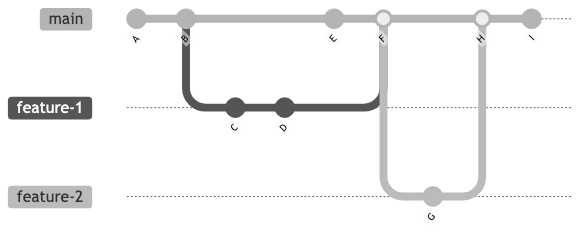
The DAG (Directed Acyclic Graph): Git history is a DAG, not a linear list. Each commit points to its parent(s). Merge commits have two parents. This structure enables branching and merging.
        feature
          ↓
    A---B---C
   /         \
  D---E---F---G  ← main
Refs and HEAD:
- A branch is just a pointer to a commit (a file containing a commit hash)
- HEAD points to your current branch (or directly to a commit in "detached HEAD" state)
- Tags are permanent pointers to specific commits (used for releases)
Programmatic Git access with the git2 crate:
You can interact with Git repositories directly from Rust using the git2 crate (bindings to libgit2). This is useful for building custom tooling, dashboards, or CI integrations.
// Dependency: git2 library

FUNCTION MAIN() → Ok or Error
    // Open the repository in the current directory
    repo ← REPOSITORY_OPEN(".")

    // --- Check current branch ---
    head ← repo.HEAD()
    branch_name ← head.SHORTHAND() or "(detached)"
    PRINT "Current branch: " + branch_name

    // --- Check for uncommitted changes ---
    statuses ← repo.STATUSES()
    dirty_count ← COUNT entries in statuses WHERE status ≠ CURRENT
    IF dirty_count > 0
        PRINT "Working tree has " + dirty_count + " uncommitted change(s)"
    ELSE
        PRINT "Working tree is clean"

    // --- List the 5 most recent commits ---
    revwalk ← repo.REVWALK()
    revwalk.PUSH_HEAD()
    revwalk.SET_SORTING(TIME)

    PRINT "Recent commits:"
    FOR i, oid IN ENUMERATE(revwalk)
        IF i ≥ 5
            BREAK
        commit ← repo.FIND_COMMIT(oid)
        summary ← commit.SUMMARY() or "(no message)"
        name ← commit.AUTHOR().NAME() or "unknown"
        // Short hash: first 7 characters of the SHA
        short_hash ← oid.TO_STRING()[0..7]
        PRINT "  " + short_hash + " — " + name + ": " + summary

    RETURN Ok
This gives you the building blocks for tasks like enforcing branch naming conventions in CI, generating changelogs, or building status dashboards — all without shelling out to the git CLI.
Branching Strategies
How teams organize branches directly affects their ability to deliver software quickly and safely.
Trunk-Based Development
Everyone commits to a single branch (main/trunk). Feature branches are short-lived (hours, not days). Changes are integrated continuously.
main: ──A──B──C──D──E──F──G──H──
             \  /       \  /
              fb1         fb2
         (hours)     (hours)
How it works:
- Developers create short-lived feature branches (or commit directly to main)
- Branches live for hours, not days or weeks
- Feature flags hide incomplete work from users
- CI runs on every commit to main
Who uses it: Google, Meta, Netflix, most high-performing teams.
Why it works: Small, frequent merges have fewer conflicts. Problems are caught early. The main branch is always deployable.
GitHub Flow
A simplified branching model: one long-lived branch (main) and feature branches merged via pull requests.
main:    ──A──B──────C──────D──
               \    /  \    /
                fb1     fb2
            (days)   (days)
How it works:
- Create a branch from
main - Make commits on your branch
- Open a pull request for review
- Merge to
mainafter approval - Deploy from
main
Who uses it: Most startups, open-source projects, small-to-medium teams.
GitFlow
A structured model with multiple long-lived branches: main (production), develop (integration), release/*, feature/*, hotfix/*.
main:     ──A───────────B───────C──
              \        / \      /
develop:   ──D──E──F──G   \  H──
                \  /        \/
                fb1       hotfix
How it works:
- Features branch from
develop - When ready,
developbranches intorelease/*for stabilization release/*merges into bothmainanddevelop- Hotfixes branch from
mainand merge back to bothmainanddevelop
Who uses it: Teams with formal release cycles, mobile apps (app store review), on-premise software.
Why it often hurts: Too many long-lived branches mean more merge conflicts, more drift between branches, and slower integration. For most web applications, it's over-engineered.
Merge vs Rebase
Merge creates a merge commit with two parents. Preserves the exact history of how work happened.
git checkout main
git merge feature
    A---B---C  (feature)
   /         \
  D---E---F---G  (main, merge commit)
Rebase replays your commits on top of the target branch. Creates a linear history.
git checkout feature
git rebase main
D---E---F---A'---B'---C' (feature, rebased)
| | Merge | Rebase | |---|-------|--------| | History | Preserves true history (branches visible) | Creates clean, linear history | | Conflicts | Resolved once in the merge commit | May need resolving for each replayed commit | | Safety | Never rewrites history | Rewrites commit hashes (dangerous for shared branches) | | Best for | Shared branches, main integration | Local cleanup before merging |
Golden rule: Never rebase commits that have been pushed to a shared branch.
Conflict Resolution
Merge conflicts happen when two branches modify the same lines. Git marks the conflict in the file:
<<<<<<< HEAD
fn calculate_tax(amount: f64) -> f64 {
    amount * 0.21  // Updated to 21% VAT
=======
fn calculate_tax(amount: f64) -> f64 {
    amount * 0.20  // Standard VAT rate
>>>>>>> feature-branch
Resolution strategy:
- Understand both changes — why were they made?
- Talk to the other developer if the intent is unclear
- Choose the correct version (or combine both)
- Test after resolving — conflicts in logic aren't always caught by Git
- Never blindly accept "mine" or "theirs"
Code Review & Pull Requests
Code review is one of the highest-leverage SE practices. It catches bugs, spreads knowledge, maintains quality, and builds team culture.
What to look for in a code review:
| Priority | Focus | |----------|-------| | Correctness | Does the code do what it claims to do? Are edge cases handled? | | Design | Is it in the right place? Does it follow existing patterns? | | Readability | Can you understand it without asking the author? | | Testing | Are there tests? Do they test the right things? | | Security | Any input validation issues? Auth checks? |
What NOT to do in code review:
- Bikeshed over formatting (let tools handle it)
- Rewrite the author's code in your style
- Block PRs for subjective preferences
- Approve without reading ("LGTM" rubber-stamping)
Automating formatting and lint checks with a pre-commit hook (Rust example):
Instead of arguing about formatting in code review, enforce it automatically. The following .git/hooks/pre-commit script runs cargo fmt and cargo clippy before every commit in a Rust project. If either tool fails, the commit is rejected.
#!/usr/bin/env bash
# .git/hooks/pre-commit — Enforce formatting and lint rules for Rust projects
# Make executable: chmod +x .git/hooks/pre-commit

set -euo pipefail

echo "==> Running cargo fmt --check..."
if ! cargo fmt --check 2>/dev/null; then
    echo ""
    echo "ERROR: Code is not formatted. Run 'cargo fmt' and re-stage your changes."
    exit 1
fi

echo "==> Running cargo clippy..."
if ! cargo clippy --all-targets --all-features -- -D warnings 2>/dev/null; then
    echo ""
    echo "ERROR: Clippy found warnings. Fix them before committing."
    exit 1
fi

echo "==> Pre-commit checks passed."
exit 0
Tip: Rather than asking every developer to manually install this hook, commit a hooks/pre-commit file to the repository and have your project's setup script (or a Makefile target) symlink it:
# In your Makefile or setup script
setup-hooks:
	ln -sf ../../hooks/pre-commit .git/hooks/pre-commit
	chmod +x .git/hooks/pre-commit
Alternatively, use a tool like pre-commit or cargo-husky to manage hooks declaratively. The key point: formatting and lint discussions should never appear in code review — the CI and hooks handle them.
Good PR practices:
- Small PRs — Under 400 lines of changes. Large PRs get rubber-stamped because reviewers lose focus.
- Clear description — What changed, why, how to test it
- One concern per PR — Don't mix a bug fix with a refactor with a new feature
- Self-review first — Review your own diff before requesting others
Monorepos vs Polyrepos
Monorepo: All projects/services live in a single repository.
| Pros | Cons | |------|------| | Atomic cross-project changes | Requires custom tooling at scale | | Easy code sharing and reuse | CI/CD complexity (what changed? what to rebuild?) | | Single source of truth | Access control is coarser | | Consistent tooling and standards | Repository size grows large |
Who uses monorepos: Google (1 repo, billions of lines), Meta, Twitter, Uber.
Polyrepo: Each project/service has its own repository.
| Pros | Cons | |------|------| | Clear ownership boundaries | Cross-repo changes require coordination | | Independent CI/CD per repo | Dependency management is harder | | Fine-grained access control | Code sharing requires publishing packages | | Simpler Git operations | Inconsistent tooling across repos |
Who uses polyrepos: Netflix (hundreds of repos), most microservice-oriented companies.
The decision depends on: Team size, how tightly coupled your services are, and your willingness to invest in custom tooling.
Business Value
- Parallel development: Branching enables multiple features to be developed simultaneously without blocking each other. A team of 50 can work on 20 features at once.
- Reduced integration risk: Frequent merging (trunk-based development) catches integration problems within hours, not weeks.
- Knowledge sharing: Code review spreads domain knowledge across the team, reducing bus factor (the risk of one person leaving and taking critical knowledge with them).
- Audit and compliance: Git history provides a complete audit trail — who changed what, when, and why. Critical for regulated industries.
- Safe experimentation: Branches let teams experiment without risk. If the experiment fails, discard the branch.
- Faster incident response:
git bisectcan pinpoint exactly which commit introduced a bug, reducing investigation time from hours to minutes.
Real-World Examples
Google's Monorepo
Google stores virtually all of its code (billions of lines, 25,000+ engineers) in a single monorepo. They built custom tools to make this work: Piper (their version control system), Critique (code review), and Blaze/Bazel (build system). The monorepo enables atomic changes across services — if you rename an API, you update all callers in the same commit. This eliminates the "diamond dependency" problem that plagues polyrepos.
How GitHub Uses GitHub Flow
GitHub (the company) practices GitHub Flow internally. Every change goes through a pull request, even from the CEO. PRs are reviewed by at least one other engineer. They deploy to production multiple times per day directly from main. This simplicity works because they invest heavily in CI, feature flags, and monitoring.
Linux Kernel Development
The Linux kernel uses a unique model: a hierarchy of maintainers. Linus Torvalds only pulls from a handful of trusted lieutenant maintainers, who pull from subsystem maintainers, who review patches from contributors. This "web of trust" model scales to thousands of contributors across the globe, but is impractical for most companies.
Microsoft's Git Migration
Microsoft migrated Windows (the largest codebase in the world, 3.5M files) from a proprietary VCS to Git. Standard Git couldn't handle the scale, so they built VFS for Git (now Scalar) — a virtualized filesystem that only downloads files you actually use. This migration enabled modern PR-based workflows and dramatically improved developer productivity.
Common Mistakes & Pitfalls
-
Long-lived feature branches — A branch that lives for weeks diverges from
mainand becomes a merge nightmare. The longer a branch lives, the riskier the merge. Target hours to days, not weeks. -
Committing secrets — Accidentally committing API keys, passwords, or
.envfiles to Git. Even if you remove them in the next commit, they're in the history forever. Use.gitignore, pre-commit hooks, and tools likegit-secretsto prevent this. -
Giant PRs — PRs with 2,000+ lines don't get properly reviewed. Break work into small, reviewable chunks. If a change is truly large, stack PRs or use feature flags to merge incrementally.
-
Force-pushing to shared branches —
git push --forceon a shared branch rewrites history and breaks everyone else's local state. Use--force-with-leaseif you must, and never force-push tomain. -
Unclear commit messages —
"fix","WIP","stuff"— these are useless when you're debugging a production issue 6 months later. Write messages that explain why the change was made. -
Merge conflict avoidance — Some teams delay merging because they fear conflicts. This makes conflicts worse. Merge early, merge often.
Trade-offs
| Approach | Pros | Cons | |----------|------|------| | Trunk-based development | Fastest integration, least conflict | Requires feature flags, strong CI, disciplined team | | GitHub Flow | Simple, works for most teams | Feature branches can still live too long | | GitFlow | Structured, good for formal releases | Over-engineered for web apps, merge complexity | | Monorepo | Atomic changes, easy code sharing | Needs custom tooling, harder access control | | Polyrepo | Clear ownership, simple per-repo | Cross-repo changes are painful, dependency management |
When to Use / When Not to Use
Trunk-based development:
- Use when: You have strong CI/CD, feature flags, and a culture of small changes
- Avoid when: Your team can't keep
maindeployable, or you lack CI
GitHub Flow:
- Use when: You want something simple that works for most web projects
- Avoid when: You need formal release cycles or multiple production versions
GitFlow:
- Use when: You ship versioned software (mobile apps, on-premise), need hotfix workflows
- Avoid when: You deploy continuously (web apps, SaaS)
Code review:
- Always use for production code
- Skip for: prototypes, solo projects, or when pair programming (the review happened live)
Key Takeaways
- Git is a DAG of content-addressed objects. Understanding this makes every Git command intuitive.
- The best branching strategy is the simplest one your team can execute well. Most teams should start with GitHub Flow.
- Short-lived branches are the single most impactful practice for reducing merge pain.
- Code review is about knowledge sharing and quality, not gatekeeping. Keep reviews constructive and fast.
- Small, focused PRs get better reviews and ship faster than large ones.
- Monorepo vs polyrepo is an organizational decision, not a technical one. Choose based on your team structure and coupling.
Further Reading
-
Books:
- Pro Git — Scott Chacon & Ben Straub (free online) — The definitive Git reference
- Software Engineering at Google — Chapter on version control and code review at scale
-
Papers & Articles:
- Trunk-Based Development — Comprehensive guide to trunk-based development
- How Google Does Code Review — Google's engineering practices guide for code review
- Monorepo vs Polyrepo — Practical comparison with trade-offs
-
Tools:
- Conventional Commits — A specification for commit messages
- git-secrets — Prevents committing secrets
- Scalar — Git at scale (from Microsoft)