
REST API Design
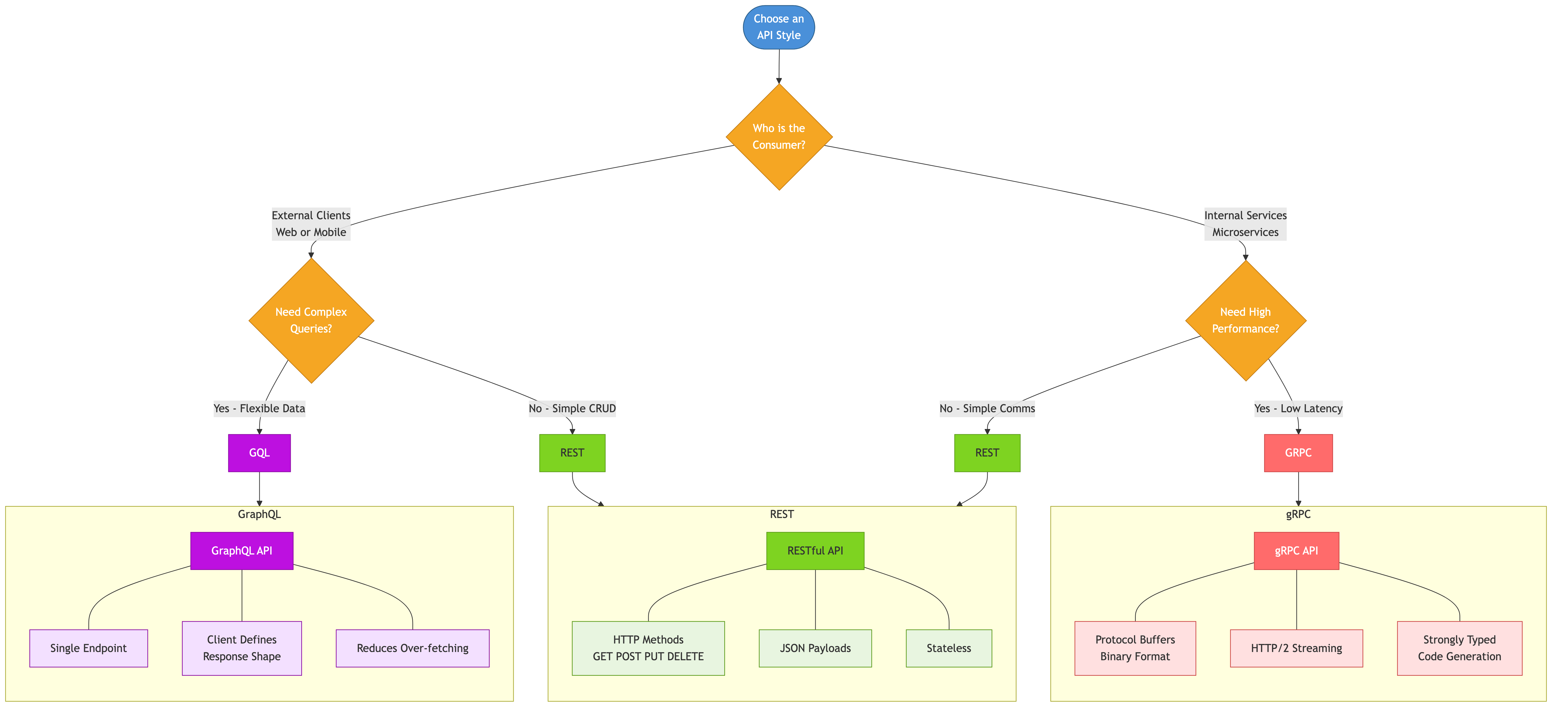
Overview
REST (Representational State Transfer) is the dominant architectural style for web APIs. It uses HTTP as its protocol and models the system as a collection of resources that can be manipulated through standard HTTP methods. Good REST API design makes APIs intuitive, consistent, and evolvable.
Resource Modeling
Resources are the fundamental abstraction in REST. Every entity in your system maps to a resource identified by a URL.
Naming Conventions
Good resource naming:
  /users                     Collection of users
  /users/123                 Specific user
  /users/123/orders          Orders belonging to user 123
  /users/123/orders/456      Specific order for user 123
  /products                  Collection of products
  /products/789/reviews      Reviews for product 789

Bad resource naming:
  /getUser?id=123            Verbs in URLs (use HTTP methods instead)
  /users/123/getOrders       Action in URL
  /user/123                  Inconsistent singular/plural
  /api/v1/users_list         Redundant suffixes

Rules:
  - Use plural nouns for collections: /users not /user
  - Use hyphens for multi-word resources: /order-items not /orderItems
  - Nest resources to show relationships: /users/123/orders
  - Keep nesting shallow (max 2-3 levels)
  - Resources represent things, not actions
Actions That Do Not Map to CRUD
Some operations are not pure CRUD. Model them as sub-resources:

  POST /orders/123/cancel           Cancel an order
  POST /users/123/password-reset    Trigger password reset
  POST /payments/456/refund         Refund a payment

Alternative: Use a "command" resource:
  POST /password-reset-requests     Create a password reset request
  POST /refunds                     Create a refund

Avoid: /doSomething, /performAction, /executeTask
HTTP Methods
GET     Retrieve a resource. Must be safe (no side effects) and idempotent.
        GET /users/123 -> Returns user 123

POST    Create a new resource. Not idempotent.
        POST /users -> Creates a new user, returns the created resource

PUT     Replace an entire resource. Idempotent.
        PUT /users/123 -> Replaces user 123 with the full representation

PATCH   Partial update of a resource. May or may not be idempotent.
        PATCH /users/123 -> Updates specific fields of user 123

DELETE  Remove a resource. Idempotent.
        DELETE /users/123 -> Deletes user 123

HEAD    Same as GET but returns only headers (no body). Useful for
        checking existence or metadata without transferring data.

OPTIONS Returns allowed methods and CORS headers for a resource.

Idempotent means: calling the operation multiple times has the same
effect as calling it once. GET, PUT, DELETE are idempotent. POST is not.
HTTP Status Codes
2xx Success:
  200 OK                    General success for GET, PUT, PATCH, DELETE
  201 Created               Resource created successfully (POST)
  202 Accepted              Request accepted for async processing
  204 No Content            Success with no response body (DELETE)

3xx Redirection:
  301 Moved Permanently     Resource URL has permanently changed
  304 Not Modified          Cached version is still valid (conditional GET)

4xx Client Errors:
  400 Bad Request           Malformed request, validation failure
  401 Unauthorized          Authentication required or failed
  403 Forbidden             Authenticated but not authorized
  404 Not Found             Resource does not exist
  405 Method Not Allowed    HTTP method not supported for this resource
  409 Conflict              State conflict (duplicate, version mismatch)
  422 Unprocessable Entity  Syntactically valid but semantically wrong
  429 Too Many Requests     Rate limit exceeded

5xx Server Errors:
  500 Internal Server Error Unexpected server failure
  502 Bad Gateway           Upstream service returned invalid response
  503 Service Unavailable   Server temporarily overloaded or in maintenance
  504 Gateway Timeout       Upstream service did not respond in time

Common mistakes:
  - Returning 200 with an error in the body (use proper status codes)
  - Using 404 for authorization failures (use 403)
  - Using 500 for all errors (distinguish client from server errors)
Pagination
Large collections must be paginated. There are several approaches.
Offset-Based Pagination
GET /users?offset=20&limit=10

Response:
{
  "data": [...],
  "pagination": {
    "offset": 20,
    "limit": 10,
    "total": 1532
  }
}

Pros: Simple, allows jumping to any page
Cons: Inconsistent results if data changes between pages,
      slow for large offsets (database must skip rows)
Cursor-Based Pagination
GET /users?limit=10&cursor=eyJ1c2VyX2lkIjogMTIzfQ==

Response:
{
  "data": [...],
  "pagination": {
    "next_cursor": "eyJ1c2VyX2lkIjogMTMzfQ==",
    "has_more": true
  }
}

Pros: Consistent results, efficient at any depth
Cons: Cannot jump to arbitrary pages, cursor is opaque

Used by: Twitter API, Slack API, Stripe API
Recommended for most production APIs.
Keyset Pagination
GET /users?limit=10&created_after=2026-03-15T10:00:00Z&id_after=123

Similar to cursor-based but with transparent parameters.
Requires a stable, unique sort order.
Filtering, Sorting & Search
Filtering:
  GET /products?category=electronics&price_min=100&price_max=500
  GET /orders?status=shipped&created_after=2026-01-01

Sorting:
  GET /products?sort=price         Ascending by price
  GET /products?sort=-created_at   Descending by created date
  GET /products?sort=category,-price  Multi-field sort

Search:
  GET /products?q=wireless+headphones
  GET /users?search=alice@example.com

Field selection (sparse fieldsets):
  GET /users/123?fields=name,email,avatar_url
  Reduces payload size, improves performance
  Used by: Facebook Graph API, Google APIs
Versioning
Strategy 1: URL path versioning
  GET /v1/users/123
  GET /v2/users/123
  Pros: Explicit, easy to route, easy to test
  Cons: URL changes between versions
  Used by: Stripe, Twitter, Google

Strategy 2: Header versioning
  GET /users/123
  Accept: application/vnd.myapi.v2+json
  Pros: Clean URLs
  Cons: Harder to test, easier to forget
  Used by: GitHub API

Strategy 3: Query parameter versioning
  GET /users/123?version=2
  Pros: Easy to add
  Cons: Pollutes query string, caching complications

Recommendation: URL path versioning is simplest and most widely used.
Only increment the major version for breaking changes.
HATEOAS
Hypermedia As The Engine Of Application State means the API response includes links to related actions and resources.
GET /orders/123

{
  "id": 123,
  "status": "shipped",
  "total": 99.99,
  "links": {
    "self": "/orders/123",
    "customer": "/users/456",
    "items": "/orders/123/items",
    "tracking": "/shipments/789",
    "return": "/orders/123/return"
  }
}

Benefits:
  - Clients discover available actions dynamically
  - Server controls navigation, reducing client-side URL construction
  - API is more evolvable (change URLs without breaking clients)

Reality:
  - Few public APIs fully implement HATEOAS
  - Most API consumers prefer documented, stable URLs
  - Useful for internal APIs with generated clients
  - Stripe and GitHub use limited hypermedia (link headers)
Error Response Design
Consistent error format:
{
  "error": {
    "code": "VALIDATION_FAILED",
    "message": "The request body contains invalid fields.",
    "details": [
      {
        "field": "email",
        "message": "Must be a valid email address.",
        "value": "not-an-email"
      },
      {
        "field": "age",
        "message": "Must be a positive integer.",
        "value": -5
      }
    ],
    "request_id": "req-abc-123"
  }
}

Requirements:
  - Machine-readable error code (not just HTTP status)
  - Human-readable message
  - Field-level detail for validation errors
  - Request ID for debugging and support
  - Never expose stack traces or internal details in production
Real-World API Design Examples
Stripe API is widely considered the gold standard for REST design. Key patterns: consistent resource naming, cursor-based pagination, idempotency keys for POST requests, expandable nested objects, and comprehensive error codes.
GitHub API uses URL versioning via Accept headers, cursor-based pagination with link headers, conditional requests via ETags, and rate limiting with clear response headers.
Twilio API nests resources to model relationships (accounts/calls/recordings), uses meaningful status codes, and provides both JSON and XML responses.
Common Pitfalls
- Verbs in URLs: Use
/orderswith POST, not/createOrder. HTTP methods convey the action. - Inconsistent naming: Pick a convention (camelCase, snake_case) and apply it everywhere. Mixing conventions confuses consumers.
- Returning 200 for errors: Status codes exist for a reason. Returning 200 with
"success": falsedefeats HTTP tooling and caching. - Deep nesting:
/users/123/orders/456/items/789/reviewsis too deep. Flatten:/order-items/789/reviews. - Not supporting idempotency: POST requests should accept an idempotency key to handle retries safely. Stripe does this with
Idempotency-Keyheader. - Ignoring pagination from the start: Adding pagination later is a breaking change. Always paginate collections.
Key Takeaways
- Model your API around resources (nouns), not actions (verbs). Let HTTP methods express the action.
- Use proper HTTP status codes. Clients and infrastructure depend on them.
- Implement cursor-based pagination from day one. Offset pagination breaks at scale.
- Design consistent error responses with machine-readable codes, human-readable messages, and request IDs.
- Version your API explicitly. URL path versioning is the most practical approach.
- Study well-designed APIs (Stripe, GitHub, Twilio) for patterns and conventions that have proven effective at scale.