
Caching Fundamentals
Overview
Caching stores copies of frequently accessed data in a faster storage layer to reduce latency, lower load on origin systems, and improve throughput. Caching is one of the highest-leverage performance optimizations in system design, but it introduces complexity around data freshness and consistency.
Why Cache
Without caching:
  Every request hits the database.
  Database query: 10-50ms
  At 10,000 requests/sec: database is overwhelmed.

With caching:
  First request hits the database and stores the result in cache.
  Subsequent requests read from cache.
  Cache lookup: 0.1-1ms
  Database load reduced by 90%+ for read-heavy workloads.

Real impact:
  - Reduce average response latency from 50ms to 2ms
  - Handle 10x more traffic with the same database
  - Survive traffic spikes without scaling backend infrastructure
  - Reduce cloud costs by avoiding database over-provisioning
What to Cache
Good candidates for caching:
  - Data that is read far more often than written
  - Expensive computations (aggregations, recommendations)
  - Data that does not change frequently
  - API responses from external services
  - Session data and authentication tokens
  - Static content (HTML fragments, configuration)

Poor candidates for caching:
  - Data that changes on every access (real-time counters)
  - Data where staleness is unacceptable (bank balances)
  - Large datasets that exceed cache memory
  - Data unique to each request (one-time tokens)
  - Write-heavy data with low read frequency
Cache Hit & Cache Miss
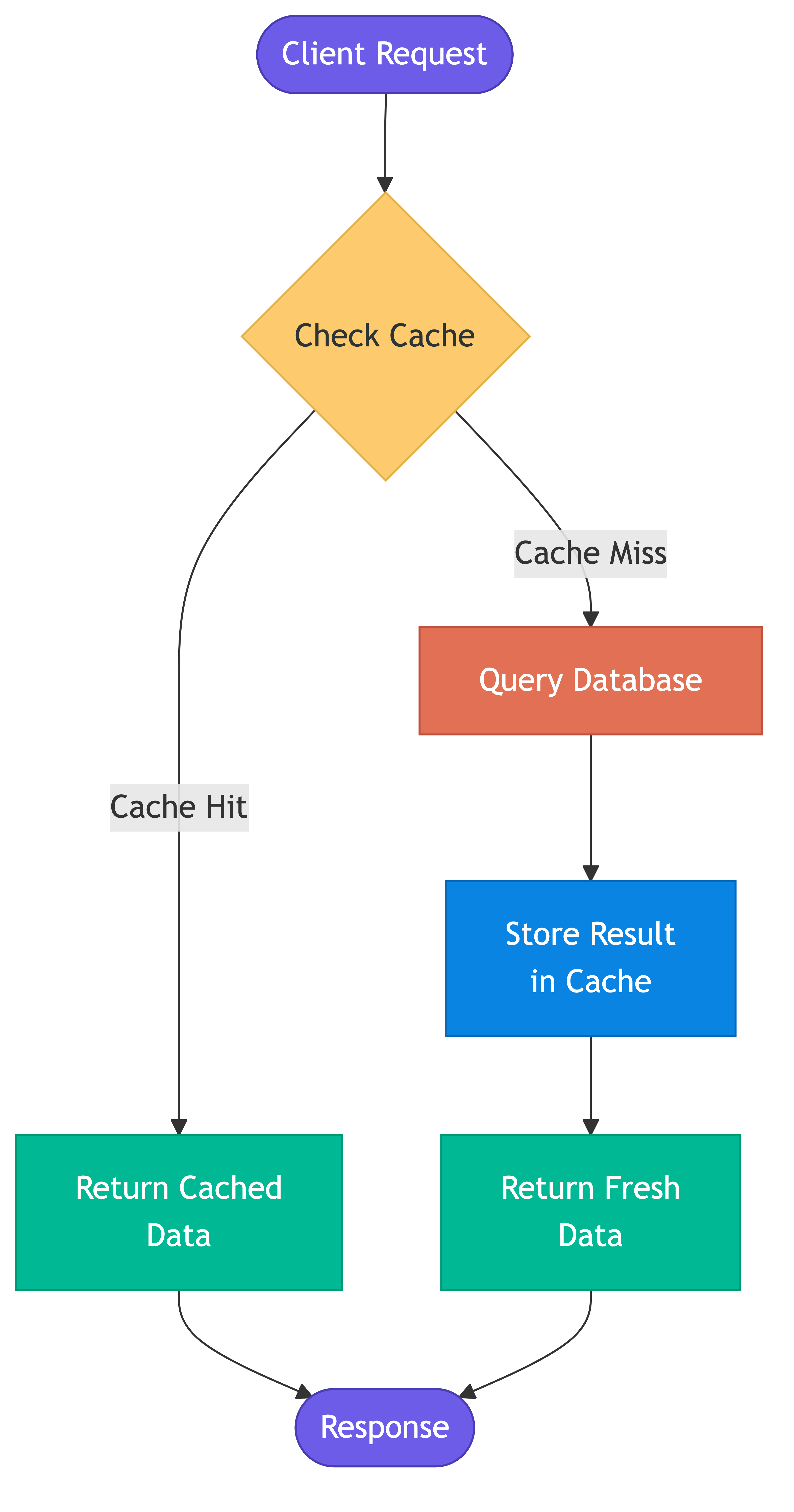
Cache hit: Requested data is found in the cache.
  Client -> Cache (found!) -> Return cached data
  Fast path. This is what you optimize for.

Cache miss: Requested data is not in the cache.
  Client -> Cache (not found) -> Database -> Store in cache -> Return data
  Slow path. Adds cache lookup overhead on top of database query.

Cache hit ratio = hits / (hits + misses)
  Target: 90-99% for most workloads
  Below 80%: Cache is not effective, investigate access patterns
  Above 99%: Excellent, but verify you are not over-caching stale data

Cold cache: Empty cache after restart or deployment.
  All requests are misses until the cache warms up.
  Can cause a spike in database load.
TTL (Time to Live)
TTL defines how long cached data remains valid before it expires and must be refreshed.
Setting TTL:
  cache.set("user:123", user_data, ttl=300)  // Expires in 5 minutes

TTL trade-offs:
  Short TTL (seconds to minutes):
    - Data is fresher
    - More cache misses
    - Higher database load
    - Good for: frequently changing data, session tokens

  Long TTL (hours to days):
    - More cache hits
    - Data may be stale
    - Lower database load
    - Good for: configuration, reference data, product catalogs

  No TTL (cache forever):
    - Maximum cache hits
    - Data is never automatically refreshed
    - Must invalidate manually on changes
    - Good for: immutable data (content-addressed, versioned resources)

TTL guidelines by data type:
  User session:          15-30 minutes
  Product listing:       5-15 minutes
  Configuration:         1-5 minutes
  User profile:          5-30 minutes
  Search results:        1-5 minutes
  Static content:        24 hours to indefinite
  API rate limit counter: 1 minute (sliding window)
Eviction Policies
When the cache is full, the eviction policy determines which items to remove to make room for new ones.
LRU (Least Recently Used)
Evicts the item that has not been accessed for the longest time.

Access sequence: A, B, C, D, A, E (cache size: 4)
  [A]
  [A, B]
  [A, B, C]
  [A, B, C, D]        Cache full
  [B, C, D, A]        A accessed, moves to front
  [C, D, A, E]        E added, B evicted (least recently used)

Pros:
  - Simple to implement and understand
  - Works well for most access patterns
  - Good general-purpose default

Cons:
  - A full scan can evict all useful cached items
  - Does not consider frequency of access
  - One-time accesses pollute the cache

Used by: Redis (approximated LRU), Memcached, most frameworks
Recommendation: Use LRU as the default unless you have a specific reason not to.
LFU (Least Frequently Used)
Evicts the item accessed the fewest times.

Access counts: A(10), B(3), C(7), D(1)
  Cache full, new item E arrives.
  D evicted (accessed only 1 time).

Pros:
  - Keeps frequently accessed items even if not recently used
  - Better than LRU for workloads with stable hot items

Cons:
  - Items that were popular in the past but are no longer relevant
    (frequency pollution) stick around
  - Cold start problem: new items always have low frequency
  - More complex implementation

Used by: Redis (LFU option since Redis 4.0)
Best for: Workloads with stable, known hot keys.
Other Eviction Policies
FIFO (First In, First Out):
  Evicts the oldest item regardless of access pattern.
  Simple but ignores access frequency and recency.

Random:
  Evicts a random item. Surprisingly effective in some workloads.
  Zero overhead for tracking access patterns.

TTL-based:
  Evict expired items first, then fall back to LRU/LFU.
  Combines time-based and access-based eviction.

W-TinyLFU (used by Caffeine cache in Java):
  Combines recency and frequency with a compact frequency sketch.
  Outperforms both LRU and LFU in most benchmarks.
  Used by: Apache Cassandra's row cache, many JVM applications.
Cache Warming
Cache warming is the process of pre-populating the cache before it receives live traffic.
Why Warm the Cache
Cold cache problem:
  After deployment, restart, or cache flush:
  - All requests are cache misses
  - Database receives full query load simultaneously
  - Response latency spikes
  - Possible cascading failure if database cannot handle the spike

Without warming:                 With warming:
  Time 0: 0% hit rate            Time 0: 85% hit rate (pre-loaded)
  Time 1: 20% hit rate           Time 1: 90% hit rate
  Time 5: 60% hit rate           Time 5: 95% hit rate
  Time 15: 90% hit rate          Time 15: 98% hit rate
Warming Strategies
Strategy 1: Pre-load from database
  On startup, query the database for the most frequently
  accessed items and load them into cache.
  Works well when you know your hot keys.

Strategy 2: Replay access logs
  Analyze recent access logs to identify popular items.
  Load those items into cache before switching traffic.
  More accurate than guessing hot keys.

Strategy 3: Shadow traffic
  Route a copy of production traffic to the new cache
  without serving responses from it. The cache warms
  up from real access patterns.

Strategy 4: Gradual traffic shift
  Slowly ramp traffic from 1% to 100% over minutes.
  Cache warms naturally as traffic increases.
  Load balancer or feature flag controls the ramp.

Strategy 5: Cache replication
  When replacing a cache node, copy data from existing
  nodes before the new node receives traffic.
  Redis supports this natively with replication.
Cache Levels
L1: In-process cache (application memory)
  Latency: microseconds
  Size: megabytes (limited by application heap)
  Examples: HashMap, Guava Cache, Caffeine
  Best for: Configuration, small reference data, hot objects

L2: Local machine cache (separate process, same host)
  Latency: sub-millisecond
  Size: gigabytes (limited by machine memory)
  Examples: Redis on localhost, local Memcached
  Best for: Session data, computed results

L3: Distributed cache (remote servers)
  Latency: 1-5 milliseconds (network hop)
  Size: terabytes (across cluster)
  Examples: Redis Cluster, Memcached fleet
  Best for: Shared state across application instances

L4: CDN / Edge cache
  Latency: depends on geographic proximity
  Size: massive (distributed globally)
  Examples: CloudFront, Cloudflare, Fastly
  Best for: Static assets, public API responses

Multi-level caching:
  Check L1 -> Check L2 -> Check L3 -> Database
  Each miss falls through to the next level.
  Populate each level on the way back.
Cache Metrics
Essential metrics to monitor:
  Hit ratio:        hits / (hits + misses)
  Miss ratio:       1 - hit ratio
  Eviction rate:    evictions per second (high = cache too small)
  Memory usage:     percentage of allocated cache memory used
  Latency (p50/p99): cache operation latency at different percentiles
  Key count:        number of items in cache
  TTL distribution: how long until items expire

Warning signs:
  Hit ratio < 80%:         Access patterns may not be cache-friendly
  Eviction rate increasing: Cache size may need to increase
  p99 latency spiking:     Possible hot key or resource contention
  Memory usage at 100%:    Constant evictions, consider larger cache
Real-World Examples
Facebook uses Memcached as a massive look-aside cache in front of MySQL. They cache billions of objects and achieve hit rates above 99%. TAO, their graph data cache, handles trillions of reads per day.
Netflix uses EVCache (built on Memcached) to cache user preferences, viewing history, and personalization data. Their cache layer handles millions of requests per second.
Stack Overflow serves 1.3 billion page views per month with a relatively small infrastructure, heavily relying on multi-level caching: in-process caching with Redis as L2, all running on just a handful of servers.
Common Pitfalls
- Caching without measuring: Always instrument hit rates, latency, and eviction rates. Without metrics, you are guessing.
- TTL too long: Stale data causes user-visible bugs that are hard to debug because they appear intermittently.
- TTL too short: Frequent cache misses negate the benefit of caching. Measure and tune based on data change frequency.
- Not planning for cold cache: Every deployment and restart creates a cold cache. Without warming, you get a load spike on your database.
- Caching errors: If a database query fails and you cache the error response, every subsequent request gets the cached error until TTL expires. Never cache failure responses.
- Treating cache as a primary data store: Caches are ephemeral. Data in cache can be evicted or lost at any time. Always have a fallback to the source of truth.
- Ignoring cache size: An unbounded cache will consume all available memory and crash the process.
Key Takeaways
- Caching is the single highest-leverage optimization for read-heavy systems. A 95% hit rate means your database handles only 5% of read traffic.
- TTL is a trade-off between freshness and performance. Start with shorter TTLs and extend them based on data change frequency and tolerance for staleness.
- LRU is the right default eviction policy for most workloads. Consider LFU only for workloads with stable hot keys.
- Multi-level caching (in-process, distributed, CDN) gives the best performance. Each level trades capacity for speed.
- Always plan for cold cache scenarios. Pre-warming or gradual traffic ramp prevents database overload after restarts.
- Monitor cache metrics continuously. Hit ratio, eviction rate, and latency tell you whether your caching strategy is working.