
Design a Notification System
A notification system delivers messages to users across multiple channels: push notifications, email, SMS, and in-app alerts. Services like Firebase Cloud Messaging, Amazon SNS, and Twilio handle billions of notifications daily. This design covers the full pipeline from ingestion to delivery tracking.
Functional Requirements
- Support multiple channels: push (iOS, Android, web), email, SMS, and in-app
- Allow services to send notifications via a unified API
- Support priority levels (critical, high, normal, low)
- Respect user preferences (opt-in/opt-out per channel, quiet hours)
- Provide a template engine for reusable message formats
- Track delivery status (sent, delivered, read, failed)
- Retry failed deliveries with configurable backoff
- Rate limit outbound notifications per user to prevent spam
Non-Functional Requirements
- High throughput: handle 1 billion notifications per day
- Low latency for critical notifications (under 1 second end-to-end)
- At-least-once delivery guarantee
- 99.99% availability
- Graceful degradation when a downstream provider is unavailable
Estimation
Traffic
1 billion notifications/day
~11,500 notifications/second average
~35,000 notifications/second peak (3x average)

Channel breakdown (approximate):
  Push:    40%  -> 400M/day
  Email:   30%  -> 300M/day
  In-app:  20%  -> 200M/day
  SMS:     10%  -> 100M/day
Storage
Each notification record: ~500 bytes (metadata, status, timestamps)
Daily storage: 1B * 500B = 500 GB/day
Retention: 30 days -> 15 TB active storage
Templates: negligible compared to notification records
User preferences: 500M users * 200 bytes = 100 GB
Bandwidth
Inbound API requests: ~35K/sec peak * 1 KB avg = 35 MB/sec
Outbound to providers: varies by channel
  Push payloads: ~4 KB average
  Email payloads: ~50 KB average (with HTML)
  SMS payloads: ~200 bytes
Total outbound peak: ~200 MB/sec
High-Level Design
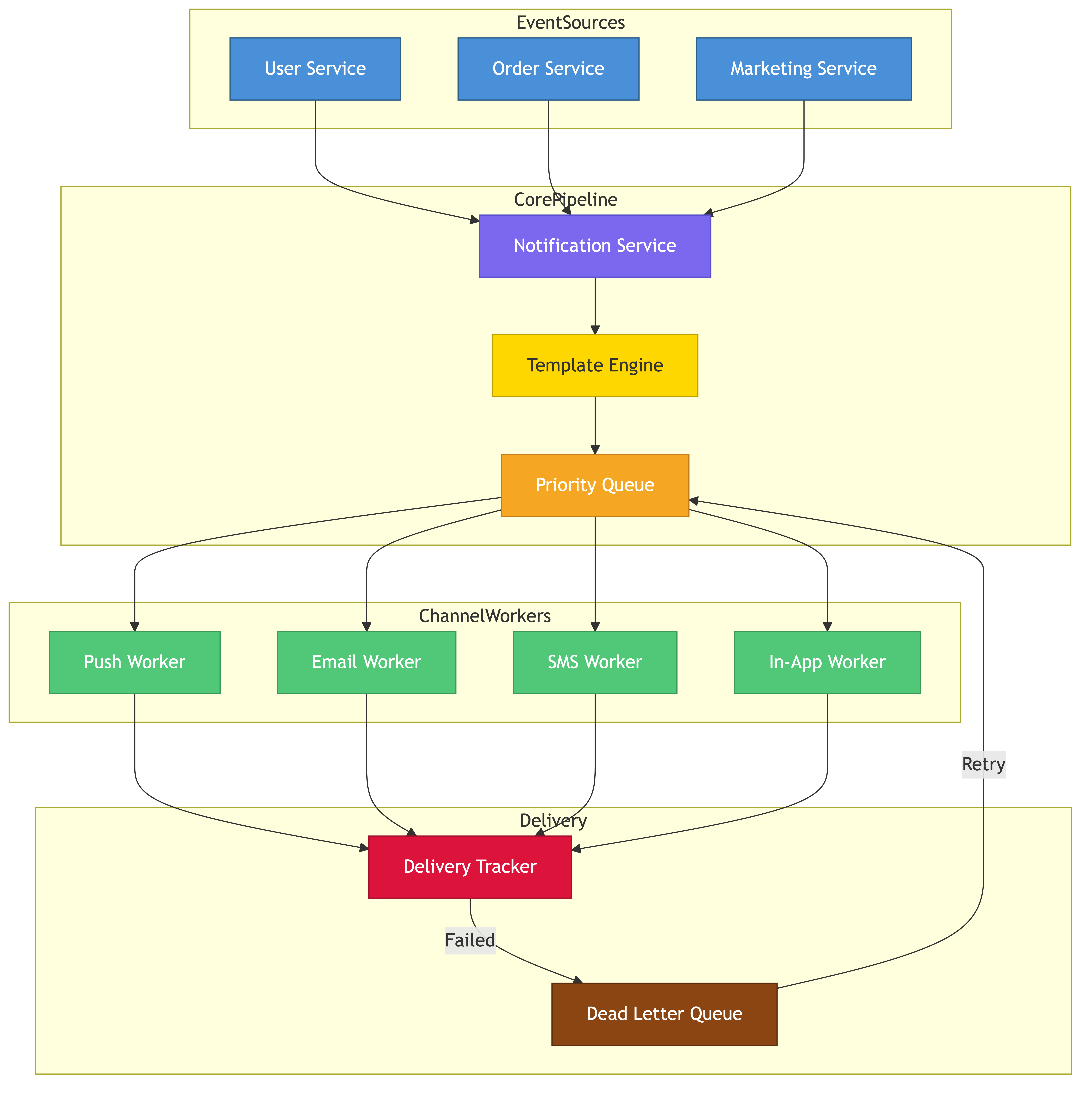
The system breaks into five layers: ingestion, processing, routing, delivery, and tracking.
Ingestion Layer
Internal services call a Notification API to request sends. The API validates the payload, authenticates the caller, applies rate limits, and drops the message onto a message queue.
Processing Layer
Workers consume from the queue, hydrate templates, resolve user preferences, de-duplicate messages, and assign priority. Processed notifications are routed to channel-specific queues.
Routing Layer
A router examines each notification and decides which channel(s) to use based on user preferences, device registration, and priority rules. A critical alert might fan out to push + SMS + email simultaneously.
Delivery Layer
Channel-specific workers pull from their queues and call downstream providers (APNs, FCM, SendGrid, Twilio). Each worker handles retries, circuit breaking, and provider failover.
Tracking Layer
Delivery receipts, webhooks from providers, and client-side read confirmations flow into a tracking pipeline that updates notification status in the database.
Detailed Design
Notification API
POST /v1/notifications
{
  "recipient_id": "user-123",
  "template_id": "order-shipped",
  "template_data": {"order_id": "A-9981", "eta": "Apr 5"},
  "channels": ["push", "email"],
  "priority": "high",
  "idempotency_key": "ship-A-9981-v1"
}

Response:
{
  "notification_id": "ntf-abc-456",
  "status": "accepted"
}
The idempotency key prevents duplicate sends when callers retry. The API stores the key in Redis with a 24-hour TTL and returns the original response if a duplicate is detected.
Priority Queues
Notifications enter one of four priority queues: critical, high, normal, low. Workers consume from higher-priority queues first using weighted fair queuing. Critical notifications bypass rate limiters entirely.
Queue layout:
  notifications.critical  -> consumed first, no rate limit
  notifications.high      -> consumed second, relaxed rate limit
  notifications.normal    -> consumed third, standard rate limit
  notifications.low       -> consumed last, strict rate limit
Kafka is a strong fit here. Each priority level maps to a separate topic. Consumer groups process topics with different polling frequencies.
Template Engine
Templates are stored in a template service with versioning. Each template contains channel-specific variants.
Template: order-shipped (v3)
  push:
    title: "Your order {{order_id}} has shipped"
    body: "Estimated delivery: {{eta}}"
  email:
    subject: "Order {{order_id}} Shipped"
    html_body: "<h1>Good news!</h1><p>Order {{order_id}} is on the way...</p>"
  sms:
    body: "Order {{order_id}} shipped. ETA: {{eta}}"
Templates are compiled at processing time using a Mustache-style engine. The compiled output is attached to the notification before it enters the channel queue.
User Preferences & Quiet Hours
A preferences service stores per-user settings:
user-123:
  channels:
    push: enabled
    email: enabled
    sms: disabled
  quiet_hours:
    start: "22:00"
    end: "07:00"
    timezone: "America/New_York"
  frequency_cap:
    max_per_hour: 10
    max_per_day: 50
During quiet hours, non-critical notifications are held in a delay queue and released when the window opens. Critical notifications (account security, emergency alerts) ignore quiet hours.
Rate Limiting
Rate limiting operates at two levels:
- Per-sender: prevents a misbehaving service from flooding the system (e.g., 10,000 notifications/minute per service)
- Per-recipient: prevents notification fatigue (e.g., 10/hour, 50/day per user)
The rate limiter uses a sliding window counter in Redis. When a recipient's limit is hit, lower-priority notifications are dropped or deferred. The sender receives a 429 response or the notification is silently deprioritized depending on configuration.
Redis key: rate:user:user-123:hour:2026040315
Redis key: rate:user:user-123:day:20260403
TTL matches the window duration.
INCR on each send. Check before processing.
Delivery & Retry Logic
Each channel worker implements a delivery loop with exponential backoff:
Attempt 1: immediate
Attempt 2: after 30 seconds
Attempt 3: after 2 minutes
Attempt 4: after 10 minutes
Attempt 5: after 1 hour
Max attempts: 5 (configurable per channel)
Workers use circuit breakers per downstream provider. When a provider's error rate exceeds a threshold (e.g., 50% over 30 seconds), the circuit opens and the worker fails fast. Notifications are re-queued for retry after the circuit half-opens.
For push notifications specifically, failed deliveries due to invalid device tokens trigger a cleanup flow that removes stale tokens from the device registry.
Delivery Tracking
Every state transition is recorded:
notification_id | channel | status    | timestamp           | metadata
ntf-abc-456    | push    | accepted  | 2026-04-03T10:00:00 | {}
ntf-abc-456    | push    | sent      | 2026-04-03T10:00:01 | {provider: "fcm"}
ntf-abc-456    | push    | delivered | 2026-04-03T10:00:02 | {fcm_id: "msg-xyz"}
ntf-abc-456    | email   | sent      | 2026-04-03T10:00:03 | {provider: "sendgrid"}
ntf-abc-456    | email   | opened    | 2026-04-03T10:05:00 | {ip: "..."}
Status updates arrive from three sources: synchronous provider responses, asynchronous webhooks (delivery receipts, bounce notifications), and client SDKs (read receipts for in-app notifications).
A Kafka topic collects all status events. A stream processor aggregates them into the notification status table and feeds analytics dashboards.
In-App Notifications
In-app notifications are different from push/email/SMS because the system must store them for later retrieval. They live in a per-user notification inbox backed by a time-sorted data structure (Cassandra with a clustering key on timestamp, or Redis sorted sets for active users).
GET /v1/users/user-123/notifications?unread=true&limit=20

Response:
{
  "notifications": [
    {"id": "ntf-abc-456", "title": "Order shipped", "read": false, "created_at": "..."},
    ...
  ],
  "unread_count": 7
}
Unread counts are cached in Redis and decremented on read. WebSocket connections push real-time updates to connected clients.
Data Store Choices
Component               | Store          | Reason
Notification metadata   | Cassandra      | High write throughput, time-series friendly
User preferences        | PostgreSQL     | Structured, low volume, strong consistency
Templates               | PostgreSQL     | Versioned, low volume, relational
Device tokens           | Cassandra      | High cardinality, frequent updates
Rate limit counters     | Redis          | Atomic increments, TTL support
In-app notification box | Cassandra      | Per-user time-sorted queries
Delivery status events  | Kafka + S3     | Streaming ingestion, long-term archival
Trade-offs & Alternatives
At-Least-Once vs Exactly-Once Delivery
This design uses at-least-once delivery. Exactly-once is impractical across external providers since APNs, FCM, and email gateways do not guarantee idempotent delivery. The idempotency key at the API layer prevents duplicate ingestion, but downstream duplicates are possible. For most notification use cases, an occasional duplicate is acceptable.
Pull vs Push for In-App
A pure pull model (client polls) is simpler but adds latency. A pure push model (WebSocket) is real-time but requires persistent connections. The hybrid approach (WebSocket when connected, pull on app open) balances both. Firebase Realtime Database uses this pattern effectively.
Single Queue vs Per-Channel Queues
A single queue with channel tags is simpler to operate but creates head-of-line blocking. A slow email provider stalls push deliveries. Per-channel queues isolate failures at the cost of more infrastructure. Per-channel queues win at this scale.
Third-Party Providers vs Direct Integration
Sending push notifications requires integrating with APNs and FCM directly. For email and SMS, you can integrate directly with SMTP servers and telecom APIs or use aggregators like SendGrid and Twilio. Aggregators reduce complexity but add cost and a dependency. Most teams start with aggregators and bring critical paths in-house as volume grows.
Bottlenecks & Scaling
Hot Recipients
A celebrity user might receive millions of notifications from a viral event. Per-recipient rate limiting caps delivery, but the processing pipeline still needs to handle the fan-in. Shard processing by recipient ID so that one hot user does not block others.
Provider Rate Limits
Downstream providers impose their own rate limits (e.g., FCM allows 1,000 messages/second per project by default). The delivery layer must respect these limits with per-provider token buckets. When limits are hit, messages back up in channel queues, which is acceptable as long as queue depth is monitored.
Email Reputation
Sending high volumes of email risks deliverability issues. Warm up new IP addresses gradually, implement SPF/DKIM/DMARC, process bounces promptly, and maintain separate IP pools for transactional vs marketing email.
Database Write Throughput
At 1 billion notifications/day, the status table receives roughly 3-4 billion writes/day (multiple status transitions per notification). Cassandra handles this well with time-bucketed partition keys. Avoid unbounded partitions by including a date component in the partition key.
Queue Backlog During Outages
When a downstream provider goes down, its channel queue grows. Set retention policies and dead-letter queues. Notifications older than their TTL are moved to a dead-letter topic for investigation. Alert on queue depth and consumer lag.
Common Pitfalls
- Treating all channels the same: push, email, SMS, and in-app have fundamentally different latency profiles, cost structures, and failure modes. Design each delivery path independently.
- Ignoring user fatigue: without per-user rate limiting, users get overwhelmed and disable notifications entirely. Once push permissions are revoked, they rarely come back.
- No idempotency: network retries and queue redeliveries cause duplicate sends. Always deduplicate at ingestion and track sent message IDs at the delivery layer.
- Blocking on template rendering: complex email templates with dynamic content can be slow to render. Precompile templates and render asynchronously in the processing layer.
- Hardcoding provider integrations: providers change APIs, have outages, and adjust pricing. Use an adapter pattern so swapping providers requires changing one module, not the entire delivery pipeline.
- Skipping delivery tracking: without status tracking, you cannot debug why a user claims they never received a notification. Log every state transition.
Key Takeaways
- A notification system is a multi-stage pipeline: ingest, process, route, deliver, track. Each stage should be independently scalable.
- Priority queues ensure critical notifications (security alerts, OTPs) are not delayed by bulk marketing sends.
- User preferences and rate limiting are not optional features. They are essential for maintaining user trust and platform health.
- At-least-once delivery is the practical guarantee. Design recipients to tolerate occasional duplicates.
- Circuit breakers and provider failover prevent a single downstream outage from cascading through the entire system.
- Track every notification from acceptance to delivery. Observability is what separates a reliable notification system from a fire-and-forget message sender.