
Building Blocks Overview
Every large-scale system is assembled from a small set of recurring components. Understanding what each block does, when to reach for it, and how the blocks connect is the single most important skill in system design.
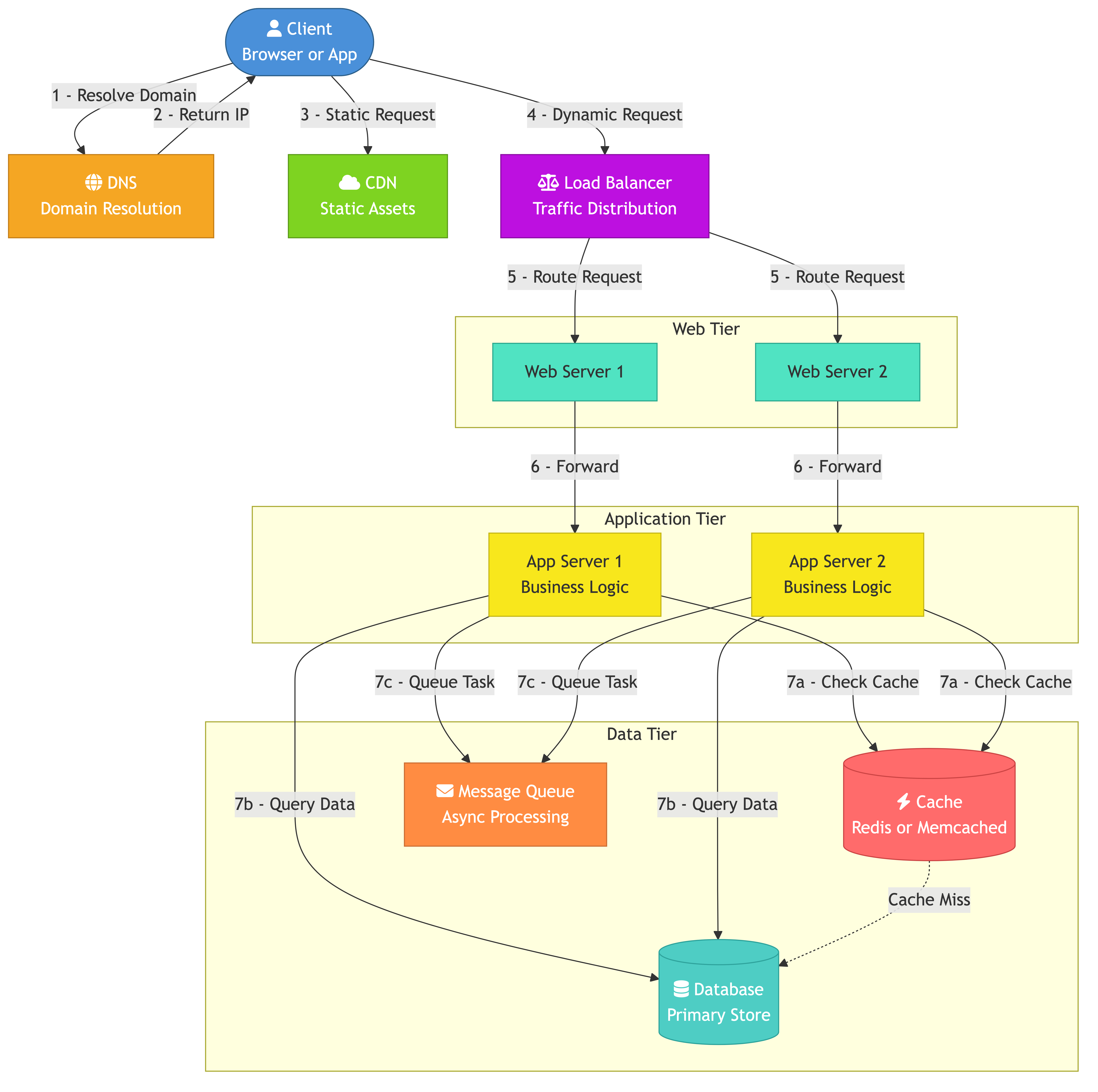
This file maps out the core building blocks and shows how they compose into a working architecture.
DNS
The Domain Name System translates human-readable hostnames into IP addresses. It is the first hop in almost every request.
How It Fits
A client types shop.example.com. DNS resolves it to the IP of a load balancer or CDN edge node. DNS-level routing can also direct users to the nearest data center (GeoDNS).
Key Properties
- Cached aggressively at multiple layers (browser, OS, ISP resolver)
- TTL controls how quickly changes propagate
- Can be used for coarse-grained load distribution across regions
Load Balancers
A load balancer distributes incoming traffic across a pool of servers so that no single server becomes a bottleneck.
Where They Sit
- Between clients & web servers (public-facing)
- Between web servers & application servers (internal)
- Between application servers & databases (connection pooling)
What They Provide
- Even traffic distribution
- Health checking — removes unhealthy nodes from the pool
- SSL termination — offloads encryption work from backend servers
- A single stable entry point even as backends scale in & out
Web Servers
Web servers handle HTTP requests. In many architectures the "web server" layer is the public-facing tier that serves static content and forwards dynamic requests to application servers.
Typical Responsibilities
- Serve static assets (HTML, CSS, JS, images)
- Terminate TLS if no separate load balancer does it
- Reverse-proxy dynamic requests to the application tier
- Apply rate limiting & basic access control
Nginx & Apache are the classic choices; in modern stacks the application framework often embeds its own HTTP server.
Application Servers
Application servers run business logic. They receive requests from the web tier, interact with databases & caches, and return responses.
Design Considerations
- Keep them stateless so any instance can handle any request
- Push session state into an external store (Redis, database)
- Scale horizontally by adding more instances behind the load balancer
Databases
Databases provide durable, queryable storage. The two broad families are relational (SQL) and non-relational (NoSQL).
Relational Databases
- Tables, rows, columns, SQL
- Strong consistency via ACID transactions
- Good for structured data with complex relationships
- Examples: PostgreSQL, MySQL, Amazon Aurora
NoSQL Databases
- Key-value, document, column-family, graph
- Trade some consistency for horizontal scalability
- Good for high-write throughput, flexible schemas, or graph queries
- Examples: DynamoDB, Cassandra, MongoDB, Neo4j
Choosing Between Them
Ask: Do I need multi-table joins & transactions? If yes, start relational. If the data is naturally a document or key-value pair and the primary access pattern is by key, NoSQL may be simpler and faster.
Caches
A cache stores frequently accessed data in memory so reads can be served without hitting the database.
Common Patterns
- Cache-aside (lazy loading): Application checks cache first; on miss, reads from DB and populates cache.
- Write-through: Every write goes to cache & DB together. Cache is always fresh but writes are slower.
- Write-behind: Writes go to cache first, then async to DB. Fast writes but risk of data loss.
Where Caches Live
- Application-level: In-process (HashMap) or local (embedded Redis)
- Distributed: Shared Redis or Memcached cluster accessible by all app servers
- CDN edge: Static & semi-static content cached at PoPs worldwide
Cache Invalidation
This is the hard part. Strategies include TTL expiry, explicit invalidation on writes, and versioned keys.
Content Delivery Networks (CDNs)
A CDN is a globally distributed network of edge servers that cache content close to users.
What CDNs Cache
- Static assets: images, CSS, JS bundles, fonts
- Video & audio streams
- API responses (with short TTLs for semi-dynamic content)
Benefits
- Lower latency — content served from the nearest PoP
- Reduced origin load — most reads never reach your servers
- DDoS absorption — edge network absorbs volumetric attacks
Push vs Pull
- Pull CDN: Edge fetches from origin on first request, then caches. Simpler to set up.
- Push CDN: You upload content to the CDN ahead of time. Better for large, rarely-changing files.
Message Queues
A message queue decouples producers from consumers. The producer writes a message; the consumer processes it later.
Why Queues Matter
- Decoupling: Services don't need to know about each other.
- Buffering: Absorb traffic spikes without overwhelming downstream services.
- Reliability: Messages persist until acknowledged; work isn't lost if a consumer crashes.
Common Systems
- RabbitMQ — traditional broker, supports complex routing
- Apache Kafka — distributed log, high throughput, replay capability
- Amazon SQS — fully managed, simple queue semantics
Pub/Sub vs Point-to-Point
- Point-to-point: One message goes to one consumer. Good for task distribution.
- Pub/sub: One message goes to all subscribers. Good for event broadcasting.
How the Blocks Fit Together
A typical request flow for a web application:
User -> DNS -> CDN (static hit? return) -> Load Balancer
  -> Web Server -> Application Server -> Cache (hit? return)
  -> Database (read/write) -> Response back up the chain

Background work:
  Application Server -> Message Queue -> Worker Service -> Database
Layered Architecture Example: E-Commerce
Layer 1 — Edge
  CDN serves product images, JS bundles, CSS

Layer 2 — Ingress
  Global load balancer routes to nearest region
  Regional load balancer distributes across app servers

Layer 3 — Application
  Stateless app servers handle API requests
  Session state stored in Redis

Layer 4 — Data
  PostgreSQL for orders & inventory (ACID transactions)
  Elasticsearch for product search
  Redis for shopping cart & session cache

Layer 5 — Async
  Kafka for order events
  Workers process payments, send emails, update analytics
Choosing Blocks for Your System
Not every system needs every building block. A decision framework:
Question                                    If yes, consider
Serving static assets to end users?         CDN
Multiple app server instances?              Load balancer
Read-heavy with repeated queries?           Cache (Redis, Memcached)
Need async processing or decoupling?        Message queue
Structured data with relationships?         Relational database
High write throughput, flexible schema?     NoSQL database
Full-text search or ranking?                Search engine (Elasticsearch)
Real-time bidirectional communication?      WebSocket server
Global user base?                           Multi-region + GeoDNS
Start with the minimum set and add blocks as concrete requirements emerge.
Common Pitfalls
- Jumping to microservices too early. Start with a well-structured monolith; extract services when you have clear bounded contexts and a team large enough to own them.
- Ignoring the database. Adding caches & queues won't fix a badly modeled schema or missing indexes. Optimize the data layer first.
- Caching without invalidation strategy. Stale data causes subtle bugs. Decide on TTL, explicit invalidation, or versioning before you ship.
- Treating the CDN as optional. For any user-facing product, a CDN is one of the cheapest performance wins available.
- Single points of failure. Every block in the chain should be redundant. One load balancer, one database, one queue broker — any single instance is a risk.
- Over-engineering for scale you don't have. Design for 10x your current load, not 1000x. You can re-architect later with real data about bottlenecks.
Key Takeaways
- System design is composition: pick the right blocks and wire them together.
- DNS, load balancers, CDNs, web servers, app servers, databases, caches, and message queues are the core vocabulary.
- Stateless application servers + external state stores = horizontal scalability.
- Caches reduce latency; queues reduce coupling; both improve resilience.
- Start simple. Add complexity only when a concrete bottleneck demands it.