
Message Queues
Message queues provide asynchronous communication between services by buffering messages in an intermediary. They decouple producers from consumers, absorb traffic spikes, and enable independent scaling of system components.
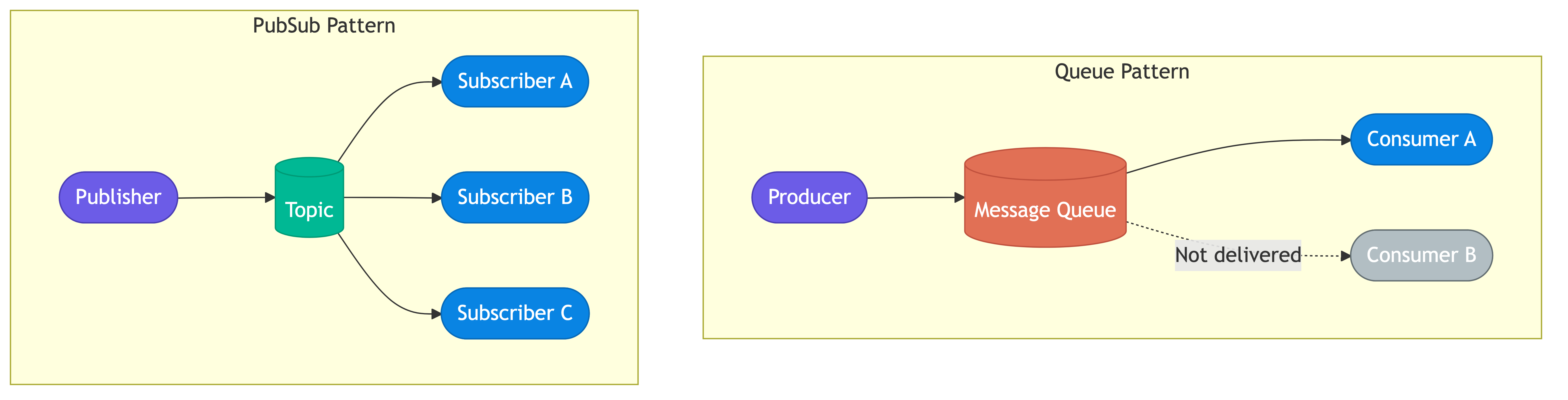
Queues vs Topics
The two fundamental messaging models serve different communication patterns.
Point-to-Point Queues
A queue delivers each message to exactly one consumer. Multiple consumers can read from the same queue, but each message is processed once. This model suits work distribution where you want parallel processing without duplication.
Producer --> [Queue] --> Consumer A (gets msg 1)
Producer --> [Queue] --> Consumer B (gets msg 2)
Producer --> [Queue] --> Consumer C (gets msg 3)
Amazon SQS operates this way. When you submit an order, one message goes into the queue and one worker picks it up for processing. Adding more workers increases throughput linearly.
Topics (Publish-Subscribe)
A topic delivers each message to all subscribers. Every consumer gets its own copy. This model suits event notification where multiple systems need to react to the same event.
Producer --> [Topic] --> Subscriber A (gets all msgs)
                    --> Subscriber B (gets all msgs)
                    --> Subscriber C (gets all msgs)
Apache Kafka topics work this way using consumer groups. Within a consumer group, messages are distributed (queue behavior). Across consumer groups, messages are broadcast (topic behavior). This hybrid is why Kafka fits so many use cases.
Producers & Consumers
Producer Responsibilities
Producers serialize messages, choose the destination queue or topic, and handle delivery failures. Well-designed producers include metadata with each message.
Message structure:
  - id: unique identifier (UUID)
  - timestamp: when the message was created
  - type: "order.created"
  - payload: { orderId: "abc-123", amount: 59.99 }
  - metadata: { source: "checkout-service", correlationId: "req-456" }
Producers should implement retry logic with exponential backoff. If the broker is unavailable, buffer messages locally or write to a persistent outbox table to prevent data loss.
Consumer Responsibilities
Consumers deserialize messages, execute business logic, and acknowledge completion. The consumer must be prepared to handle the same message more than once because network failures can cause redelivery.
Consumer processing loop:
  1. Poll or receive message from queue
  2. Deserialize and validate
  3. Execute business logic
  4. Acknowledge (ack) the message
  5. If processing fails, reject (nack) or let visibility timeout expire
Spotify uses Kafka consumers extensively. Their event-driven pipeline processes billions of listening events daily, with different consumer groups handling recommendations, analytics, and royalty calculations from the same topic.
Acknowledgment Patterns
Acknowledgment determines when a message is considered successfully processed.
Auto-Acknowledge
The broker removes the message as soon as it delivers it. Simple but risky: if the consumer crashes mid-processing, the message is lost.
Manual Acknowledge
The consumer explicitly tells the broker it finished processing. This is the safer default. Most production systems use manual acknowledgment.
Manual ack flow:
  1. Broker delivers message, marks it "in-flight"
  2. Consumer processes the message
  3. Consumer sends ACK --> broker deletes message

  If no ACK within timeout:
  4. Broker marks message visible again
  5. Another consumer picks it up (redelivery)
Negative Acknowledge
The consumer explicitly rejects a message, signaling that processing failed. The broker can immediately requeue it or route it to a dead letter queue depending on configuration.
RabbitMQ supports basic.ack, basic.nack, and basic.reject with fine-grained control over requeue behavior. SQS uses visibility timeouts instead of explicit nack: if you don't delete the message within the timeout, it becomes visible again.
Dead Letter Queues
A dead letter queue (DLQ) captures messages that cannot be processed after repeated attempts. Without a DLQ, poison messages cycle endlessly through the system, consuming resources and blocking other work.
When Messages Go to the DLQ
Routing to DLQ happens when:
  - Message exceeds maximum retry count (e.g., 3 attempts)
  - Message TTL expires
  - Consumer explicitly rejects without requeue
  - Message format is invalid (deserialization failure)
DLQ Processing Strategy
DLQ messages need human or automated attention. Common approaches include dashboards that alert operators, automated retry after a delay, or forwarding to a manual review system.
Main Queue --> Consumer (fails) --> retry 1 --> retry 2 --> retry 3 --> DLQ
                                                                         |
                                                                         v
                                                              Alert + Investigation
                                                                         |
                                                                         v
                                                              Fix root cause, replay
AWS SQS DLQs are used extensively at companies like Capital One for payment processing. When a payment message fails validation three times, it routes to a DLQ where an operations team investigates before replaying the corrected message.
Ordering Guarantees
Message ordering is one of the most misunderstood aspects of queue-based systems.
No Ordering Guarantee
Standard SQS queues provide best-effort ordering. Messages may arrive out of order, especially under high throughput. This is acceptable for independent tasks like image resizing or email sending.
FIFO (First In, First Out)
SQS FIFO queues and Kafka partitions guarantee ordering within a partition or message group. The tradeoff is reduced throughput.
Kafka ordering guarantee:
  - Messages with the same partition key go to the same partition
  - Within a partition, order is strictly preserved
  - Across partitions, no ordering guarantee

  Example: partition by userId
    User A's events: [login, click, purchase] --> Partition 0 (ordered)
    User B's events: [login, search, logout]  --> Partition 1 (ordered)
    No guarantee about ordering between User A and User B
Ordering with Concurrency
Strict global ordering kills parallelism. The practical solution is partitioned ordering: order within a logical group (user, order, account) but allow parallel processing across groups.
LinkedIn uses Kafka with partition keys based on member ID. All events for a given member are ordered, but events across members process in parallel across hundreds of consumers.
Backpressure & Flow Control
When producers outpace consumers, the queue grows unboundedly. Backpressure mechanisms prevent this from cascading into outages.
Queue-Side Controls
Backpressure strategies:
  - Max queue length: reject or drop messages once the queue hits a size limit
  - Message TTL: expire old messages that are no longer relevant
  - Flow control: broker slows down producers by delaying acknowledgments
RabbitMQ supports memory and disk-based flow control. When the broker's memory usage exceeds a threshold (default 40% of system RAM), it blocks publishing connections until consumers catch up. This prevents the broker from running out of memory but can cause producer timeouts if not handled.
Consumer-Side Controls
Prefetch limits control how many unacknowledged messages a consumer holds at once. A prefetch of 1 means the consumer finishes one message before receiving the next. A prefetch of 50 allows batching but risks message loss if the consumer crashes with 50 in-flight messages.
Prefetch tuning tradeoff:
  Low prefetch (1-5):   safer, lower throughput, higher latency per message
  High prefetch (50+):  riskier, higher throughput, better batch efficiency

  SQS: MaxNumberOfMessages (1-10 per receive call)
  RabbitMQ: basic.qos prefetch_count
  Kafka: max.poll.records
Uber uses adaptive prefetch in their internal queue infrastructure. During normal load, consumers prefetch aggressively for throughput. When processing latency spikes, they reduce prefetch automatically to prevent cascading failures.
Choosing a Message Queue
| System     | Model          | Ordering       | Use Case                    |
|------------|----------------|----------------|-----------------------------|
| SQS        | Queue          | Best-effort    | Task distribution           |
| SQS FIFO   | Queue          | Strict (group) | Ordered workflows           |
| RabbitMQ   | Queue + Topic  | Per-queue      | Complex routing             |
| Kafka      | Log (Topic)    | Per-partition   | Event streaming, replay     |
| Redis      | Queue (List)   | FIFO per list  | Lightweight job queues      |
SQS is the default choice on AWS when you need a simple, managed queue with no operational overhead. Use FIFO when ordering matters within a group.
RabbitMQ excels at complex routing. Its exchange system (direct, fanout, topic, headers) lets you route messages based on content, headers, or patterns. Choose it when routing logic is non-trivial.
Kafka is not a traditional queue — it is a distributed commit log. Messages persist after consumption, enabling replay. Choose it when you need event sourcing, stream processing, or multiple independent consumer groups reading the same data.
Redis lists or streams work well for lightweight, low-latency job queues where durability is less critical. Redis Streams add consumer groups and acknowledgment, making them viable for moderate workloads.
Common Pitfalls
- Assuming exactly-once delivery. Standard queues guarantee at-least-once. Your consumers must be idempotent.
- Ignoring DLQs. Without a dead letter queue, poison messages block processing indefinitely or silently disappear.
- Over-relying on global ordering. Requiring total order across all messages destroys parallelism. Partition by entity instead.
- Unbounded queue growth. If consumers fall behind and you have no backpressure or TTL, queues grow until they exhaust storage or memory.
- Tight coupling through message format. Changing the schema without versioning breaks consumers. Use schema registries or include version fields.
- Fire-and-forget producing. Not waiting for broker acknowledgment means messages can be lost during network blips.
Key Takeaways
- Queues deliver each message to one consumer (work distribution). Topics deliver to all subscribers (event broadcast).
- Manual acknowledgment with dead letter queues is the production default for reliable processing.
- Ordering guarantees come at the cost of throughput. Partition by logical entity to get ordering where it matters without sacrificing parallelism.
- Consumers must be idempotent because redelivery is normal, not exceptional.
- Dead letter queues are essential for diagnosing and recovering from processing failures without losing data.