
Horizontal vs Vertical Scaling
When a system can't handle its load, you have two fundamental choices: make the machine bigger (vertical scaling) or add more machines (horizontal scaling). Most production systems eventually need horizontal scaling, but knowing when each approach is appropriate saves time and money.
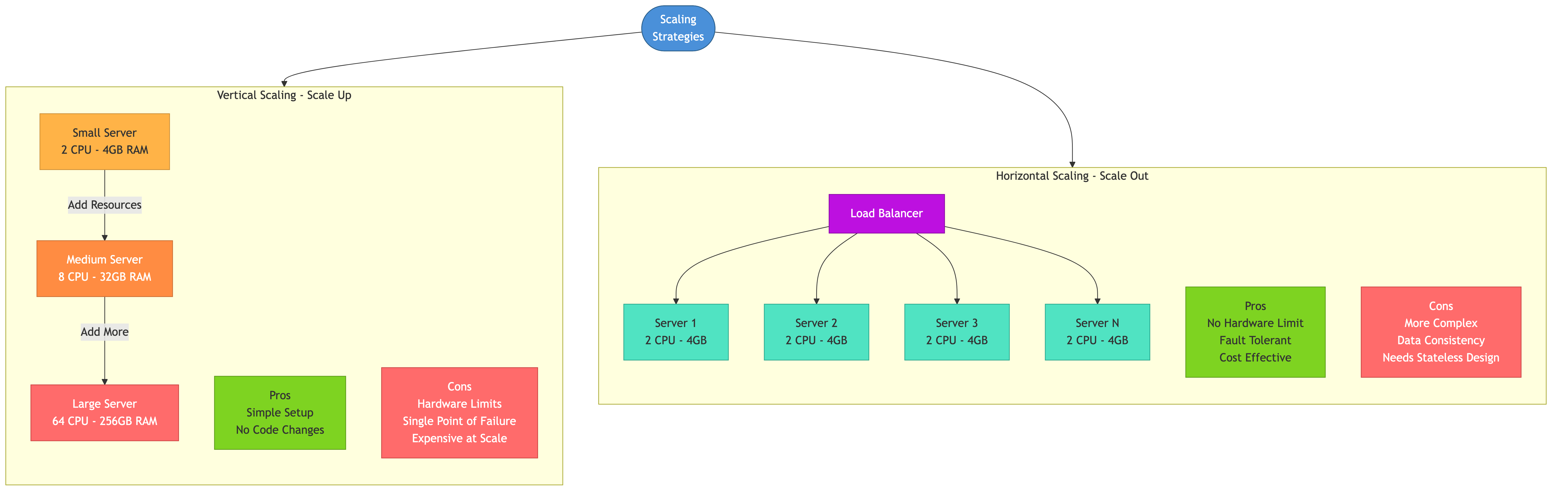
Vertical Scaling (Scale Up)
Vertical scaling means upgrading to a more powerful machine: more CPU cores, more RAM, faster disks.
Advantages
- Simple — no changes to application code or architecture
- No distributed systems complexity — one machine, one database, one process
- Lower operational overhead — fewer nodes to manage, monitor, and patch
Disadvantages
- Hard ceiling — the biggest available machine has finite resources
- Cost curve is super-linear — doubling capacity often more than doubles cost
- Single point of failure — one machine going down takes everything down
- Downtime for upgrades — swapping hardware or resizing a VM often requires a restart
When Vertical Scaling Makes Sense
- Early-stage products with small user bases
- Workloads that are hard to distribute (single-threaded processes, monolithic databases)
- Quick wins — upgrading from 8 GB to 64 GB RAM can buy months of headroom
Real-World: Stack Overflow
Stack Overflow serves hundreds of millions of page views per month from a small number of powerful servers. Aggressive caching, optimized queries, and vertical scaling have kept their infrastructure remarkably simple compared to companies with similar traffic.
Horizontal Scaling (Scale Out)
Horizontal scaling means adding more machines to a pool. Each machine handles a portion of the work.
Advantages
- No hard ceiling — add machines as needed
- Better fault tolerance — losing one machine doesn't lose the whole system
- Cost-efficient at scale — commodity hardware is cheaper per unit than top-tier machines
- Can scale elastically — add capacity during peaks, remove during troughs
Disadvantages
- Requires application changes — stateless design, distributed data, coordination
- Operational complexity — more machines to deploy, monitor, and debug
- Network overhead — machines communicate over the network, which is slower and less reliable than local function calls
- Data consistency challenges — keeping data synchronized across nodes is hard
When Horizontal Scaling Is Necessary
- Traffic exceeds what any single machine can handle
- You need high availability (no single point of failure)
- Workloads are naturally parallelizable (web requests, map-reduce jobs)
- Elastic demand requires adding/removing capacity quickly
Stateless Design
Horizontal scaling only works if any server can handle any request. This requires stateless application servers.
What Stateless Means
A server is stateless if it holds no client-specific data between requests. Every request contains all the information needed to process it (or the server fetches state from an external store).
Stateful (hard to scale):
  Server A holds session for User 1
  Server B holds session for User 2
  If Server A dies, User 1's session is lost

Stateless (easy to scale):
  Any server can handle any user's request
  Session data lives in Redis/database
  If Server A dies, User 1's next request goes to Server B seamlessly
Rules for Stateless Servers
- No in-memory session state
- No local file storage that other requests depend on
- No server-specific caches that create inconsistency (shared cache is fine)
- Configuration is the same across all instances
Session Management
Moving session state out of the application server is the first step toward horizontal scaling.
External Session Stores
Option 1: Redis / Memcached
  - Fast (in-memory)
  - TTL-based expiration for automatic cleanup
  - Shared across all app servers
  - Redis offers persistence if session loss is unacceptable

Option 2: Database
  - More durable but slower
  - Good enough for low-traffic applications
  - Clean up expired sessions with a background job

Option 3: Client-side (JWT)
  - Session data stored in a signed token on the client
  - No server-side storage needed
  - Cannot be revoked easily (until expiration)
  - Token size grows with the amount of session data
Choosing a Session Strategy
For most web applications, Redis is the best balance of speed, simplicity, and reliability. JWTs work well for stateless APIs where revocation is less critical. Database-backed sessions are a simple starting point for smaller applications.
Shared-Nothing Architecture
Shared-nothing is a design principle where each node is self-contained and does not share memory, disk, or state with other nodes. Nodes communicate only via the network.
Properties
- Each node can operate independently
- No contention on shared resources (no locks on shared memory or disk)
- Linear scalability — adding a node adds capacity without slowing others
- A node failure doesn't corrupt or lock shared state
In Practice
Shared-nothing web tier:
  [LB] -> [App 1] [App 2] [App 3]
  All read session state from Redis
  All query the same database cluster
  None share memory or local disk state

Shared-nothing database tier (sharded):
  Shard 1: users A-M on Node 1
  Shard 2: users N-Z on Node 2
  Each shard is independent; no cross-shard state
Real-World: Amazon
Amazon's architecture follows shared-nothing principles. Each service owns its data, exposes it via APIs, and scales independently. This is a key reason Amazon can deploy thousands of times per day without services blocking each other.
Auto-Scaling
Horizontal scaling enables auto-scaling: automatically adding or removing instances based on metrics.
How It Works
1. Define scaling policy:
   - Scale out when average CPU > 70% for 5 minutes
   - Scale in when average CPU < 30% for 10 minutes

2. Auto-scaler monitors metrics (CPU, memory, request count, queue depth)

3. When threshold is breached:
   - Launch new instances from a machine image (AMI, container image)
   - Register with load balancer
   - Start receiving traffic

4. When load decreases:
   - Drain connections from excess instances
   - Deregister from load balancer
   - Terminate instances
Scaling Triggers
- CPU/memory utilization — most common, works for compute-bound workloads
- Request count — scale based on requests per second per instance
- Queue depth — for worker services consuming from a message queue
- Custom metrics — application-specific (active WebSocket connections, jobs in progress)
Scaling Challenges
- Cold start latency. New instances take time to boot and warm up. Scale proactively before you need it, not reactively after you're overwhelmed.
- Thundering herd. Scaling in too aggressively can cause the remaining servers to become overloaded, triggering a scale-out, creating oscillation.
- Minimum instances. Always keep enough instances running to handle a baseline load plus one failure.
Migration Path: Vertical to Horizontal
Most systems start vertically scaled and migrate to horizontal as they grow.
Step 1: Externalize State
Move sessions, caches, and file storage to external services (Redis, S3, shared database).
Step 2: Stateless Application Tier
Verify any app server can handle any request. Run at least two instances behind a load balancer.
Step 3: Database Scaling
Add read replicas for read-heavy workloads. Consider caching to reduce database load.
Step 4: Shard When Necessary
When the primary database hits its write ceiling, shard by a natural key (user ID, tenant ID).
Step 5: Service Decomposition
Extract high-traffic or independently-scaling components into separate services with their own data stores.
Common Pitfalls
- Premature horizontal scaling. Don't distribute a system that fits comfortably on one server. Distributed systems are harder to build, test, and debug.
- Hidden state. Local file writes, in-memory counters, or static variables that differ per instance create subtle bugs when scaling horizontally.
- Ignoring the database. Scaling the application tier to 100 instances doesn't help if they all hammer a single database. Scale the data layer too.
- Sticky sessions instead of stateless design. Sticky sessions are a band-aid. They create hot spots and break when the pinned server fails.
- No drain period when scaling in. Terminating a server while it's handling requests causes errors. Always drain connections first.
- Scaling only on CPU. A memory-bound or I/O-bound service can be struggling at 20% CPU. Use the metric that reflects your actual bottleneck.
Key Takeaways
- Vertical scaling is simple but has a hard ceiling. Horizontal scaling is more complex but effectively unlimited.
- Stateless application servers are a prerequisite for horizontal scaling. Move all state to external stores.
- Shared-nothing architecture gives each node independence, enabling linear scalability.
- Auto-scaling matches capacity to demand, saving cost during low traffic and maintaining performance during peaks.
- Start simple (vertical), externalize state, then scale horizontally when the workload demands it.
- Always scale the data layer alongside the application layer — the database is usually the bottleneck.