
Authentication & Authorization
Authentication (AuthN) verifies identity: who are you? Authorization (AuthZ) verifies permissions: what are you allowed to do? These are distinct concerns that should be implemented separately, even though they often work together in the same request flow.
AuthN vs AuthZ
Authentication (AuthN):
  Question: "Who is this user?"
  Input: credentials (password, token, certificate, biometric)
  Output: verified identity (user ID, email, roles)
  When it fails: 401 Unauthorized

Authorization (AuthZ):
  Question: "Can this user do this action?"
  Input: identity + requested action + resource
  Output: allow or deny
  When it fails: 403 Forbidden
A common mistake is conflating the two. A valid login (AuthN) does not mean the user can access every resource (AuthZ). A regular user can authenticate to an admin panel but should be denied authorization to use it.
OAuth 2.0
OAuth 2.0 is a delegation framework that allows users to grant third-party applications limited access to their resources without sharing their credentials.
The Problem OAuth Solves
Without OAuth:
  User gives their Google password to a third-party app
  App can do anything with the user's Google account
  User cannot revoke access without changing their password

With OAuth:
  User authorizes the third-party app through Google
  Google issues a limited access token to the app
  App can only do what the token allows (e.g., read email, not delete)
  User can revoke the token without changing their password
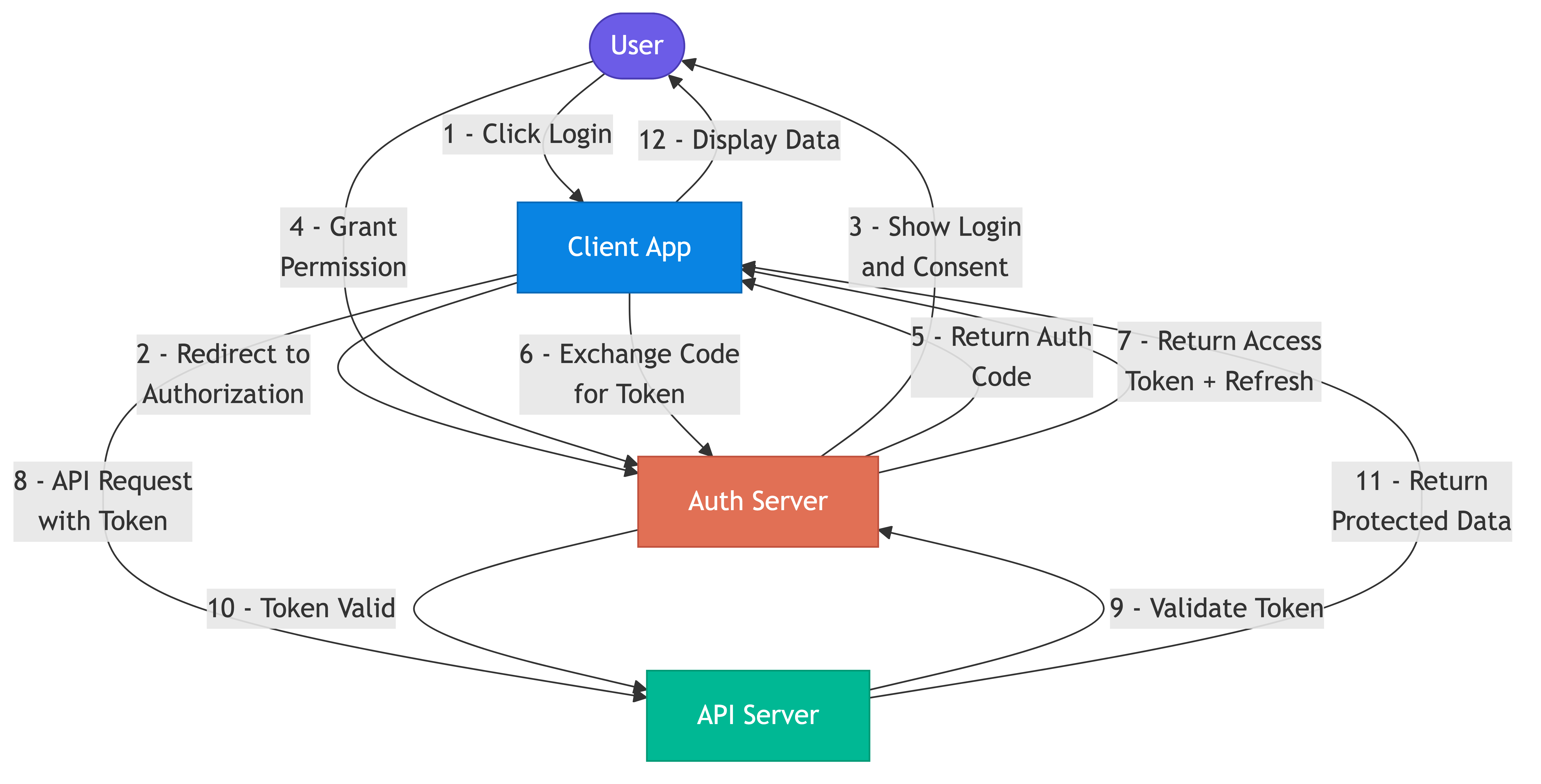
OAuth 2.0 Authorization Code Flow
This is the most common flow for web applications with a backend server.
Authorization Code Flow:

  1. User clicks "Login with Google" on your app
  2. App redirects user to Google's authorization endpoint
     GET https://accounts.google.com/o/oauth2/auth
       ?client_id=YOUR_APP_ID
       &redirect_uri=https://yourapp.com/callback
       &response_type=code
       &scope=openid email profile
       &state=random_csrf_token

  3. User authenticates with Google and grants consent
  4. Google redirects back with an authorization code
     GET https://yourapp.com/callback?code=AUTH_CODE&state=random_csrf_token

  5. Your backend exchanges the code for tokens (server-to-server)
     POST https://oauth2.googleapis.com/token
       code=AUTH_CODE
       &client_id=YOUR_APP_ID
       &client_secret=YOUR_SECRET
       &redirect_uri=https://yourapp.com/callback
       &grant_type=authorization_code

  6. Google returns access_token, refresh_token, id_token
  7. Your app uses access_token to call Google APIs on behalf of the user
OAuth 2.0 Flows Summary
| Flow                  | Use Case                          | Security Level |
|-----------------------|-----------------------------------|----------------|
| Authorization Code    | Web apps with backend             | High           |
| Auth Code + PKCE      | Mobile apps, SPAs                 | High           |
| Client Credentials    | Service-to-service (no user)      | High           |
| Device Code           | TVs, CLI tools (no browser)       | Medium         |
| Implicit (deprecated) | Legacy SPAs                       | Low (avoid)    |
GitHub uses OAuth 2.0 to let third-party apps access repositories on behalf of users. When you connect a CI tool to your GitHub account, OAuth handles the delegation.
OpenID Connect (OIDC)
OIDC is an identity layer built on top of OAuth 2.0. While OAuth 2.0 handles authorization (what can this app do), OIDC handles authentication (who is this user).
OAuth 2.0 alone:
  Returns: access_token (opaque, used to call APIs)
  Does NOT tell you who the user is

OIDC adds:
  Returns: id_token (JWT containing user identity claims)
  Standard claims: sub (user ID), email, name, picture
  Standard endpoints: /userinfo, /.well-known/openid-configuration
ID Token (decoded JWT):
  {
    "iss": "https://accounts.google.com",
    "sub": "1234567890",
    "email": "alice@example.com",
    "name": "Alice Smith",
    "picture": "https://...",
    "iat": 1710504727,
    "exp": 1710508327
  }
Okta, Auth0, and Google Identity Platform all implement OIDC. When you see "Sign in with Google" on a website, that is OIDC in action.
JSON Web Tokens (JWT)
JWTs are self-contained tokens that carry claims (data) in a cryptographically signed format. They are the standard token format for OIDC and many API authentication schemes.
JWT Structure
JWT format: header.payload.signature

Header (base64):
  { "alg": "RS256", "typ": "JWT", "kid": "key-id-1" }

Payload (base64):
  {
    "sub": "user-123",
    "email": "alice@example.com",
    "roles": ["admin", "editor"],
    "iat": 1710504727,
    "exp": 1710508327,
    "iss": "https://auth.yourapp.com"
  }

Signature:
  RS256(base64(header) + "." + base64(payload), private_key)
JWT Verification
Verification steps:
  1. Decode header, extract algorithm and key ID
  2. Fetch public key from issuer's JWKS endpoint
  3. Verify signature using public key
  4. Check expiration: exp > current_time
  5. Check issuer: iss matches expected value
  6. Check audience: aud matches your service

  No database lookup required. This is the key advantage of JWTs.
JWT Tradeoffs
Advantages:
  - Stateless: no server-side session storage needed
  - Self-contained: carries user info, reducing database queries
  - Scalable: any server can verify without shared state

Disadvantages:
  - Cannot be revoked before expiration (without a blocklist)
  - Larger than opaque tokens (hundreds of bytes vs tens)
  - Sensitive data in payload is only encoded, not encrypted
  - Token size grows with claims, increasing request overhead
Session Management
Sessions track authenticated state between requests. The choice between server-side sessions and token-based authentication affects architecture, scalability, and security.
Server-Side Sessions
Server-side session flow:
  1. User logs in with credentials
  2. Server creates session record in session store (Redis, database)
  3. Server returns session ID as a cookie
  4. Browser sends session ID cookie with every request
  5. Server looks up session by ID to verify authentication

  Session store entry:
    key: "sess_abc123"
    value: { userId: "u-789", roles: ["admin"], expiresAt: "..." }
Token-Based Sessions
Token-based flow:
  1. User logs in with credentials
  2. Server generates JWT containing user claims
  3. Server returns JWT to client
  4. Client sends JWT in Authorization header with every request
  5. Server verifies JWT signature (no database lookup)
Session Security
Session security practices:
  - Set Secure flag on cookies (HTTPS only)
  - Set HttpOnly flag (not accessible to JavaScript)
  - Set SameSite=Strict or Lax (CSRF protection)
  - Rotate session IDs after login (prevent session fixation)
  - Set reasonable expiration (15-30 minutes for sensitive apps)
  - Implement idle timeout (session expires after inactivity)
  - Use refresh tokens for long-lived access (short-lived JWT + refresh)
Slack uses short-lived access tokens (hours) with refresh tokens for their API. The short token lifetime limits the window of exposure if a token is leaked.
Role-Based Access Control (RBAC)
RBAC assigns permissions to roles, then assigns roles to users. Users inherit permissions through their role membership.
RBAC model:
  Roles:
    admin:  [create, read, update, delete, manage_users]
    editor: [create, read, update]
    viewer: [read]

  Users:
    Alice: roles = [admin]
    Bob:   roles = [editor]
    Carol: roles = [viewer]

  Authorization check:
    Can Bob delete a post?
    Bob's roles: [editor]
    Editor permissions: [create, read, update]
    "delete" not in editor permissions --> DENY
RBAC Limitations
RBAC struggles with:
  - "Editors can only edit their own posts" (requires resource ownership check)
  - "Users can read documents in their department only" (requires context)
  - "Managers can approve expenses under $10,000" (requires attribute comparison)

  These require checking attributes beyond just role membership.
AWS IAM is a large-scale RBAC system with hundreds of predefined roles and thousands of granular permissions across services.
Attribute-Based Access Control (ABAC)
ABAC evaluates policies based on attributes of the user, resource, action, and environment. It handles complex authorization scenarios that RBAC cannot express.
ABAC policy examples:

  Policy 1: "Users can edit documents they own"
    user.id == resource.ownerId AND action == "edit"

  Policy 2: "Managers can approve expenses under their approval limit"
    user.role == "manager"
    AND action == "approve"
    AND resource.amount <= user.approvalLimit

  Policy 3: "Access is allowed only during business hours from corporate network"
    environment.time BETWEEN "09:00" AND "17:00"
    AND environment.ip IN corporate_network_range
RBAC vs ABAC
| Aspect              | RBAC                        | ABAC                          |
|---------------------|-----------------------------|-------------------------------|
| Complexity          | Simple                      | Complex                       |
| Expressiveness      | Role-based only             | Any attribute combination     |
| Maintenance         | Manage roles and membership | Manage policies and attributes|
| Performance         | Fast (role lookup)          | Slower (policy evaluation)    |
| Best for            | Simple permission models    | Fine-grained, context-aware   |
Google Zanzibar powers authorization for Google Drive, YouTube, and other Google services. It evaluates relationships (owner, editor, viewer) combined with attributes to handle billions of authorization checks per second.
Common Pitfalls
- Storing passwords in plain text or with weak hashing. Use bcrypt, scrypt, or Argon2 with proper salt. Never use MD5 or SHA-256 alone for passwords.
- Long-lived JWTs without revocation. If a JWT is valid for 24 hours and gets leaked, the attacker has 24 hours of access. Use short-lived tokens (15 minutes) with refresh token rotation.
- Mixing authentication and authorization logic. Checking "is this user logged in" and "can this user do this" in the same code path leads to security gaps. Separate them into distinct middleware layers.
- Role explosion in RBAC. Creating a new role for every permission combination (editor-but-not-deleter, viewer-plus-commenter) leads to hundreds of unmanageable roles. Consider ABAC when roles exceed complexity thresholds.
- Not validating JWT claims. Verifying the signature is not enough. Always check expiration, issuer, and audience. A valid token from a different application should be rejected.
- Insecure session configuration. Missing HttpOnly, Secure, or SameSite flags on session cookies enables XSS and CSRF attacks.
Key Takeaways
- Authentication verifies identity (who). Authorization verifies permissions (what). Keep them separate in your architecture.
- OAuth 2.0 handles delegated authorization. OIDC adds identity on top. Use the Authorization Code flow with PKCE for most applications.
- JWTs are stateless and scalable but cannot be revoked before expiration. Pair short-lived JWTs with refresh tokens for a balance of convenience and security.
- RBAC is simple and sufficient for most applications. Move to ABAC when you need fine-grained, context-aware authorization decisions.
- Session security requires attention to cookie flags, token lifetimes, rotation policies, and secure storage.