
Interaction Design
Design Thinking
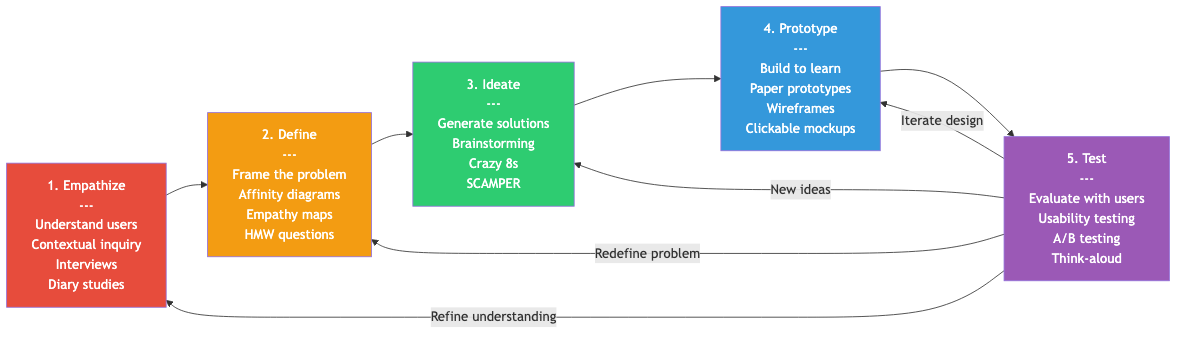
Design thinking is a human-centered, iterative problem-solving framework. The Stanford d.school model defines five phases (non-linear, often revisited).
1. Empathize
Understand users through direct engagement, not assumptions.
Methods:
- Contextual inquiry: Observe users in their natural environment while they perform real tasks
- Interviews: Semi-structured conversations exploring goals, frustrations, and workflows
- Diary studies: Users self-report experiences over days or weeks
- Shadowing: Follow users through their day without interfering
Key principle: Separate observation from interpretation. Record what users do, not what you think they mean.
2. Define
Synthesize research into actionable problem statements.
- Affinity diagrams: Cluster observations into themes
- Empathy maps: Organize what users say, think, do, and feel
- Problem statement format: "[User] needs [need] because [insight]"
- How Might We (HMW): Reframe problems as design opportunities
3. Ideate
Generate a broad range of solutions without premature judgment.
- Brainstorming (quantity over quality initially)
- Crazy 8s: Eight ideas in eight minutes
- SCAMPER: Substitute, Combine, Adapt, Modify, Put to other use, Eliminate, Reverse
- Mind mapping and concept sketching
4. Prototype
Build quick, low-cost representations to test ideas. Prototypes should be disposable --- their purpose is learning, not production.
5. Test
Evaluate prototypes with real users. Testing feeds back into every prior phase: refine empathy, redefine problems, generate new ideas, iterate prototypes.
User-Centered Design (UCD)
ISO 9241-210 defines UCD as a framework where users influence design throughout development.
Understand context of use
        |
        v
Specify user requirements
        |
        v
Produce design solutions  <---+
        |                      |
        v                      |
Evaluate against requirements -+
        |
        v
Solution meets requirements
Core principles:
- Design is based on explicit understanding of users, tasks, and environments
- Users are involved throughout design and development
- Design is driven and refined by user-centered evaluation
- The process is iterative
- Design addresses the whole user experience
- The design team includes multidisciplinary skills and perspectives
Task Analysis
Task analysis decomposes what users need to accomplish into structured representations.
Hierarchical Task Analysis (HTA)
Breaks tasks into subtasks with plans describing execution order.
0. Book a flight
   Plan 0: Do 1, then 2, then 3, then 4

   1. Search for flights
      1.1 Enter departure city
      1.2 Enter destination
      1.3 Select dates
      1.4 Click search

   2. Select a flight
      Plan 2: Do 2.1, then 2.2. If price too high, redo 1.3
      2.1 Compare options
      2.2 Choose flight

   3. Enter passenger details
      3.1 Fill in name
      3.2 Enter passport info

   4. Complete payment
      4.1 Enter payment method
      4.2 Confirm booking
GOMS (Goals, Operators, Methods, Selection Rules)
A cognitive modeling framework for predicting expert performance.
- Goals: What the user wants to achieve
- Operators: Atomic actions (keystroke, mouse click, mental preparation)
- Methods: Sequences of operators to accomplish a goal
- Selection rules: How users choose between methods
Keystroke-Level Model (KLM)
A simplified GOMS variant that predicts task time using six operators:
| Operator | Description | Typical Time |
|---|---|---|
| K | Keystroke or button press | 0.2s (skilled typist) |
| P | Point to target (mouse) | 1.1s |
| H | Home hands (keyboard to mouse) | 0.4s |
| M | Mental preparation | 1.35s |
| R | System response (wait) | variable |
| D(nD, lD) | Draw nD segments of length lD | variable |
Example: Copy-paste a word with keyboard shortcut:
M + double-click(P+K) + M + K(Ctrl) + K(C) + P(destination) + K(click) + M + K(Ctrl) + K(V)
= 1.35 + 1.1 + 0.2 + 1.35 + 0.2 + 0.2 + 1.1 + 0.2 + 1.35 + 0.2 + 0.2
= 7.45 seconds predicted
Scenarios and Personas
Personas
Fictional but research-grounded archetypes representing user segments.
Name:        Sarah Chen, 34
Occupation:  Project manager at a mid-size software company
Goals:       Track team progress without micromanaging
             Quickly identify blockers
Frustrations: Too many tools, context-switching overhead
Tech comfort: High --- uses 10+ apps daily
Quote:       "I need a single view of what matters right now."
Persona types:
- Primary: Main target user; design must satisfy them
- Secondary: Important but can tolerate some friction
- Supplemental: Stakeholders whose needs are noted but not primary
- Anti-persona: Who you are explicitly NOT designing for
Scenarios
Narrative descriptions of a persona using the system to achieve a goal. They provide context that bare requirements lack.
Scenario: Monday morning standup prep
Sarah opens the dashboard at 8:50am before the 9am standup. She needs to see
which tasks were completed last week, which are in progress, and which are
blocked. She scans the team board, filters by "blocked" status, and notes
two items. She clicks each to read the blocker description, then joins the
standup call with specific questions prepared.
User Journey Maps
Visualize the end-to-end experience across touchpoints, time, and emotional states.
Phase:     Awareness    Research      Purchase     Onboarding    Use
           ─────────────────────────────────────────────────────────
Actions:   See ad       Compare       Checkout     Setup         Daily use
           Search       Read reviews  Pay          Tutorial

Emotions:  Curious      Overwhelmed   Anxious      Frustrated    Satisfied
           ●            ●             ●            ●             ●
           ───────●─────────●─────────────●────────────●─────────────●──

Pain       Too many     No clear      Forced       Too many      Missing
Points:    options      comparison    account      steps         feature X
                                     creation
Opps:      Clear        Comparison    Guest        Progressive   Feature
           value prop   tool          checkout     onboarding    request
Information Architecture (IA)
IA organizes content so users can find what they need and understand where they are.
Organization Schemes
| Scheme | Example | Strength |
|---|---|---|
| Alphabetical | Dictionary, contacts list | Precise lookup |
| Chronological | News feed, email inbox | Time-relevant content |
| Geographical | Store locator, maps | Location-based tasks |
| Topical | Wikipedia categories | Browsing by subject |
| Task-based | "Send money", "Check balance" | Action-oriented users |
| Audience | "For students", "For faculty" | Distinct user groups |
Card Sorting
A method for discovering how users naturally categorize information.
- Open sort: Users create their own categories (discovery)
- Closed sort: Users place items into predefined categories (validation)
- Hybrid sort: Users can use predefined categories or create new ones
Sitemaps and Content Inventories
- Content inventory: Exhaustive list of all content with metadata
- Sitemap: Hierarchical diagram showing page structure and relationships
- Content audit: Qualitative assessment of content quality and relevance
Navigation Design
Navigation Patterns
| Pattern | Use Case | Example |
|---|---|---|
| Global navigation | Persistent site-wide access | Top nav bar |
| Local navigation | Section-specific links | Sidebar within docs |
| Breadcrumbs | Show location in hierarchy | Home > Products > Shoes |
| Search | Large content spaces | Site search bar |
| Faceted navigation | Filter by multiple attributes | E-commerce filters |
| Tabs | Parallel content categories | Settings panels |
| Hub-and-spoke | Mobile task-based apps | iOS home + app model |
| Step indicator | Multi-step processes | Checkout progress bar |
Wayfinding Principles
- Orientation: Users always know where they are (active states, breadcrumbs, page titles)
- Route finding: Clear paths to destinations (consistent nav, logical grouping)
- Closure: Users know when they have arrived (confirmation, completion states)
The Three-Click Rule (and Why It's a Myth)
Research shows users do not abandon tasks after three clicks. What matters is information scent --- each click should increase the user's confidence they are on the right path. A five-click path with strong scent outperforms a two-click path with ambiguous labels.
Principles of Good Interaction Design
- Visibility: Make relevant options and system state visible
- Consistency: Similar operations use similar elements and workflows
- Constraints: Limit possible actions to prevent errors
- Tolerance: Allow undo, support recovery from mistakes
- Simplicity: Remove unnecessary complexity; progressive disclosure for advanced features
- Structure: Organize content meaningfully; group related elements
- Feedback: Communicate results of actions clearly and promptly