
Platform and Infrastructure Strategy
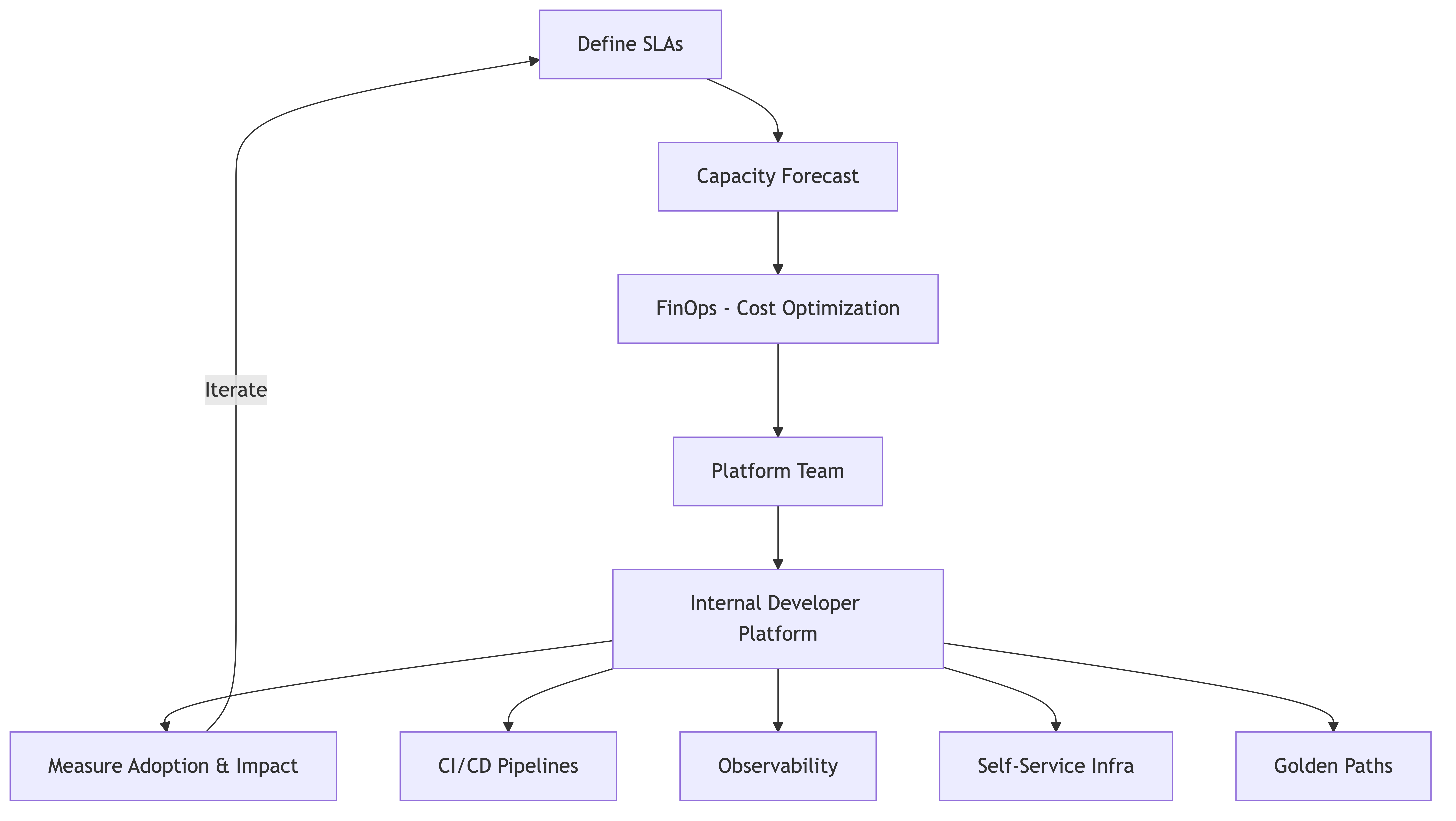
Why This Matters at the Director/VP Level
Infrastructure is one of those things that nobody thinks about when it's working and everybody thinks about when it's not. As a director or VP, your relationship with infrastructure changes fundamentally. You're no longer debugging Kubernetes manifests — you're deciding whether to invest $3M in a platform team, negotiating enterprise agreements with cloud providers, and explaining to the CFO why your AWS bill grew 40% when revenue only grew 20%.
Cloud infrastructure spend is often the second-largest expense after people costs. Let that sink in. It's not office space. It's not marketing. It's cloud bills. And yet most engineering organizations manage their cloud spend with less rigor than they manage their office supply budget.
This section covers how to think about platform and infrastructure strategy at scale — not the technical details of container orchestration, but the organizational, financial, and strategic decisions that determine whether your infrastructure is an asset or a liability.
SLA Definitions and Management
At scale, SLAs stop being a technical concern and become a business contract. You need to think about them differently.
External SLAs vs. Internal SLOs
External SLAs are contractual commitments to your customers. "We guarantee 99.9% uptime." These have legal and financial implications — missed SLAs often trigger credits, penalties, or contract termination clauses.
Internal SLOs (Service Level Objectives) are targets you set for internal services. "Our authentication service should have 99.99% availability." These don't have contractual penalties, but they have real consequences: if auth is down, nothing works.
How to Set SLAs That Make Sense
The most common mistake is setting SLAs based on what sounds good rather than what's achievable and what the business actually needs.
Start with the business requirement. Talk to your customers (or your product team, or your sales team). What do they actually need? A B2B SaaS product serving enterprise customers might need 99.95% uptime. An internal analytics dashboard might be fine with 99%.
Understand what the numbers mean.
- 99% uptime = 3.65 days of downtime per year
- 99.9% uptime = 8.76 hours of downtime per year
- 99.99% uptime = 52.6 minutes of downtime per year
- 99.999% uptime = 5.26 minutes of downtime per year
Each additional "nine" costs significantly more to achieve. Going from 99.9% to 99.99% might require redundant infrastructure across multiple regions, automated failover, and a significantly larger ops team. Make sure you're willing to pay for the nines you're promising.
Set internal SLOs higher than external SLAs. If you promise customers 99.9%, target 99.95% internally. This gives you a buffer for unexpected issues without breaching your external commitments.
Error Budgets
The concept of error budgets (from Google's SRE practice) is genuinely useful at scale. If your SLO is 99.9% for the month, you have an "error budget" of 0.1% — about 43 minutes of downtime.
When you have budget remaining, teams can take risks: deploy more frequently, run experiments, make bigger changes. When the budget is consumed, teams shift to reliability work: fixing the issues that burned the budget, adding safeguards, improving monitoring.
This turns reliability from a vague aspiration ("we should be more reliable") into a concrete, measurable resource that gets managed like any other resource.
Capacity Forecasting
Running out of capacity is a business-stopping event. Having too much capacity is burning money. Capacity forecasting is the discipline of threading that needle.
Why It's Hard
Capacity forecasting at scale is hard because growth isn't linear, usage patterns change, and new features can dramatically alter resource consumption.
I've seen a single feature launch (a new real-time notification system) increase database load by 300% overnight. No amount of linear extrapolation from historical data would have predicted that.
A Practical Forecasting Approach
Step 1: Understand your current usage. You can't forecast the future if you don't understand the present. Instrument everything: CPU, memory, disk, network, database connections, queue depth, cache hit rates. Not just averages — percentiles matter. Your p99 latency might be 10x your average.
Step 2: Correlate usage with business metrics. How does infrastructure usage scale with business growth? If you add 10,000 customers, how much additional compute, storage, and bandwidth do you need? Build a model that ties infrastructure consumption to business KPIs.
Step 3: Factor in planned changes. Talk to your product teams. What features are coming? What markets are you entering? What traffic patterns will change? A launch in a new geography might require new regions. A video feature might 5x your bandwidth.
Step 4: Add buffers. Plan for 30-50% headroom above your forecasted needs. This handles unexpected spikes, forecasting errors, and gives you time to procure additional capacity.
Step 5: Review quarterly. Capacity forecasts go stale fast. Review them quarterly against actuals, update your models, and adjust your plans.
Lead Times Matter
This is something that catches people off guard. Cloud has made us think capacity is instant — just spin up more instances. That's true for compute, but not for everything.
- Getting a new region approved and configured might take months
- Database migrations to larger instances require planning and downtime windows
- Network capacity upgrades with your ISP or CDN provider can take weeks
- Reserved instance or savings plan purchases need financial planning cycles
If you wait until you need capacity to start procuring it, you're already too late.
Infrastructure Cost Tracking and FinOps
FinOps — cloud financial management — has become a discipline in its own right, and for good reason. Cloud costs are the wild west in most organizations.
Why Cloud Costs Are Out of Control
The fundamental problem is that cloud pricing makes it extremely easy to spend money and extremely hard to understand what you're spending it on.
Any developer can spin up resources. There's no purchase order, no procurement process, no approval chain. That's the beauty of cloud — and the danger.
Combine that with pricing models that would make a mobile phone carrier blush (on-demand vs. reserved vs. spot vs. savings plans, per-second billing, data transfer charges that vary by region and direction, tiered pricing that changes at different volume thresholds) and you get bills that nobody fully understands.
Building a FinOps Practice
Step 1: Visibility. You can't manage what you can't see. Implement cost allocation through tagging. Every resource should be tagged with the team that owns it, the environment (prod/staging/dev), and the service it supports.
This sounds simple. It is not. Getting 100% tag coverage across a large organization is a multi-month effort. But without it, your cost reports are useless.
Step 2: Accountability. Assign cloud costs to the teams that create them. When a team sees that their service costs $47,000/month, they start making different decisions than when cloud spend is an amorphous corporate line item.
Show teams their costs regularly — weekly or monthly. Make it part of team dashboards. Some organizations include cloud cost efficiency as a metric in engineering reviews.
Step 3: Optimization. Once you have visibility and accountability, you can start optimizing:
- Right-sizing. Most instances are over-provisioned. Analyze actual usage and downsize. This alone typically saves 20-30%.
- Reserved capacity. For stable workloads, commit to reserved instances or savings plans. Typical savings: 30-60% vs. on-demand.
- Spot instances. For fault-tolerant workloads (batch processing, CI/CD, stateless services), use spot instances. Savings: 60-90%.
- Lifecycle policies. Automatically clean up old snapshots, unused volumes, abandoned load balancers, forgotten dev environments. This is the cloud equivalent of cleaning out the garage.
- Architecture optimization. Sometimes the biggest savings come from architectural changes: moving to serverless for bursty workloads, using cheaper storage tiers for cold data, caching aggressively to reduce database load.
Step 4: Governance. Put guardrails in place to prevent future cost explosions:
- Budget alerts that notify teams when they're trending over budget
- Policies that prevent the creation of expensive resource types without approval
- Automated shutdown of dev/staging environments outside business hours
- Regular cost review meetings with engineering leadership
The Cloud Cost Conversation with Finance
At some point, your CFO or finance team will ask why cloud costs keep growing. Be prepared for this conversation.
What finance wants to hear: "Our cloud cost per unit of business value is decreasing, even though absolute costs are increasing because the business is growing."
What you need to show: Cost efficiency metrics. Cloud cost per customer, per transaction, per API call, per dollar of revenue. If these metrics are improving, you're doing well — even if the absolute number is going up.
What to avoid: Don't just say "cloud costs went up because we grew." Finance knows that. They want to know if costs are growing proportionally to value, or if you're getting less efficient.
Platform Team Strategy
As organizations scale, the question of "should we have a platform team?" becomes unavoidable.
What a Platform Team Does
A platform team builds and maintains the shared infrastructure, tools, and services that product engineering teams use to build, deploy, and operate their applications. Think of them as building the roads and bridges that everyone else drives on.
Common platform team responsibilities:
- CI/CD pipelines
- Container orchestration and deployment tooling
- Service mesh and networking
- Observability stack (monitoring, logging, tracing)
- Developer environments
- Infrastructure as code frameworks
- Security tooling and compliance automation
When You Need a Platform Team
You don't need a platform team when you have 20 engineers. You definitely need one when you have 200. The tricky part is the transition in between.
Signs you need a platform team:
- Multiple product teams are building the same infrastructure tooling independently
- Teams are spending more than 20% of their time on infrastructure concerns
- Your deployment process is inconsistent across teams
- New engineers take weeks to set up their development environment
- You have reliability problems that cut across team boundaries
The Internal Developer Platform
The modern platform team's north star is the Internal Developer Platform (IDP) — a self-service platform that lets product engineers deploy, monitor, and manage their services without filing tickets or waiting for ops.
A good IDP provides:
- Self-service deployment. Engineers push code, it gets deployed. No tickets, no handoffs.
- Standardized templates. "I need a new microservice" should be a 10-minute task, not a 2-week project.
- Observability out of the box. Every service automatically gets monitoring, logging, and alerting.
- Security by default. Security controls are built into the platform, not bolted on afterward.
Platform as a Product
The most successful platform teams treat their platform as a product and their product engineers as customers. This means:
- User research. Talk to your engineers. What are their pain points? What slows them down? What do they wish existed?
- Product roadmap. Prioritize based on impact, not on what's technically interesting.
- Documentation. If engineers can't figure out how to use your platform without asking someone, your platform has failed.
- Support model. How do engineers get help when they're stuck? Slack channels, office hours, embedded platform engineers — pick a model and make it work.
- Adoption metrics. Track how many teams are using your platform, how satisfied they are, and how much time it saves them.
The biggest mistake platform teams make is building what they think engineers need instead of what engineers actually need. The second biggest mistake is building an incredible platform and then not investing in adoption, documentation, and support.
Build for Scale vs. Build for Now
This is one of the most nuanced decisions in engineering leadership, and it doesn't have a universal answer.
The Case for Building for Now
YAGNI — You Ain't Gonna Need It. Build for your current scale, and re-architect when you need to. Arguments in favor:
- You don't know what the future looks like. Over-engineering for a future that doesn't materialize is waste.
- Premature optimization is the root of all evil (Knuth was right).
- Getting to market faster has enormous value. Over-engineering slows you down.
- Most startups die from not having customers, not from scaling problems.
The Case for Building for Scale
Some architectural decisions are extremely expensive to change later. Arguments in favor:
- Re-platforming a database from a single-node PostgreSQL to a sharded cluster while serving production traffic is orders of magnitude harder than starting with a scalable design.
- Some scaling challenges are predictable. If you know you're going to handle 10x traffic in 18 months, plan for it now.
- The cost of downtime at scale is enormous. An hour of downtime for a company processing 11,400. That number gets very large very fast.
A Framework for the Decision
Build for now when:
- You're not sure if the product will succeed
- The component can be replaced independently (loose coupling)
- Scaling challenges are unlikely in the next 12-18 months
- You're in a competitive market where speed to market matters more than perfection
Build for scale when:
- The component is deeply embedded and expensive to replace (databases, message buses, core data models)
- You have high confidence in your growth trajectory
- The cost of failure at scale is catastrophic (data loss, extended downtime)
- The incremental cost of building for scale is small compared to the cost of retrofitting
The practical answer is usually: build for now, but make decisions that don't close off the path to scale. Use a single database, but design your schema and access patterns so that sharding later is feasible. Use a monolith, but maintain clean module boundaries so that extracting services later is straightforward.
FinOps: Cloud Financial Management in Depth
Let me go deeper on FinOps because cloud spend is often the #2 expense after headcount, and it's the expense that engineering leaders have the most control over.
The FinOps Lifecycle
FinOps follows a cycle: Inform → Optimize → Operate.
Inform: Build visibility into who is spending what, on which services, for what purpose. This requires tagging, cost allocation, and reporting dashboards that are accessible to engineering teams (not just finance).
Optimize: Identify and act on savings opportunities. Right-sizing, reserved capacity, architectural changes, waste elimination.
Operate: Embed cost awareness into engineering culture and processes. Cost reviews in sprint planning, cost impact in architectural decisions, cost efficiency in performance reviews.
Common FinOps Wins
Here are the optimizations that typically yield the biggest savings, in order of effort-to-impact ratio:
-
Delete unused resources. Every organization has forgotten EC2 instances, unused EBS volumes, orphaned load balancers, and idle RDS instances. Finding and deleting these is the lowest-hanging fruit. Typical savings: 5-15% of total spend.
-
Right-size instances. Analyze actual CPU and memory utilization. Most instances run at 10-20% average utilization. Downsizing them saves 30-50% per instance.
-
Purchase reserved capacity. For workloads that run 24/7 and are unlikely to change significantly, reserved instances or savings plans save 30-60%.
-
Use spot instances for suitable workloads. CI/CD, batch processing, dev environments — anything that can tolerate interruption. Savings: 60-90%.
-
Optimize data transfer. Data transfer costs are the hidden gotcha in cloud billing. Use CDNs, keep traffic within regions/AZs when possible, compress data in transit.
-
Storage tiering. Move infrequently accessed data to cheaper storage tiers. S3 Intelligent Tiering does this automatically. For databases, archive old data.
-
Architectural changes. Move bursty workloads to serverless. Implement caching to reduce database load. Use read replicas instead of scaling up the primary.
The Unit Economics Dashboard
The most useful FinOps artifact is a unit economics dashboard that shows:
- Cost per customer (total infrastructure cost / active customers)
- Cost per transaction (total cost / number of transactions)
- Cost per team (infrastructure cost allocated to each team)
- Cost trend (are unit costs going up or down over time?)
When you can show your CFO that cost per customer decreased by 15% this quarter even though total spend went up 20% (because you added 40% more customers), that's a conversation that goes well.
Real-World Examples
Smart Platform Investment: The Developer Platform That Changed Everything
A 400-person engineering organization was growing rapidly, hiring 15-20 engineers per month. But their onboarding time was brutal — it took new engineers an average of 3 weeks to deploy their first change to production. The deployment process involved 14 manual steps, three different ticketing systems, and required help from at least two other teams.
The VP of Engineering made a bet: she pulled 8 senior engineers out of product teams (over loud objections from product managers) and formed a platform team. Their mission was to reduce onboarding time to 2 days and deployment to a single command.
Six months later, they had built an internal developer platform with standardized service templates, automated CI/CD, self-service deployment, and built-in observability. New engineers could create and deploy a new service on their first day.
The results:
- Onboarding time dropped from 3 weeks to 2 days
- Deployment frequency across the org increased 4x
- Incidents caused by deployment errors dropped 60%
- Engineer satisfaction scores improved significantly
- The 8 engineers on the platform team effectively multiplied the productivity of 400 engineers
The investment paid for itself within the first year.
The Runaway Cloud Bill
A fast-growing SaaS company went from 800K/month in AWS spend over 18 months. Revenue had grown 3x in the same period, so leadership wasn't alarmed — until they realized that at this trajectory, cloud costs would exceed engineering payroll within a year.
The root causes were familiar:
- No tagging discipline — 60% of resources had no team or service tags
- Developers provisioned large instances "just in case" and never right-sized
- Dev and staging environments ran 24/7 despite being used only during business hours
- Nobody had purchased any reserved capacity
- Hundreds of unused EBS volumes and old snapshots were accumulating
- A logging pipeline was storing 6 months of debug-level logs at full price
They hired a FinOps lead and gave her a mandate to reduce costs by 40% without impacting performance. Over 6 months, she:
- Implemented mandatory tagging and blocked untagged resource creation
- Right-sized instances based on actual utilization (saving 25%)
- Purchased savings plans for stable workloads (saving 35% on those workloads)
- Automated shutdown of non-production environments outside business hours (saving 60% on those environments)
- Implemented log retention policies and tiered storage (saving 70% on logging costs)
- Set up team-level cost dashboards and monthly cost review meetings
Total savings: 45% reduction in monthly spend, dropping from 440K. And cloud cost per customer decreased by 60%.
Common Mistakes
1. Not Having a Platform Strategy
Letting infrastructure evolve organically works at small scale. At large scale, it produces fragmentation, duplication, and inconsistency. Every team builds their own deployment pipeline. Every service uses a different monitoring tool. New engineers can't move between teams because everything is different.
2. Over-Centralizing Platform Decisions
The opposite mistake: mandating every infrastructure decision from the center. This creates bottlenecks, frustrates teams, and slows everyone down. The right balance is standardizing the important things (deployment, monitoring, security) and letting teams choose the less critical things (testing frameworks, local tooling).
3. Ignoring Cloud Costs Until They're a Crisis
By the time the CFO is asking questions, you're already behind. Build cost visibility and accountability from the start. It's much easier to maintain cost discipline than to impose it after habits have formed.
4. Setting SLAs Without Understanding the Cost
Every additional "nine" of availability costs real money. Don't promise 99.99% because it sounds good. Understand what it takes to deliver that, and make sure the business is willing to pay for it.
5. Building a Platform Nobody Uses
If your platform team builds an incredible internal tool and nobody adopts it, you've wasted the investment. Adoption requires marketing, documentation, support, and a genuine focus on developer experience. Treat your platform like a product.
6. Not Forecasting Capacity
Running out of capacity in production is a preventable disaster. Forecast quarterly, maintain buffers, and account for upcoming feature launches and business growth.
7. Treating Infrastructure as a Cost Center
Infrastructure isn't just an expense — it's a capability. The right infrastructure investments make your entire engineering organization faster, more reliable, and more efficient. Frame infrastructure spending as an investment in engineering leverage, not just a cost to be minimized.
8. Forgetting About the Humans
Platform and infrastructure strategy isn't just about technology. It's about the people who build and operate these systems. Invest in their growth, prevent burnout (on-call fatigue is real), and make sure they feel connected to the business impact of their work.
Business Value
A strong platform and infrastructure strategy creates compounding value:
-
Engineering velocity. A good internal developer platform can improve engineering productivity by 20-40%. For a 200-person engineering org with an average fully loaded cost of 18M in effective capacity.
-
Cost efficiency. A mature FinOps practice typically reduces cloud spend by 30-50%. On a 1.5-2.5M in annual savings that goes straight to the bottom line.
-
Reliability. Well-managed infrastructure with proper SLOs, capacity planning, and incident response reduces downtime. For businesses where downtime costs 100K per hour, reducing annual downtime by even 10 hours saves 1M.
-
Talent retention. Engineers want to work with modern, well-maintained infrastructure. "We deploy 50 times a day with full confidence" is a recruiting advantage. "We deploy once a month with a prayer" is a recruiting liability.
-
Business agility. Good infrastructure lets you respond to business opportunities faster. Can you launch in a new region in weeks instead of months? Can you handle a 10x traffic spike from a viral moment? The business value of that agility is hard to quantify but very real.
-
Security and compliance. Platform-level security controls are more effective and more consistent than asking every team to implement their own. This reduces risk and simplifies compliance audits.
The organizations that invest strategically in platform and infrastructure consistently outperform those that treat it as an afterthought. Infrastructure is leverage — every dollar and hour invested in the right infrastructure improvements multiplies the effectiveness of your entire engineering organization.
Common Pitfalls
- Not having a platform strategy at all. Letting infrastructure evolve organically at scale produces fragmentation where every team builds their own deployment pipeline and uses different monitoring tools, making operational support impossible.
- Ignoring cloud costs until the CFO asks questions. By the time finance is alarmed, you are already significantly over-spending. Building cost visibility and accountability from the start is much easier than imposing discipline after wasteful habits have formed.
- Setting SLAs without understanding their cost. Promising 99.99% uptime because it sounds good, without understanding the infrastructure investment required for each additional "nine," leads to either broken promises or unbudgeted spending.
- Building a platform nobody adopts. Creating an internal developer platform without investing in documentation, marketing, support, and developer experience means the investment is wasted regardless of how technically impressive it is.
- Over-centralizing platform decisions. Mandating every infrastructure choice from a central team creates bottlenecks, frustrates product teams, and slows everyone down. Standardize the critical things and let teams choose the rest.
- Treating infrastructure purely as a cost to minimize. Infrastructure is a capability that creates leverage. Framing it only as an expense leads to chronic underinvestment that makes the entire engineering organization slower.
Key Takeaways
- SLAs are business commitments, not technical aspirations. Understand the cost of each "nine."
- Capacity forecasting is a quarterly discipline, not an annual event.
- Cloud costs are often the #2 expense — manage them with the same rigor as headcount.
- Platform teams succeed when they treat their platform as a product and their engineers as customers.
- Build for now, but don't close off the path to scale.
- FinOps follows a cycle: Inform, Optimize, Operate. Start with visibility.
- Infrastructure is leverage — invest in it strategically, not reluctantly.