
Crisis Management: Leading When Everything Is on Fire
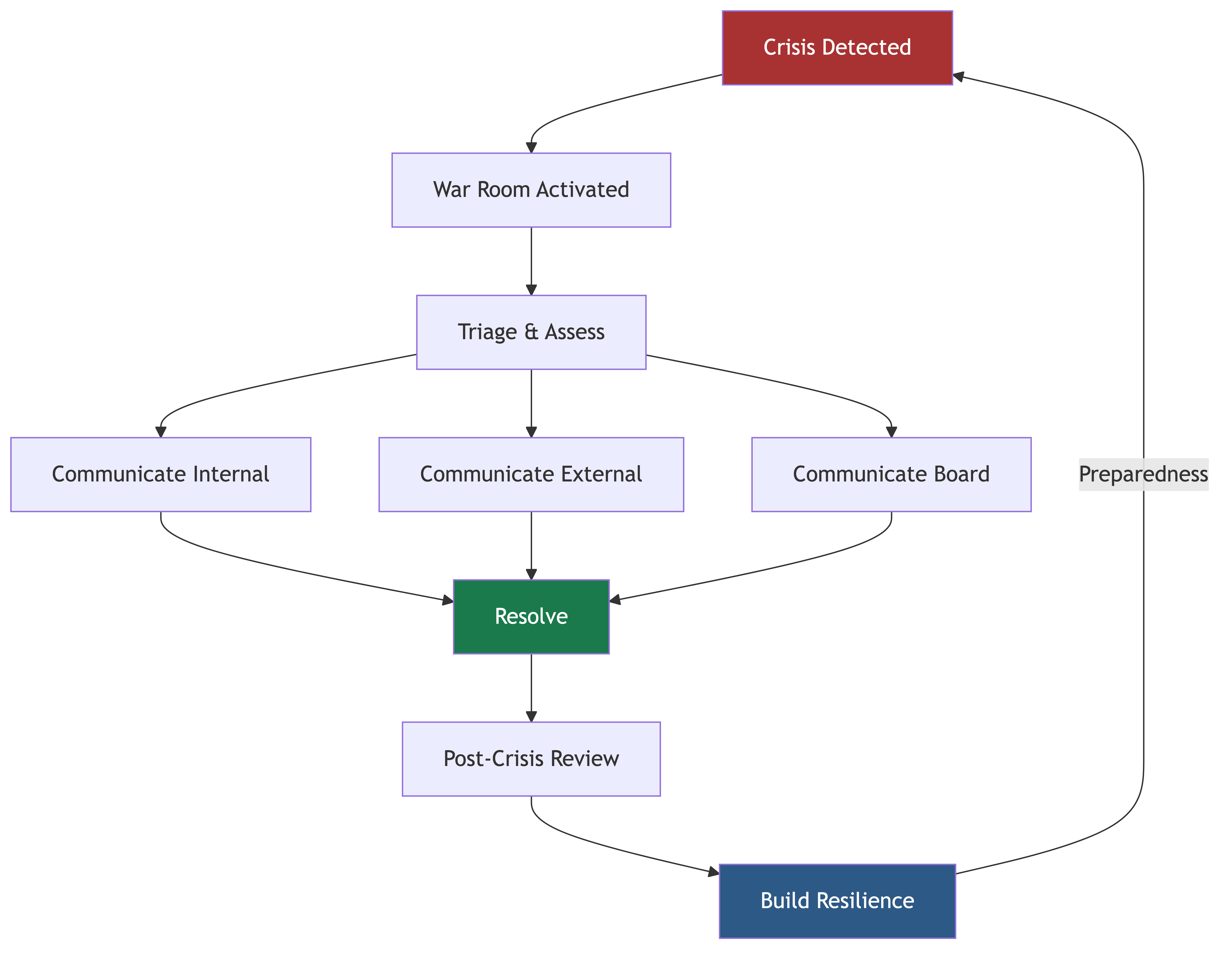
At 2:37 AM on a Saturday, your phone buzzes. Then it buzzes again. Then it starts ringing. Your payment processing system is down. Customers can't complete purchases. Revenue is hemorrhaging at $50,000 per minute. Your CEO is texting you. Your VP of Sales is calling because the biggest customer demo of the year is in four hours. The PagerDuty alerts are cascading.
What you do in the next 60 minutes defines your reputation as a leader more than any quarterly roadmap or architecture decision ever will.
I've been through dozens of major incidents across my career. Some I handled well. Some I didn't. This chapter distills what I've learned about crisis leadership, war room execution, communication under pressure, and building organizations that bend but don't break.
How You Handle Crises Defines Trust
Let me be direct about this: people don't remember your good days. They remember your bad days. Every stakeholder — your team, your CEO, your board, your customers — is forming their opinion of you based on how you perform under pressure.
A well-handled crisis can actually strengthen trust. When people see you stay calm, make good decisions, communicate clearly, and lead the team to resolution — they trust you more afterward. A poorly handled crisis does the opposite, and the damage takes years to repair.
This isn't about being perfect. Crises are messy by definition. It's about being calm, decisive, and transparent when everything around you is chaotic.
War Room Playbooks for Major Incidents
When a major incident hits, you don't have time to figure out your process. You need a playbook that everyone already knows.
Incident Classification
Not every problem is a crisis. Define clear severity levels:
SEV-1 (Critical)
- Complete service outage for all customers
- Data breach or security compromise
- Data loss or corruption
- Revenue impact exceeding defined threshold
- Response: All hands, war room, executive notification within 15 minutes
SEV-2 (Major)
- Partial service degradation affecting many customers
- Major feature unavailable
- Significant performance degradation
- Response: Incident team assembled, executive notification within 30 minutes
SEV-3 (Moderate)
- Limited impact, affecting small number of customers
- Workaround available
- Response: On-call team handles, manager notified
SEV-4 (Minor)
- Minimal impact, cosmetic issues, edge cases
- Response: Normal engineering workflow
The classification matters because it determines the response. Over-classifying wastes resources and creates alert fatigue. Under-classifying delays response to real problems.
War Room Structure
For SEV-1 and SEV-2 incidents, establish a war room immediately. Here's the structure that works:
Incident Commander (IC) The IC runs the war room. They don't debug — they coordinate. Their job is to:
- Maintain situational awareness
- Direct investigation and remediation efforts
- Make decisions about response actions
- Manage communication to stakeholders
- Track timeline and actions
The IC should be a senior engineer or engineering manager who can stay calm under pressure. It should not be the CTO for most incidents — you need to be available for executive communication while the IC runs the technical response.
Technical Lead The senior engineer closest to the affected system. They direct the debugging effort and propose remediation actions.
Communications Lead Handles all external communication — customer notifications, status page updates, social media responses. This person shields the technical team from communication overhead.
Scribe Documents everything in real time: what was tried, what worked, what didn't, key decisions and their rationale, timeline of events. This is invaluable for the post-incident review.
Subject Matter Experts Engineers pulled in as needed based on the systems involved. They investigate and implement fixes under the Technical Lead's direction.
War Room Principles
-
One conversation, one channel: All incident communication happens in one place. A dedicated Slack channel, a video call — whatever it is, everyone is in the same room (physical or virtual). Side conversations fragment information.
-
No blame during the incident: The goal is resolution, not attribution. There will be time for root cause analysis later. During the incident, the only question is "how do we fix this?"
-
Communicate status on a cadence: Every 15-30 minutes, the IC should provide a status update even if nothing has changed. "No update" is itself an update. Silence breeds anxiety.
-
Escalate early: If the team is stuck, escalate. Bring in more expertise, contact vendor support, engage the on-call for another team. The cost of escalating too early is near zero. The cost of escalating too late can be enormous.
-
Document everything: Every action taken, every hypothesis tested, every decision made. You'll need this for the post-incident review, and you'll thank yourself when a similar issue arises months later.
-
Take care of the people: Major incidents are exhausting. Make sure people take breaks, eat, and hydrate. Fatigued engineers make worse decisions. If an incident runs long, rotate people.
The First 30 Minutes
The first 30 minutes of a major incident follow a specific pattern:
Minutes 0-5: Assessment
- What's broken? What's the customer impact?
- When did it start? Was there a recent change (deploy, config change, infrastructure change)?
- What's the blast radius? All customers or a subset?
Minutes 5-15: Stabilization
- Can you roll back the most recent change?
- Can you failover to a backup system?
- Can you implement a temporary mitigation (feature flag, traffic diversion)?
- Activate the war room structure.
Minutes 15-30: Investigation and Communication
- Begin systematic debugging based on assessment
- Send first external communication (status page, customer notification)
- Brief executives on situation, impact, and expected timeline
- Assign specific investigation tracks to different engineers
The priority in the first 30 minutes is always to stop the bleeding, not to find the root cause. If you can roll back a deployment and restore service, do that first. Investigate root cause after service is restored.
Major Incident Communication
Communication during a crisis is as important as the technical response. Maybe more important.
Internal Communication
Executive Team
- Notify within 15 minutes of a SEV-1
- Provide: What happened, customer impact, what you're doing, expected timeline
- Update every 30 minutes until resolved
- Be honest about what you know and what you don't know
The worst thing you can do is give your CEO optimistic timelines. "We'll have it fixed in 30 minutes" followed by three hours of silence destroys trust. Say "We're investigating. I'll update you in 30 minutes with what we know."
Broader Engineering Team
- Post in a company-visible channel so people know what's happening
- Be clear about whether you need help and from whom
- Tell people who aren't needed to stay away — too many people in a war room slows things down
Customer-Facing Teams (Support, Sales, Success)
- Give them talking points: what happened, what's the impact, what we're doing
- Update them before you update customers so they're never blindsided by a customer call
- Tell them what they should and shouldn't promise
External Communication
Status Page
- Update within 15 minutes of a SEV-1
- Use clear, non-technical language
- Don't minimize the issue — customers know when they're being spun
- Update at regular intervals even when there's no new information
- When resolved, explain what happened and what you're doing to prevent recurrence
Customer Communication For major incidents affecting key customers:
- Proactive outreach — don't wait for them to contact you
- Acknowledge the issue, explain the impact, provide timeline
- Follow up with a detailed post-incident report
Social Media
- Monitor for customer complaints
- Respond with a link to the status page
- Don't get into technical details in public
Board Communication
For significant incidents (extended outages, data breaches, security compromises):
- Notify the board within hours, not days
- Provide a concise summary: what happened, impact, response, timeline to resolution
- Follow up with a detailed post-incident report
- Include changes you're making to prevent recurrence
Communication Templates
Have templates ready before you need them. Writing communication from scratch during a crisis is slow and error-prone.
Initial Notification Template: "We are currently experiencing [brief description of issue]. This is affecting [scope of impact]. Our engineering team is actively investigating and working on resolution. We will provide updates every [30 minutes / 1 hour]. Our next update will be at [specific time]."
Update Template: "Update on [issue]: [Current status]. [What we've tried / what we know]. [Expected next steps]. Next update at [specific time]."
Resolution Template: "[Issue] has been resolved as of [time]. [Brief explanation of what happened]. [What we're doing to prevent recurrence]. We'll publish a detailed post-incident report within [timeframe]."
Business Continuity Planning
Crisis management isn't just about responding to incidents. It's about ensuring the business can continue to operate through disruptions.
Identifying Critical Systems
Not all systems are equally important. Classify your systems by business impact:
- Tier 1: Revenue-generating systems, customer data stores, authentication. Any downtime directly impacts revenue and customer trust.
- Tier 2: Important but non-revenue-critical. Internal tools, analytics, non-critical features.
- Tier 3: Nice to have. Development environments, internal documentation, non-essential automation.
Your business continuity plan should prioritize Tier 1 systems.
Recovery Objectives
For each Tier 1 system, define:
- RTO (Recovery Time Objective): How quickly must the system be restored? Payment processing might need a 15-minute RTO. Internal reporting might tolerate 4 hours.
- RPO (Recovery Point Objective): How much data loss is acceptable? For financial transactions, the RPO should be zero. For analytics, 24 hours might be acceptable.
These numbers drive your architecture decisions. A 15-minute RTO requires hot standby or active-active architecture. A 4-hour RTO might be achievable with automated recovery from backups.
Disaster Recovery Scenarios
Plan for specific scenarios:
- Single service failure: How does the system degrade? Is there automatic failover?
- Region failure: Can you failover to another region? How long does it take? What data might be lost?
- Cloud provider outage: Can you operate on a different provider? For most companies, the answer is no — and that's a conscious trade-off.
- Data corruption: Can you restore from backups? How quickly? Have you tested it?
- Security breach: What's your containment plan? How do you investigate? Who do you notify?
- Key personnel unavailable: What if your lead database engineer is unreachable during a database crisis? Is the knowledge documented? Is there a backup?
Testing Your Plans
A disaster recovery plan that hasn't been tested is a hope, not a plan.
- Tabletop exercises: Walk through scenarios with your team. "It's 3 AM and the primary database is corrupted. Walk me through what happens." Do this quarterly.
- Failover drills: Actually fail over to your backup systems. Discover the problems in a controlled environment, not during a real crisis.
- Chaos engineering: Intentionally inject failures into your systems to test resilience. Netflix's Chaos Monkey is the famous example, but you can start simple.
- Game days: Full-scale crisis simulations where you practice the entire response process — detection, escalation, war room, communication, resolution.
Crisis Leadership
Your role as CTO during a crisis is different from everyone else's. You're not debugging code (usually). You're leading.
Being Calm
This is the most important thing. If you're panicking, everyone else will panic too. Your team is watching you for cues about how serious the situation is. Calm confidence — even when you don't feel it — creates the psychological safety your team needs to do their best work under pressure.
Practical tips:
- Take a breath before speaking. One second of pause prevents reactive statements.
- Lower your voice. Loud voices escalate stress.
- Focus on what you can control, not what you can't.
- If you're feeling overwhelmed, step out for 60 seconds. Literally walk away, take three breaths, and come back.
Being Decisive
In a crisis, a good decision made quickly is better than a perfect decision made slowly. You won't have complete information. You'll need to make judgment calls.
Some frameworks for crisis decision-making:
- Reversible vs. irreversible: For reversible decisions, act quickly. For irreversible decisions, take more time.
- Stop the bleeding first: Mitigation before root cause analysis. Always.
- Explicitly state decisions: "We are rolling back the deployment now." Not "Maybe we should consider rolling back?" Clarity prevents confusion.
- Own the decision: If you make a call that turns out to be wrong, own it and adjust. Don't blame others for following your direction.
Being Transparent
During a crisis, the temptation to minimize or hide problems is strong. Resist it.
- Tell your team what you know and what you don't know.
- Tell your CEO the truth, even when it's bad.
- Tell your customers the truth. They'll forgive downtime. They won't forgive dishonesty.
- Admit when you don't know the answer. "I don't know yet, but here's what we're doing to find out" is a perfectly valid response.
Protecting Your Team
Crises put enormous pressure on people. As CTO, you have a responsibility to protect your team:
- Shield them from external pressure. The CEO calling every 5 minutes to ask "is it fixed yet?" doesn't help. Tell your CEO you'll update them on a schedule, and then manage the communication so your engineers can focus.
- Watch for burnout during extended incidents. Force breaks and rotations.
- After the crisis, acknowledge the effort. People who gave up their weekend to fix a production issue deserve recognition.
- Never, ever publicly blame an engineer for causing an incident. The system failed, not the person.
Post-Crisis Review
The incident is resolved. Customers are back online. Now comes the most important part: learning from what happened.
Blameless Post-Mortems
The gold standard for post-incident review is the blameless post-mortem:
- Focus on systems, not people: "The deployment pipeline lacked a canary phase" not "Engineer X deployed without testing."
- Seek to understand, not to judge: Why did the person make the decision they made? What information were they missing? What system allowed the error to reach production?
- Be specific about contributing factors: Vague root causes lead to vague fixes. "Human error" is not a root cause. "The deployment system allows direct pushes to production without automated rollback capability" is.
Post-Mortem Template
- Summary: One-paragraph description of what happened
- Timeline: Minute-by-minute account of the incident
- Impact: Customer impact, revenue impact, duration
- Root cause: What actually caused the incident?
- Contributing factors: What made the incident worse or harder to resolve?
- Detection: How was the incident detected? How could we detect it faster?
- Response: What went well? What could be improved?
- Action items: Specific, assigned, time-bound actions to prevent recurrence
- Lessons learned: Broader organizational learnings
Making Post-Mortems Effective
- Conduct within 48 hours: While memories are fresh
- Include everyone involved: Engineering, ops, support, communications
- Share broadly: Post-mortems should be available to the entire engineering organization. Transparency drives learning.
- Track action items: Every action item should have an owner and a deadline. Review progress in subsequent team meetings.
- Celebrate learning: Post-mortems should feel like a learning opportunity, not a punishment. If people dread post-mortems, they'll hide incidents.
Building Organizational Resilience
The best crisis management isn't reactive — it's building an organization that can absorb shocks and recover quickly.
Technical Resilience
- Redundancy: No single points of failure for critical systems
- Graceful degradation: Systems should degrade gracefully under failure, not collapse entirely
- Automated recovery: Systems should self-heal when possible. Auto-scaling, automatic failover, circuit breakers.
- Monitoring and alerting: You can't fix what you can't see. Invest in comprehensive monitoring with intelligent alerting (not alert fatigue).
- Runbooks: Documented procedures for common failure modes. When the on-call engineer is paged at 3 AM, they should have clear instructions for the most common scenarios.
Organizational Resilience
- On-call rotations: Distribute on-call responsibility fairly. Burnout from unfair on-call is a real retention problem.
- Knowledge distribution: No system should be understood by only one person. If your lead database admin is the only one who can restore from backup, you have a critical vulnerability.
- Regular drills: Practice makes the real thing less chaotic. Teams that drill regularly respond faster and more calmly during real incidents.
- Psychological safety: Engineers who are afraid of blame will hide problems. Build a culture where reporting issues early is rewarded, not punished.
- Cross-training: Engineers should be able to handle systems outside their primary area. This provides depth in your incident response bench.
Cultural Resilience
- Learning culture: Every incident is a learning opportunity. Organizations that learn from failures become stronger. Organizations that blame for failures become more fragile.
- Communication norms: Clear, practiced communication patterns mean people know what to do during a crisis without being told.
- Trust: Teams that trust each other work better under pressure. Trust is built in calm times and spent during crises. Invest in it continuously.
Real-World Examples
The 3 AM Database Failure
A startup's primary database server experienced a hardware failure at 3 AM. The on-call engineer was paged but had never dealt with a database failover. There was no runbook. The database admin was on vacation and unreachable. It took four hours to restore service because the engineer had to figure out the recovery process in real time. The CTO's takeaway: they implemented comprehensive runbooks for every Tier 1 system, required cross-training for all critical operational procedures, and ran quarterly failover drills. The next database issue was resolved in 12 minutes.
The Data Breach Response
A SaaS company discovered unauthorized access to customer data. The CTO's response was exemplary: within one hour, the breach was contained. Within four hours, the scope was assessed. Within 24 hours, affected customers were notified with a clear explanation of what happened, what data was exposed, and what the company was doing about it. The CTO then published a public post-mortem detailing the root cause and the security improvements being made. Customer churn after the breach was surprisingly low — customers said the transparent response actually increased their trust.
The Cascading Failure
A cloud infrastructure provider experienced a partial outage that caused a cascading failure across a company's microservices. The services had tight coupling and no circuit breakers — when one service slowed down, it consumed connection pools for upstream services, which then failed, causing their upstream services to fail, and so on until the entire system was down. The resolution required restarting services in a specific order, which took two hours because the dependency graph wasn't documented. The post-mortem led to implementing circuit breakers, bulkhead patterns, and a documented service dependency map.
The Communication Failure
During a major outage, a company's CTO was so focused on the technical response that they forgot to communicate with customers. The status page wasn't updated for two hours. The support team had no information to give angry customers. The CEO learned about the outage from a customer's tweet. The outage itself was resolved in 90 minutes — an impressive technical response. But the communication failure overshadowed the technical success. Customers felt blindsided and leadership felt uninformed. The CTO learned that during a crisis, communication IS the job — the technical response can be delegated.
Common Mistakes
1. No Playbook Until You Need One
The worst time to define your incident response process is during an incident. Build your playbooks, define your roles, and practice your response before the crisis hits.
2. The CTO Does Everything
If you're the incident commander, the technical debugger, the executive communicator, and the customer liaison, you'll do all of them poorly. Delegate. Your job is to lead the response, not to do every part of it.
3. Optimistic Communication
"We'll have it fixed in 30 minutes" when you don't actually know. Under-promise and over-deliver. "We're actively investigating and will update you in 30 minutes" is always safe.
4. Skipping the Post-Mortem
When the crisis is over, everyone wants to move on. Don't let them. The post-mortem is where the value is. Without it, you'll have the same crisis again.
5. Post-Mortems With Blame
If your post-mortems assign blame, people will stop reporting incidents. Make them genuinely blameless. Focus on systems and processes, not individuals.
6. Not Testing Disaster Recovery
"We have backups" is not the same as "we've tested restoring from backups." "We have a failover system" is not the same as "we've tested failing over." Untested recovery plans fail when you need them most.
7. Alert Fatigue
If your team gets 200 alerts a day, they'll ignore the one that matters. Tune your alerts ruthlessly. Every alert should be actionable. If it's not actionable, it's noise.
8. Treating Every Incident as SEV-1
If everything is urgent, nothing is. Clear severity classification ensures that your highest-severity response is reserved for truly critical incidents.
9. Not Taking Care of People
Extended incidents exhaust people. Engineers making decisions on four hours of sleep make bad decisions. Rotate people, force breaks, and acknowledge the personal cost of crisis response.
Building Your Crisis Readiness
Phase 1: Foundation (Months 1-2)
- Define incident severity levels
- Build basic war room playbook
- Identify Tier 1 systems and their current recovery capabilities
- Establish on-call rotations with proper tooling
Phase 2: Documentation (Months 2-4)
- Write runbooks for every Tier 1 system
- Create communication templates
- Define RTO/RPO for critical systems
- Document service dependencies
Phase 3: Practice (Months 4-6)
- Run first tabletop exercise
- Test backup restoration
- Conduct first failover drill
- Train incident commanders
Phase 4: Maturity (Ongoing)
- Quarterly tabletop exercises
- Regular failover drills
- Chaos engineering introduction
- Continuous improvement of runbooks and playbooks based on real incidents
Business Value
Crisis management capabilities deliver direct business value:
- Revenue protection: Faster incident response means less downtime, which means less revenue loss. Reducing mean time to resolution from 4 hours to 1 hour for a system that generates 30K per incident.
- Customer retention: How you handle crises directly impacts churn. Customers who feel well-informed and well-served during an outage are more loyal afterward. Customers who feel ignored churn.
- Brand protection: In the age of social media, a poorly handled outage becomes a PR crisis. A well-handled one becomes a trust-building moment. The difference is preparation and communication.
- Insurance and compliance: Many insurance policies and compliance frameworks require documented business continuity and disaster recovery plans. Having them reduces premiums and satisfies auditors.
- Employee confidence: Engineers who know they're prepared for crises are less stressed, more productive, and more likely to stay. Nobody wants to work at a company where on-call means chaos.
- Executive trust: A CTO who handles crises well earns enormous trust from the CEO and board. That trust translates into autonomy, resources, and influence.
- Competitive advantage: Reliability is a feature. Customers choose platforms they can depend on. Your crisis management capability directly supports your reliability story.
The investment in crisis management — playbooks, drills, tooling, training — is small compared to the cost of a single poorly handled major incident. It's one of the highest-ROI investments a CTO can make.
Summary
Crisis management is where technical leadership becomes visible leadership. The frameworks, playbooks, and drills you build during calm times determine whether a crisis is a controlled response or a chaotic scramble.
Lead with calm. Decide with conviction. Communicate with transparency. Learn from every incident. Protect your people.
The CTOs who earn the deepest trust aren't the ones who never have incidents. They're the ones who handle incidents so well that the organization emerges stronger on the other side.
Common Pitfalls
-
Having no playbook until a crisis hits. The worst time to define your incident response process is during an incident. Roles, communication templates, and escalation paths must be established and practiced before they are needed.
-
The CTO trying to do everything personally. Serving simultaneously as incident commander, technical debugger, executive communicator, and customer liaison means doing all of them poorly. Delegate and lead the response rather than executing every part.
-
Providing optimistic timelines without evidence. Saying "we will have it fixed in 30 minutes" when you do not actually know erodes trust when the deadline passes. Under-promise and update on a regular cadence instead.
-
Skipping the post-mortem because everyone wants to move on. The post-incident review is where the real value is. Without it, the same crisis will happen again. Conduct it within 48 hours while memories are fresh.
-
Running blameful post-mortems. If post-mortems assign blame to individuals, people will stop reporting incidents and hide problems. Focus on systems and processes, not people.
-
Never testing disaster recovery plans. "We have backups" is not the same as "we have tested restoring from backups." Untested recovery plans fail roughly 70% of the time when actually needed.
Key Takeaways
-
How you handle crises defines trust more than any roadmap or architecture decision. A well-handled crisis can actually strengthen stakeholder confidence.
-
Establish clear severity levels (SEV-1 through SEV-4) so the response is proportional to the impact. Over-classifying creates alert fatigue; under-classifying delays response.
-
The war room structure needs an incident commander (who coordinates, not debugs), a technical lead, a communications lead, a scribe, and subject matter experts pulled in as needed.
-
In the first 30 minutes, prioritize stopping the bleeding over finding the root cause. Roll back, failover, or mitigate first. Investigate after service is restored.
-
Communication during a crisis is as important as the technical response. Update executives every 30 minutes, keep the status page current, and give customer-facing teams talking points before updating customers.
-
Blameless post-mortems that focus on systems rather than individuals drive genuine learning and improvement. Every action item needs an owner and a deadline.
-
Build organizational resilience through redundancy, graceful degradation, documented runbooks, fair on-call rotations, knowledge distribution, and regular drills. The investment is small compared to the cost of a single poorly handled major incident.