
Communication & Status Reporting
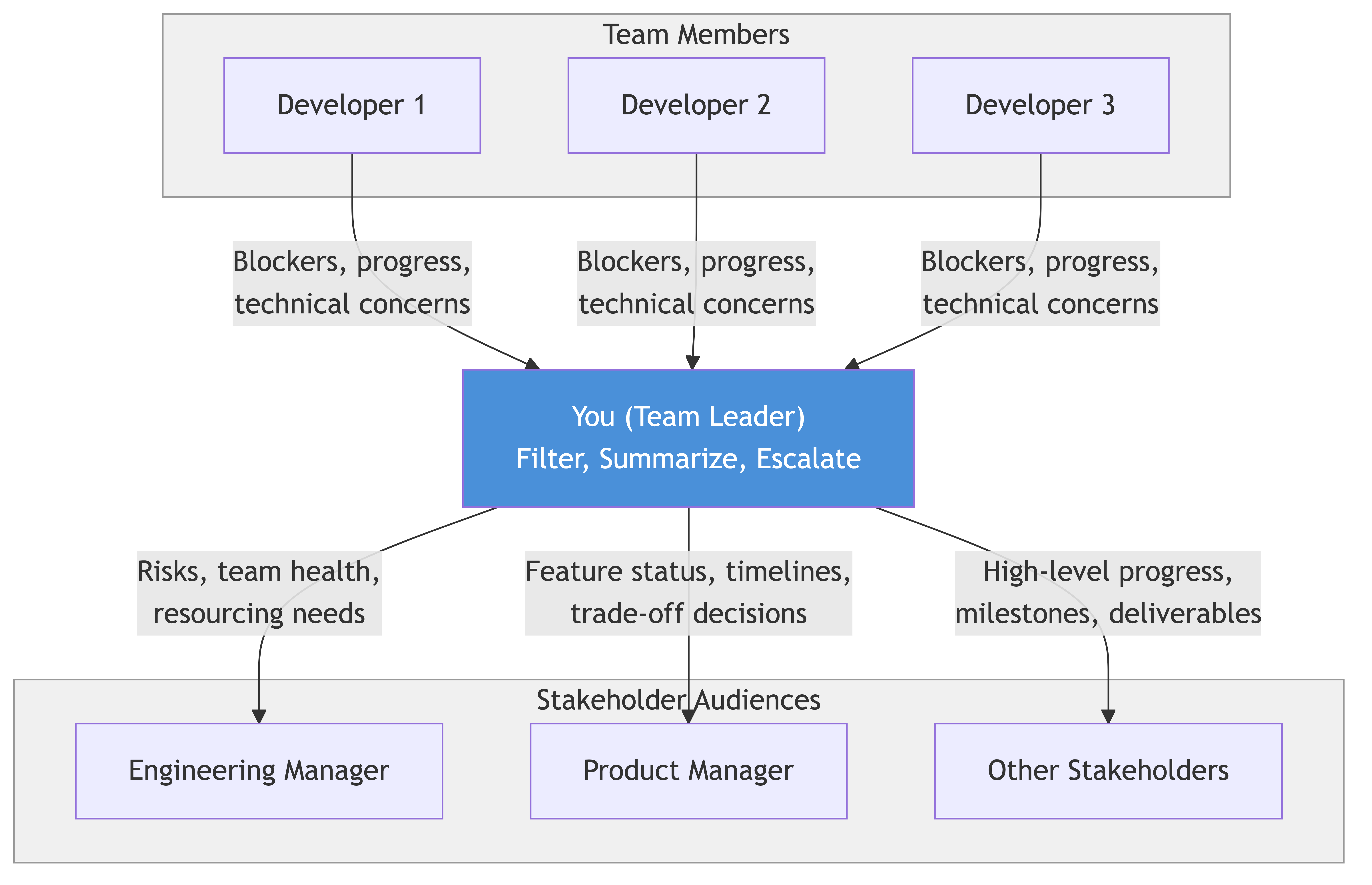
As a team leader, you are no longer judged primarily by the quality of your code. You are judged by the quality of your communication. That sounds dramatic, but think about it: every decision that happens above you, beside you, or below you depends on information flowing correctly. When communication works, teams move fast, problems get caught early, and people trust each other. When it breaks down, you get surprises, duplicated effort, missed deadlines, and a general feeling that nobody knows what is going on.
The uncomfortable truth is that most communication failures in engineering teams are not caused by bad intentions. They are caused by team leaders who did not realize that routing information is now a core part of their job. You used to consume information. Now you produce it, filter it, translate it, and distribute it. That is a fundamentally different skill.
This guide covers the practical side of how to communicate effectively as a team leader — what to say, to whom, in what format, and when.
1. You Are Now an Information Router
Here is the mental model shift that changes everything: you are a router, not an endpoint.
As an IC, information came to you and you used it to do your work. As a team leader, information comes to you and your job is to figure out who else needs it, in what form, and how urgently. Some of it goes up to your EM. Some goes down to your team. Some goes sideways to other teams. Some gets filtered out entirely because nobody else needs it.
This is not optional. If you do not actively route information, one of two things happens. Either people do not get what they need and make bad decisions, or they go around you to get it and you become irrelevant. Neither is good.
Here is what information routing looks like in practice:
Upward. Your EM needs to know about risks, blockers, timeline changes, and team health. They do not need to know about every technical decision or every standup update. Your job is to compress a week of team activity into a few sentences that tell them whether things are on track and whether they need to do anything.
Downward. Your team needs to know about business context, priority changes, upcoming decisions that affect them, and feedback from stakeholders. They do not need to know about budget discussions, reorg rumors, or political dynamics above them — unless those things directly affect their work. Shield them from noise, but give them enough context to make good decisions.
Sideways. Other teams need to know about your dependencies, your timelines, and anything that affects shared resources. They do not need your internal team dynamics or your detailed sprint plans. Keep it focused on the interface between your teams.
Filtering. Some information stops with you. Not everything needs to be passed along. If your EM mentions in passing that leadership is evaluating a new product direction that might affect your team in six months, you probably do not need to tell your team that today. It would just create anxiety about something that might not happen. Use judgment. When in doubt, ask yourself: "If I do not share this, will someone be unable to do their job or be surprised by something they should have seen coming?" If the answer is no, it can wait or stay with you.
The biggest mistake new team leaders make is treating themselves as a pass-through instead of a router. They forward every Slack message, CC everyone on every email, share every piece of context in every standup. That is not communication. That is noise. Your job is not to share everything — it is to share the right things with the right people at the right time.
2. Async vs. Sync Communication
Default to async. Always. Unless you have a specific reason not to.
This is not just a preference or a trend. It is a fundamental productivity principle. Every synchronous meeting you schedule costs every attendee the meeting time plus the context-switching cost on either side. A 30-minute meeting with five people is not 30 minutes of cost. It is closer to five hours of cost when you account for preparation, context switching, and recovery time. Async communication, by contrast, lets people engage when they have the mental bandwidth and the context to respond thoughtfully.
Here is a practical framework for when to use each:
Use Async (Slack, Docs, Email) When
- Sharing status updates or FYIs
- Asking questions that do not need an immediate answer
- Distributing information that people need to read at their own pace
- Documenting decisions for future reference
- Giving feedback that is not time-sensitive
- Coordinating work that has a clear owner and does not need real-time negotiation
Use Sync (Meetings, Calls) When
- There is genuine ambiguity that requires back-and-forth discussion
- Emotions are involved (conflict resolution, sensitive feedback, bad news)
- You need to build alignment among multiple people with different perspectives
- A decision is blocked and needs to happen now
- The topic is complex enough that async threads would become unmanageable
Why This Matters for Productivity
Engineers need long, uninterrupted blocks of time to do deep work. Every meeting fragments those blocks. Research consistently shows that engineers are most productive when they have at least two to three hours of uninterrupted focus time. Every meeting you schedule chips away at that.
As a team leader, you set the tone. If you default to scheduling a meeting for every question, your team will start doing the same. Pretty soon your calendar looks like Swiss cheese and everyone is complaining about not having time to code. But if you demonstrate that most things can be handled in a well-written Slack message or a short doc, you create a culture where meetings are rare and therefore valuable.
A practical rule: before scheduling any meeting, ask yourself "Could I write this in a Slack message or a doc and get the same outcome?" If the answer is yes, do not book the meeting.
One more thing. When you do use async, write well. A sloppy Slack message that generates fifteen clarifying questions is worse than a meeting. The tradeoff only works if your written communication is clear, complete, and structured. More on that in the next section.
3. Writing for Different Audiences
The same information needs to be framed differently depending on who is reading it. This is not about spin or politics. It is about respect for people's time and context.
Your team, your EM, and your stakeholders all need different things from you. Sending the same update to everyone is lazy, and it means nobody gets what they actually need.
For Your Team: Details
Your engineers need the "how" and the "what." They need to know exactly what changed, why, what the technical implications are, and what they need to do about it. They have the context to understand technical details, and they need those details to do their work.
Example: "The payments team changed their API response format for the /transactions endpoint. The amount field is now a string instead of an integer. We need to update our parser before Thursday's release. Sarah, can you pick this up? Estimated at about two hours of work plus testing."
For Your EM: Summaries
Your EM needs the "so what." They are managing multiple teams and cannot hold the technical details of all of them. They need to know: is it on track, what is the risk, and do they need to do anything?
Example: "Payments API change requires a small fix on our side. Sarah is handling it, should be done before Thursday. No risk to the release."
For Stakeholders: Outcomes
Stakeholders — product managers, executives, partner teams — care about business impact. They do not care about API field types. They want to know: will this affect the user, the timeline, or the cost?
Example: "No impact to the Thursday release or to users. We caught a dependency change early and the fix is already in progress."
Same event. Three different framings. Each one gives the reader exactly what they need without burdening them with what they do not.
Here is the practical skill: before you write any update, pause and ask "Who is reading this, and what do they need to know to do their job?" If you cannot answer that question, you are not ready to write the update yet.
A common trap for new leaders is writing updates that are really about demonstrating their own competence. Lots of technical detail, lots of "look how much I know." Nobody wants that. People want to know whether things are on track and whether they need to act. Give them that and save the technical deep-dives for the people who actually need them.
4. Status Updates That People Actually Read
Most status updates are bad. They are long, vague, full of jargon, and structured in a way that makes the reader do all the work to extract meaning. Nobody reads them. They get skimmed at best, ignored at worst.
Good status updates are the opposite. They are short, structured, and actionable. Someone should be able to read yours in under two minutes and know exactly what is happening.
Here is the format that works:
The Four-Part Status Update
What is done. Completed work since the last update. Keep it brief. Bullet points. This is not the place for detailed retrospectives.
What is next. What the team is focusing on in the coming period. Again, brief. The reader should be able to see the trajectory.
What is blocked. Anything that is preventing progress. Be specific about the blocker and who can unblock it. "Waiting on API access from the platform team — requested Tuesday, followed up Thursday, no response yet" is useful. "Blocked on dependencies" is not.
What I need from you. This is the most important part and the one most people leave out. Tell the reader exactly what action you need from them. "Can you ping the platform team's EM about our API access request?" is a clear ask. If you do not need anything, say so. "No action needed from you this week" is a perfectly valid line and it saves your reader from wondering whether they missed something.
What Makes This Work
The structure does the heavy lifting. Your reader's eyes can jump straight to the section that matters to them. An EM who trusts you will skip "what is done" and go straight to "what is blocked." A stakeholder will look at "what is next" and "what I need from you." Everyone gets what they need without having to parse a wall of text.
Keep it consistent. Send it at the same time, in the same format, every time. Consistency builds trust because people know where to find the information and they stop having to chase you for it.
One more principle: never bury bad news in the middle of a status update. If something is going wrong, lead with it. "We are going to miss the March 15 deadline by approximately one week. Here is why, here is the plan, here is what I need." Your reader should hit the most important information first, not discover it in paragraph four.
5. RACI Basics
RACI stands for Responsible, Accountable, Consulted, Informed. It is a simple framework for clarifying who does what on a piece of work. You do not need it for everything, but when ownership is unclear — especially on cross-team projects — it prevents the kind of confusion that kills velocity.
Here is what each letter means:
Responsible. The person (or people) who actually do the work. They are hands-on-keyboard, writing the code, creating the design, running the analysis.
Accountable. The single person who owns the outcome. Not the work — the outcome. If the project fails, this is the person who answers for it. There can only be one A. If you have two people accountable, nobody is accountable.
Consulted. People whose input is needed before a decision is made. They have expertise or a stake in the outcome, and their perspective matters. They are two-way communication — you ask, they respond.
Informed. People who need to know what happened after the fact. One-way communication. They do not need to weigh in, they just need to be kept in the loop.
When To Use RACI
You do not need a RACI chart for every task your team picks up. That would be bureaucratic nonsense. Use it when:
- Multiple teams are involved and it is not obvious who owns what
- A project failed or stalled because of unclear ownership and you need to reset
- There is a repeated pattern of "I thought you were handling that" conversations
- You are kicking off a cross-functional initiative and want to set expectations upfront
Keep It Simple
A RACI chart for a small project should fit on a single page. If it takes longer to fill out the chart than to do the work, you have gone too far. The point is clarity, not process. Write it once, agree on it in a five-minute conversation, and refer back to it when confusion arises.
The most common failure mode with RACI is making it and then never looking at it again. If you are going to use it, reference it actively. When someone asks "who is handling the data migration piece?" you should be able to point to the chart and say "That is Alex. Maria is consulted, and the platform team is informed."
The second most common failure mode is having multiple people in the Accountable column. Fight this temptation. Shared accountability is no accountability. If the project has multiple workstreams, each workstream gets its own A, and someone is A for the overall project.
6. Meeting Facilitation
Your meetings are a direct reflection of your leadership. If your meetings are disorganized, unfocused, and go long, people will assume the same about how you run your team. If your meetings are tight, purposeful, and end with clear outcomes, people will trust that you know what you are doing.
Here are the non-negotiable rules:
Always Have an Agenda
Every meeting needs an agenda shared before the meeting starts. It does not need to be formal — a few bullet points in the calendar invite is fine. But it needs to exist. An agenda does two things: it tells people whether they actually need to attend, and it keeps the conversation focused.
If you cannot write an agenda, cancel the meeting. Seriously. If you do not know what the meeting is about, neither will the attendees. "Let's sync up" is not an agenda. "Decide on the API versioning approach for the new endpoint (options A and B in this doc)" is an agenda.
Start on Time
Start at the scheduled time, even if people are missing. Do not punish the people who showed up on time by making them wait for the people who did not. When you consistently start on time, people learn to show up on time. When you consistently wait, people learn that they do not need to be punctual.
End with Action Items
Every meeting should end with a clear list of who is doing what by when. Say it out loud. Write it down. Send it in a follow-up message. If a meeting ends without action items, one of two things happened: either the meeting was purely informational and should have been an email, or decisions were made but nobody wrote them down, which means they will be forgotten by tomorrow.
Cancel If No Agenda
This bears repeating because it is the most powerful tool in your meeting facilitation toolkit. A recurring meeting with no agenda for this week should be cancelled. Give people back their time. This sends a strong signal: we do not meet for the sake of meeting. When we do meet, it matters.
During the Meeting
Watch for the loudest person dominating the conversation. Actively pull in quieter voices: "Jamie, you have been closest to this part of the system — what is your take?" Watch for tangents and redirect: "That is a good point, but let's take it offline and stay focused on the API decision." Watch for the meeting turning into a working session when it should be a decision meeting, or vice versa.
Keep track of time. If you scheduled 30 minutes and you are 20 minutes in with two more agenda items to cover, say so. "We have 10 minutes left and two more items. Let's timebox each one to five minutes, or we can defer one to async."
7. Escalation Paths
Knowing when and how to escalate is a core communication skill. Escalating too early makes you look like you cannot handle problems. Escalating too late means the problem has grown past the point where others can help. Getting the timing right takes practice, but there are guidelines.
When to Escalate
- You have tried to resolve the issue and cannot, and further delay will cause real damage
- The issue requires authority or influence you do not have (budget approval, cross-org decisions, executive alignment)
- The issue involves people dynamics you are not equipped to handle alone (HR issues, serious interpersonal conflict)
- A commitment to a stakeholder or customer is at risk and your manager needs to know before they hear it from someone else
To Whom
The default escalation path is your EM. For most problems, they are the right person. If it is a technical issue that affects another team, it might go to their team lead directly (and you CC your EM). If it is a product or business decision, it might go to the PM or a product leader. The key is knowing your organization well enough to route the escalation to the person who can actually do something about it.
How
Be direct and structured. Lead with the impact, explain what you have tried, and state what you need.
"Hey — I want to flag that we are likely to miss the March 15 deadline by five to seven days. The integration with the payments team's new API is taking longer than expected because their documentation is outdated and we have found three undocumented breaking changes. I have been working directly with their tech lead, but we are still uncovering issues. I think we need their EM to prioritize updating the docs, or we need to adjust our timeline. Can you help?"
That is a good escalation. It is specific, it shows you have already tried to solve it, and it gives the person you are escalating to a clear action they can take.
For a deeper dive on risk identification and escalation mechanics, see the Identifying & Escalating Risks guide — it covers the instincts and frameworks in more detail than we need here.
8. Difficult Messages
At some point, you will need to deliver bad news. A deadline slipped. A critical bug hit production. Someone on the team is leaving. These moments define your credibility as a leader more than any number of smooth status updates.
The principles are simple, but following them under pressure is hard.
Be Direct
Do not bury the lead. Do not soften it with five minutes of context before getting to the point. State the thing clearly, upfront.
Bad: "So, you know how we were working on the checkout flow, and there were some complexities with the payment provider integration, and the team has been really working hard on it, but there were some unexpected issues with the API compatibility..."
Good: "We are going to miss the checkout launch date by one week. Here is why and here is our plan."
People can handle bad news. What they cannot handle is feeling like you are hiding something or wasting their time with a preamble designed to soften the blow. Directness is a form of respect.
Own It
Even if the cause was outside your control, own the communication. Do not throw your team under the bus. Do not blame other teams in the first breath. Start with what happened and what you are doing about it. There is a time for root cause analysis, and it is not in the first message.
"We missed the deadline" is better than "The payments team's API was broken and that is why we missed the deadline." The second one might be true, but leading with blame signals that you are more interested in protecting yourself than in solving the problem.
Have a Plan
Never deliver bad news without a plan, even a rough one. "Here is what went wrong, and here is what we are doing about it" is infinitely better than just "Here is what went wrong." People do not need a perfect plan. They need to know that someone is thinking about what to do next and that the situation is not spiraling.
Match the Channel to the Message
Sensitive messages should not be delivered in a Slack channel where thirty people can see them. A production incident needs a public response in the right channel. Someone leaving the team is a conversation, not an email. A missed deadline might be a direct message to your EM before the broader announcement. Think about who should hear it first, who should hear it second, and what channel respects both the severity and the audience.
The Hardest Part
The hardest part of delivering bad news is not the words. It is the timing. Every instinct will tell you to wait — maybe it will get better, maybe you can fix it before anyone notices, maybe if you just have one more day. That instinct is wrong almost every time. The longer you wait, the worse it gets. Bad news does not improve with age.
9. Real-World Examples
Example 1: Clear Communication Preventing a Crisis
A team lead notices during sprint planning that a key dependency — the authentication service team's new SSO feature — is listed as "on track" in the other team's status update, but in a casual Slack conversation, their engineer mentions they are still working through security review feedback. The timelines do not add up.
Instead of assuming it is fine, the team lead sends a direct message to the other team's lead: "Hey, I saw SSO is listed as on track, but it sounds like security review might push things out. We are building on top of that for our April release. Can we sync on timelines for five minutes today?"
It turns out the SSO feature was going to slip by two weeks. Because the team lead caught it early, they were able to adjust their own sprint plan, inform their stakeholders, and propose a phased launch that did not depend on SSO being ready. The April release went out on time with a reduced scope, and SSO was integrated in the follow-up release.
If the team lead had trusted the status update and not asked the question, they would have discovered the slip two weeks later with no time to adjust. What could have been a missed deadline and a scramble was instead a smooth plan B.
Example 2: Poor Communication Causing a Crisis
A backend team completes a database migration over the weekend. The tech lead mentions it in standup on Monday morning but does not send any broader communication. The frontend team, which queries the same database, starts getting errors on Monday afternoon. They spend three hours debugging before someone finally asks in a general engineering channel whether anything changed over the weekend.
It turns out the migration changed the column names in a table the frontend team reads from. A five-second Slack message on Friday — "Heads up: we are migrating the users table this weekend, column names are changing, here is the mapping" — would have prevented three hours of wasted debugging and a frustrated frontend team.
The backend tech lead did not withhold the information maliciously. They just did not think about who else needed to know. That is a routing failure. The information existed but was never delivered to the people who needed it.
Example 3: A Status Report That Changed a Decision
A team lead has been sending consistent weekly status updates to their EM and the product team. In one of those updates, under the "What is blocked" section, they write: "We have spent 40% of the last two sprints on support tickets from the legacy billing system. At this rate, the new billing migration will not be done until Q3 instead of Q2."
The product VP reads this, realizes the legacy system is costing more in engineering time than anyone had quantified, and approves an additional contractor to handle support tickets so the core team can focus on the migration. The migration finishes on the original Q2 timeline.
That outcome only happened because the team lead put a specific, quantified problem in a status report that reached the right person. If they had just said "we are a bit behind on the migration," nobody would have acted. The specificity — 40% of two sprints, Q3 instead of Q2 — made the cost concrete and the decision obvious.
10. Common Mistakes
Over-Communicating (Noise)
Sharing everything with everyone creates noise, and noise trains people to ignore you. If your Slack messages, emails, and status updates all feel equally urgent and equally detailed, people stop paying attention. They start skimming, then they start ignoring. When you actually have something important to say, it gets lost in the river of updates nobody asked for.
The fix: be deliberate about what you share and with whom. Ask "does this person need this information to do their job?" If the answer is no, do not send it.
Under-Communicating (Surprises)
The opposite problem, and in many ways worse. When you do not share enough, people get surprised. Surprises destroy trust. Your EM hears about a missed deadline from a stakeholder. Your team finds out about a priority change from a Slack thread they were not tagged in. Another team discovers a breaking change when their build fails.
The fix: have a communication cadence and stick to it. Weekly status updates, regular one-on-ones, proactive Slack messages when things change. When in doubt, share more rather than less — but share it to the right people, not to everyone.
Wrong Channel
Delivering a sensitive message in a public channel. Burying an urgent escalation in a weekly email. Sending a long strategic discussion over Slack where it gets lost in the scroll. Every channel has a purpose, and using the wrong one undermines your message.
The fix: before you hit send, pause and ask "Is this the right channel for this message and this audience?" Urgent and high-impact goes to direct, synchronous communication. Reference material goes to docs. Quick updates go to Slack. Sensitive matters go to private conversations first.
Burying Bad News
This is the most tempting mistake and the most damaging. You put bad news in the fourth paragraph of a long update. You sandwich it between two pieces of good news. You use language that minimizes it: "a slight delay" when you mean "we are going to miss the deadline by two weeks." You hope nobody will notice or that you will fix it before anyone reads closely.
People always notice. And when they realize you buried it, they lose trust in all your future communication. They start reading your updates skeptically, looking for what you might be hiding. That is a terrible dynamic to create.
The fix: lead with bad news. State it clearly. Follow it with your plan. Your credibility is built not on having perfect outcomes, but on being honest about imperfect ones.
Business Value
Everything in this guide connects directly to business outcomes. That connection is worth making explicit, because when you are in the middle of crafting a status update or deciding whether to send a Slack message, it can feel like administrative overhead. It is not.
Speed of decision-making. When information flows to the right people at the right time, decisions happen faster. A well-structured status update that reaches a VP can unlock budget, headcount, or priority changes in days instead of weeks. Poor communication means decisions stall because the decision-maker never had the information they needed.
Reduced waste. The database migration example above cost three hours of a frontend team's time. Multiply that kind of communication failure across an organization and across a year. The accumulated cost of wasted debugging, duplicated work, and building on wrong assumptions is staggering. Clear communication prevents rework, and preventing rework is one of the highest-leverage things a team leader can do.
Trust and autonomy. When your EM trusts your communication, they give you more freedom. When stakeholders trust your status updates, they stop scheduling "just checking in" meetings. When other teams trust that you will flag dependencies early, they stop building defensive buffers into their timelines. Trust is a business asset. It reduces coordination overhead and lets everyone move faster.
Retention. Engineers leave managers, not companies. And one of the top complaints engineers have about bad managers is poor communication — not knowing what is happening, feeling blindsided by changes, not understanding the context behind decisions. When you communicate well with your team, they feel informed, included, and respected. That directly impacts whether they stay.
Risk reduction. Every crisis that was prevented by early communication, every escalation that was handled before it became an emergency, every misunderstanding that was resolved before it became a conflict — these are business outcomes. They do not show up on dashboards, but their absence is felt in smooth launches, met deadlines, and teams that trust each other enough to move fast.
The return on investing in your communication skills is not abstract. It is measured in engineering hours not wasted, deadlines not missed, and decisions not delayed. For a team leader, there is no higher-leverage skill to develop.
Common Pitfalls
- Over-communicating by sharing everything with everyone. Flooding people with information creates noise, and noise trains them to ignore you. When you actually have something important to say, it gets lost. Be deliberate about what you share and with whom.
- Under-communicating and creating surprises. When you do not share enough, people get blindsided. Your EM learns about a missed deadline from a stakeholder, or another team discovers a breaking change when their build fails. Surprises destroy trust faster than almost anything.
- Using the wrong channel for the message. Delivering sensitive news in a public Slack channel, burying an urgent escalation in a weekly email, or sending a complex strategic discussion over chat where it gets lost in the scroll all undermine the message.
- Burying bad news in the middle of an update. Sandwiching bad news between positive items or using minimizing language ("a slight delay" when you mean two weeks late) erodes credibility. People always notice, and they start reading all your updates skeptically.
- Treating yourself as a pass-through instead of a router. Forwarding every Slack message, CC'ing everyone on every email, and sharing every piece of context in every standup is not communication. It is noise. Your job is to share the right things with the right people at the right time.
- Writing status updates that demonstrate competence rather than inform. Loading updates with technical detail to show how much you know wastes everyone's time. People want to know whether things are on track and whether they need to act. Give them that and save the deep-dives for those who need them.
Key Takeaways
- As a team leader, you are an information router, not an endpoint. Your job is to figure out who needs what information, in what form, and how urgently, then deliver it accordingly.
- Default to async communication. Every synchronous meeting costs more than the calendar time suggests when you account for preparation, context switching, and recovery.
- Write for your audience. Your team needs technical details, your EM needs summaries and risks, and stakeholders need business impact. The same event requires different framing for each.
- Status updates should follow a consistent four-part structure: what is done, what is next, what is blocked, and what you need from the reader. Someone should be able to scan it in under two minutes.
- Use RACI to clarify ownership on cross-team projects. The most important rule is that only one person can be Accountable for each workstream.
- Every meeting needs an agenda, should start on time, and must end with clear action items. If you cannot write an agenda, cancel the meeting.
- Delivering bad news directly and early, with a plan, builds far more credibility than delivering it late or trying to hide it.