
Prioritization & Task Breakdown
Here is a truth that nobody tells you when you become a team leader: the hardest part of the job is not building things. It is deciding what to build. And more importantly, what not to build.
As an individual contributor, someone handed you a ticket and you built it. The scope was clear, the decision was made, and your job was execution. Now you're the one making those decisions — or at least heavily influencing them. And the difference between a team that delivers real impact and a team that stays busy but accomplishes nothing almost always comes down to prioritization.
This guide is about getting that right.
1. Prioritization Is Your Superpower
Let's start with a fundamental reality. Your team will always have more work than it can do. Always. There is no point in the future where you will finish everything and have nothing left. The backlog is infinite. The capacity is finite.
This means that every single sprint, every single week, you are making a tradeoff. When you say yes to one thing, you are saying no to everything else. Most new team leaders don't internalize this. They try to do everything. They pack sprints to 110% capacity. They say "we'll get to that next sprint" to everything. And then they wonder why the team is burned out, nothing ships on time, and stakeholders are frustrated.
Deciding what NOT to do is more important than deciding what to do.
Read that again. It sounds obvious but it takes most leaders years to truly believe it. The best teams are not the ones that do the most work. They are the ones that do the right work. A team that ships three high-impact features in a quarter is infinitely more valuable than a team that ships fifteen things that nobody cares about.
Your job as a team leader is to be the filter. To protect your team's time and attention. To make sure that every hour of engineering effort is pointed at something that actually matters. This is not easy. It requires you to understand the business, push back on stakeholders, make tough calls, and sometimes disappoint people.
But this is the job. And when you get good at it, it feels like a superpower. You will watch other teams thrash while yours delivers consistently. That is not because your engineers are better. It is because you are feeding them better work.
2. Prioritizing by Business Impact
Not all tickets are created equal. This seems obvious, but you would be amazed how many teams treat their backlog like a flat list where everything is equally important.
It is not. A bug affecting 10% of paying customers is not the same as a nice-to-have feature request. A performance improvement that reduces churn is not the same as a UI tweak that a designer thought would look cool. A security vulnerability is not the same as a tech debt cleanup.
To prioritize well, you need to understand business impact. And that means you need to ask a few questions about every piece of work:
Who does this affect? Is it all users, a segment, paying customers, internal teams, one specific stakeholder? The broader the impact, the higher it should rank — generally.
What happens if we don't do this? This is the most underrated question in prioritization. If the answer is "nothing much," that tells you something. If the answer is "we lose revenue, customers churn, or we get a security breach," that tells you something very different.
How does this connect to what the business is trying to achieve right now? If your company's top priority this quarter is reducing churn, then anything that reduces churn should be near the top. If it is acquiring new customers, then onboarding improvements beat internal tooling. Context matters.
Is this urgent or just important? A production outage is urgent and important. Paying down tech debt is important but rarely urgent. A stakeholder's pet feature request is usually neither. Be honest about this distinction.
Here is a practical exercise. Take your current backlog and try to assign each item to one of these categories:
- Revenue-generating: Directly leads to new revenue or protects existing revenue.
- Cost-reducing: Makes the team or company more efficient.
- Risk-reducing: Fixes security issues, reduces operational risk, addresses compliance.
- Foundation-building: Tech debt, infrastructure, tooling that enables future velocity.
- Nice-to-have: Everything else.
You will probably find that a large percentage of your backlog is in the last category. That is normal. The important thing is being honest about it.
3. Frameworks That Actually Work
There are dozens of prioritization frameworks out there. Most of them are overthought and underused. Here are three that actually work in practice, and more importantly, when to use each one.
RICE (Reach, Impact, Confidence, Effort)
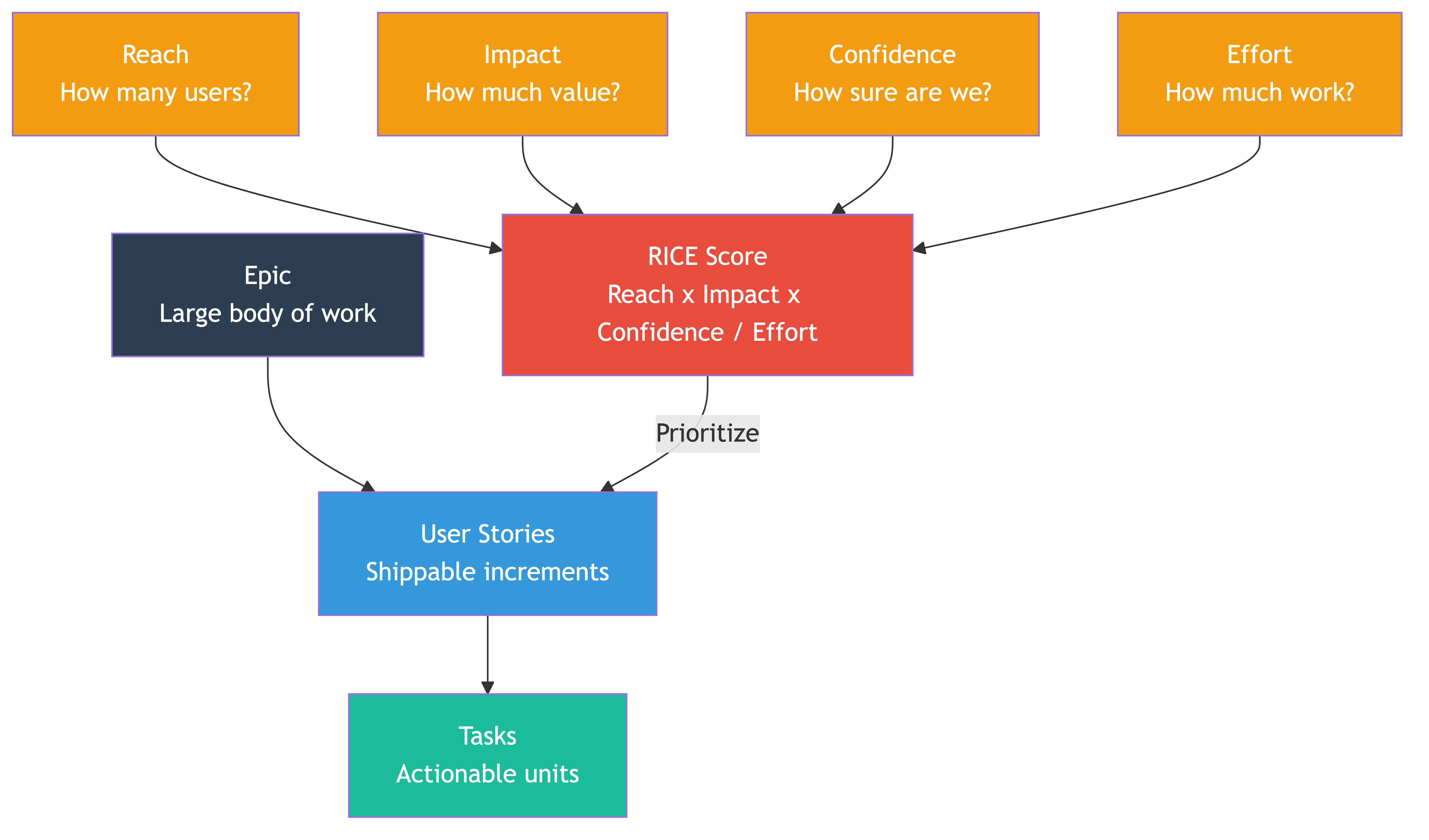
RICE gives you a numerical score for each piece of work:
- Reach: How many users or customers does this affect in a given time period?
- Impact: How much does it affect them? (Typically scored: 3 = massive, 2 = high, 1 = medium, 0.5 = low, 0.25 = minimal)
- Confidence: How sure are you about the above estimates? (100% = high, 80% = medium, 50% = low)
- Effort: How many person-weeks (or person-sprints) will this take?
The formula: (Reach x Impact x Confidence) / Effort = RICE Score
When to use it: RICE is great when you have a lot of items to compare and you need an objective-ish way to stack-rank them. It is especially useful when you are debating priorities with product managers or stakeholders because it forces everyone to make their assumptions explicit.
When not to use it: Don't use RICE for everything. It is overkill for small decisions. And be careful — the numbers can create a false sense of precision. A RICE score of 47 vs. 45 is meaningless noise. Use it to separate the top tier from the middle from the bottom, not to fine-tune the order within a tier.
MoSCoW (Must / Should / Could / Won't)
This is simpler and works well for planning a release or a sprint:
- Must have: The release is worthless without these. Non-negotiable.
- Should have: Important, and we will be disappointed if they don't make it, but the release still works without them.
- Could have: Nice to have. If there is time, great. If not, no real harm.
- Won't have (this time): Explicitly out of scope. Not "later," not "maybe." Out.
When to use it: MoSCoW is excellent for scoping a release, a sprint, or a project. It forces you to be explicit about what is in and what is out. The "Won't" category is the most important part — it gives you and your stakeholders a shared understanding of what you are deliberately not doing.
When not to use it: It doesn't help you compare individual items within a category. If you have ten "Must haves," you still need to figure out which one to do first.
Eisenhower Matrix
Two axes: Urgent vs. Not Urgent, Important vs. Not Important.
| Urgent | Not Urgent | |
|---|---|---|
| Important | Do it now | Schedule it |
| Not Important | Delegate or timebox it | Drop it |
When to use it: The Eisenhower matrix is most useful when you feel overwhelmed and everything feels like it is on fire. It forces you to separate genuine urgency from artificial urgency. Most "urgent" things are not actually important. Most important things are not actually urgent. Getting this distinction right is half the battle.
When not to use it: It is a thinking tool, not a backlog management tool. Don't try to tag every Jira ticket with an Eisenhower quadrant. Use it in your head when you are deciding how to spend your day or your week.
The Real Secret
Here is the thing about frameworks: the specific one you use matters less than the discipline of using one at all. The goal is to force yourself to think explicitly about tradeoffs instead of going with your gut or defaulting to whoever asked most recently.
Pick one, use it consistently, and you will be ahead of 90% of teams.
4. Breaking Down Tickets
Prioritization tells you what to work on. Task breakdown tells you how to work on it. And the quality of your task breakdown directly determines your team's velocity, predictability, and morale.
Here is the hierarchy most teams work with:
Epic — A large body of work that delivers a significant capability. Usually takes multiple sprints. Example: "Implement user notification system."
Story — A user-facing slice of functionality within an epic. Should be deliverable in a single sprint. Example: "As a user, I can receive email notifications when someone comments on my post."
Task — A specific piece of technical work within a story. Should be completable in a day or less. Example: "Create notification preferences database table" or "Build email template for comment notifications."
The art is in making work small enough to ship daily but meaningful enough to deliver value.
Why Small Tickets Matter
Small tickets are not just a process preference. They are a delivery strategy.
Small tickets get reviewed faster. A 50-line pull request gets reviewed in 15 minutes. A 500-line pull request sits in the queue for two days because nobody wants to deal with it.
Small tickets surface problems early. If someone is going in the wrong direction, you find out after a day, not after a week.
Small tickets reduce risk. A merge conflict on a small change is trivial. A merge conflict on a week-long branch is a nightmare.
Small tickets are easier to estimate. The smaller the work, the less uncertainty. We are terrible at estimating big things. We are decent at estimating small things.
Small tickets keep momentum. Closing tickets feels good. Watching work move across the board feels good. A team that ships something every day has better morale than a team where everything is "in progress" for two weeks.
How to Break Down Work
Start from the user's perspective. What is the smallest thing you can deliver that a user (or the system) can actually use or validate?
A common mistake is breaking work down by technical layer: "build the database schema," "build the API," "build the frontend." This means nothing is usable until everything is done. Instead, try to break down by vertical slice: "user can create a notification preference (end to end)" is better because it is testable, deployable, and provides feedback.
Here is a practical technique. Take a story and ask these questions:
- What is the happy path? That is your first ticket.
- What are the edge cases? Each significant one is a ticket.
- What error handling is needed? That is a ticket.
- What about performance? If it matters, that is a ticket.
- What about monitoring or logging? That might be a ticket.
If a single ticket still feels too big, ask: "Can this be split into a version that works but is incomplete, and a follow-up that finishes it?" If yes, split it.
The rule of thumb: if a ticket takes more than two days, it should probably be smaller.
5. Estimation Techniques
Estimation is one of those topics that starts arguments. Let's walk through the options and when each one makes sense.
Story Points vs. Time Estimates
Story points measure relative complexity. A 5-point story is roughly twice as complex as a 3-point story, but nobody is promising it will take exactly twice as long. Points account for complexity, uncertainty, and effort without committing to hours.
Time estimates measure calendar time. "This will take two days." They are intuitive, easy to understand, and almost always wrong.
The eternal debate: story points advocates say they account for variation between engineers and reduce pressure. Time estimate advocates say story points are just time estimates in disguise and everyone secretly converts them to hours anyway.
Here is the honest answer: both work, and neither is magic. The important thing is consistency within your team and a shared understanding of what the numbers mean. If your team uses story points, great. If your team estimates in half-day increments, also great. If your team uses neither and just counts tickets, that can work too.
What matters is that you have some way to roughly gauge how much work fits in a sprint so you can plan without massively over-committing or under-committing.
T-shirt Sizing
Small, Medium, Large, Extra Large. That is it.
T-shirt sizing is useful when you have a lot of items and you need a quick, rough sort. It works well for backlog grooming sessions where you are sizing dozens of items and don't want to spend 10 minutes debating whether something is a 5 or an 8.
Map it to something concrete for planning purposes. For example: S = 1 day, M = 2-3 days, L = 1 week, XL = needs to be broken down further.
Planning Poker
Everyone on the team simultaneously reveals their estimate. If there is wide disagreement (e.g., one person says 2 and another says 8), you discuss. The discussion is the valuable part — it surfaces different assumptions, hidden complexity, and knowledge gaps.
Planning poker is not about getting the "right" number. It is about forcing a conversation that surfaces risks and misunderstandings before work begins. If your team skips the discussion and just averages the numbers, you are missing the entire point.
Why Relative Estimation Beats Absolute
Humans are terrible at absolute estimation. Ask someone how long a project will take and they will be wrong by 50-200%. But ask them whether Task A is bigger or smaller than Task B, and they will be right most of the time.
This is why relative estimation (story points, t-shirt sizes) tends to outperform absolute estimation (hours, days). You are not asking "how long?" You are asking "compared to this other thing we already did, how big is this?"
Use your team's history. If last sprint you completed 30 story points, plan for roughly 30 this sprint. Over time, your velocity stabilizes and planning becomes more predictable. The individual estimates are noisy. The aggregate is surprisingly stable.
When "Just Count the Tasks" Is Good Enough
Here is a secret that estimation purists hate: if your team breaks work into consistently small tickets (1-2 days each), you can skip estimation entirely and just count tickets.
Your sprint capacity becomes "we usually complete about 12 tickets per sprint." No story points. No planning poker. No debates about whether something is a 3 or a 5. Just well-broken-down work and a count.
This works surprisingly well for mature teams that are disciplined about ticket size. It does not work if ticket sizes vary wildly. But if you have good task breakdown practices — and after reading section 4, you should — it is a perfectly valid approach.
6. Handling Uncertainty
Some work is straightforward. You have done it before, you know the system, and the estimate writes itself. But a lot of work — especially the most important work — involves significant unknowns. A new integration, an unfamiliar technology, a performance problem with no obvious cause.
You cannot estimate what you do not understand. And pretending you can is how teams end up with two-week stories that turn into six-week sagas.
Spikes
A spike is a time-boxed investigation ticket. Its deliverable is not code — it is knowledge. Specifically, enough knowledge to estimate and plan the actual work.
For example: "Spike: investigate feasibility of integrating with Payment Provider X. Deliverable: a short write-up of the approach, estimated effort, and any risks. Time box: 2 days."
Spikes should always be time-boxed. Without a time box, investigations expand forever. Two days is usually enough. If two days is not enough to understand the problem well enough to plan, that itself is important information — it means the work is riskier than you thought.
Timeboxing Exploration
Even outside of formal spikes, timeboxing is your best tool for handling uncertainty. Instead of estimating how long something will take (when you genuinely don't know), commit to spending a fixed amount of time and then reassessing.
"Let's spend two days on this and see where we are. If we've made good progress, we'll estimate the rest. If we're stuck, we'll change our approach."
This is not giving up on planning. It is being honest about the limits of your knowledge and creating a checkpoint where you can make a better decision.
"We Don't Know What We Don't Know"
The most dangerous kind of uncertainty is the kind you don't even recognize. You think the work is straightforward, you estimate confidently, and then halfway through you discover a hidden dependency or a fundamental architectural problem.
You cannot eliminate this entirely, but you can reduce it:
- Ask your most experienced engineer to poke holes in the plan before work begins. They will often spot risks that everyone else missed.
- Start with the riskiest part first. If one piece of the work might blow up, do that piece first rather than saving it for the end.
- Build in buffers. Not padding (that is dishonest), but explicit contingency. "We think this is 8 points, but if the API behaves unexpectedly, it could be 13. Let's plan for 10 and keep a backup plan."
- Check in early and often. Don't wait until the end of the sprint to discover something went sideways. Daily standups exist for this. Use them.
7. Dependencies
Dependencies are the silent killers of delivery. Two teams working independently can each move fast. The moment they depend on each other, both slow down. Dependencies introduce waiting, coordination overhead, miscommunication, and risk.
Identifying Dependencies Early
Every time you plan a piece of work, ask: "What does this need that we don't control?"
Common dependencies:
- Another team's API or service that doesn't exist yet.
- A design that hasn't been finalized.
- A decision that hasn't been made by leadership.
- Data that another team needs to provide.
- Infrastructure or environment setup that is owned by another group.
- An external vendor or third-party service.
Map these out before work begins. Not in a 40-page project plan — just a simple list. "For this story, we need X from Team Y by date Z." Write it down. Make it visible.
Communicating Dependencies Clearly
The worst thing you can do with a dependency is assume the other party knows about it. They don't. Or they do, but they have different priorities. Or they think it is due next month when you need it next week.
Be explicit. Reach out to the other team directly. Say: "We are planning to start work on Feature X in Sprint 4. We will need your API endpoint by Sprint 3 so we can integrate. Is that realistic? If not, let's figure out a plan."
Do this early. Do this in writing. Follow up. The earlier a dependency conflict surfaces, the more options you have to deal with it.
Reducing Dependencies
The best dependency is no dependency. Whenever possible, design your work to minimize cross-team dependencies.
- Build against a contract, not an implementation. If you need another team's API, agree on the interface and mock it. Build and test against the mock. Integrate later.
- Bring the work in-house when feasible. If you depend on another team for a small piece of work and they are swamped, ask if your team can do it instead. This is often faster than waiting.
- Batch your integrations. Instead of depending on another team continuously, structure your work so the dependency is concentrated in a single point. Build everything independently, then integrate once.
- Accept imperfection. Sometimes you can ship a slightly less ideal solution that has no dependencies instead of a perfect solution that requires three other teams. The less ideal solution that ships today beats the perfect solution that ships never.
Dependencies are a fact of life in any organization. You won't eliminate them. But the teams that identify them early, communicate them clearly, and reduce them where possible are the teams that actually ship on time.
8. The Art of Saying No
Or more precisely, the art of saying "not now."
As a team leader, you will face constant pressure to take on more work. From product managers, from other teams, from executives, from customers (via support), from your own engineers who have a cool idea. Everyone has a reason why their thing is the most important.
And a lot of these people are your colleagues, your partners, people you need good relationships with. So saying no feels risky. It feels like you're being unhelpful or obstructionist.
But remember section 1. Your team has finite capacity. Every yes is a no to something else. If you say yes to everything, you are saying no to doing anything well.
How to Say No Without Burning Bridges
Acknowledge the request genuinely. "I can see why this matters. The data you're showing me about customer complaints is real." People need to feel heard before they can accept a no.
Explain what you are saying yes to. Don't just say "we can't." Say "here's what we're working on and why." When people see that you're not sitting idle but working on something equally or more important, the no feels different.
Offer alternatives. "We can't do this in Sprint 5, but we could pick it up in Sprint 7. Would that work?" Or: "We can't build the full solution, but here's a quick workaround that might help in the meantime." Or: "This might be a better fit for Team X — want me to connect you?"
Use your prioritization framework. This is one of the biggest benefits of having a framework. Instead of "I don't want to do this," it becomes "here's how we score work, here's where this lands, and here's the cutoff for this sprint." It depersonalizes the decision.
Be honest about tradeoffs. "I can absolutely move this to the top. But that means Feature Y slips by two weeks. Do you want me to have that conversation with the VP of Product?" When people realize their request has consequences, they often reconsider its urgency.
Say it early. A quick "this won't make it this sprint" in the first week is a thousand times better than "we didn't get to it" at the end of the sprint. Early communication preserves trust even when the answer is disappointing.
The goal is not to be a blocker. The goal is to be a responsible steward of your team's capacity. The best team leaders are known for delivering what they commit to, and that reputation is built by being honest about what they cannot commit to.
9. Business Value
Everything in this guide ultimately comes back to one thing: delivering business value. And as a team leader, understanding business value is what separates you from being a task manager who just moves tickets around.
What Is Business Value?
Business value is the measurable benefit that a piece of work delivers to the organization. It can take many forms:
- Revenue: This feature directly generates money. New customers sign up, existing customers upgrade, or a new revenue stream opens.
- Retention: This work prevents customers from leaving. Fixing a painful bug, improving performance, or adding a capability that competitors have.
- Efficiency: This reduces cost. Automating a manual process, reducing infrastructure spend, or eliminating operational toil.
- Risk reduction: This prevents future pain. Security patches, compliance requirements, disaster recovery improvements.
- Strategic positioning: This enables future value. Platform work, architectural improvements, or capabilities that unlock future products.
Why You Need to Think in Business Value Terms
When you frame work in terms of business value, several things change:
You make better prioritization decisions. Instead of debating technical elegance, you debate impact. A messy but high-impact feature beats a beautifully architected feature that nobody needs.
You communicate better with non-technical stakeholders. Product managers, executives, and sales teams don't care about your microservices architecture. They care about revenue, customers, and growth. When you can say "this work will reduce page load time by 40%, which our data shows correlates with a 15% reduction in cart abandonment," you are speaking their language.
You build credibility. When leadership sees that your team consistently delivers high-value work and can articulate why, they trust you more. That trust gives you more autonomy, more resources, and more influence over the roadmap.
Your team feels more motivated. Engineers want to know their work matters. "We shipped this feature and 30,000 users adopted it in the first week" is infinitely more motivating than "we closed 47 Jira tickets this sprint."
Connecting Daily Work to Business Value
Make this part of your planning rituals. When you pick up a story, everyone on the team should be able to answer: "Why are we building this? What business outcome does it support?"
If nobody can answer that question, it is a strong signal that the work might not be worth doing — or that you need to have a conversation with your product manager to understand the "why" before committing engineering time.
Not every ticket will have an obvious, direct connection to revenue. Infrastructure work, tech debt, and tooling improvements have indirect value through velocity, reliability, and developer experience. That is fine. But you should still be able to articulate the connection: "We're investing two sprints in this refactor because it will cut feature development time in this area by 50% for the next year."
If you cannot make that case, question whether the work belongs in this sprint.
10. Real-World Examples
Let me give you three scenarios that illustrate how prioritization plays out in practice.
Scenario 1: The Team That Prioritizes Well
Team Alpha is building an e-commerce platform. They have a product manager who brings a well-organized roadmap, but the team leader, Sarah, doesn't just accept it at face value. She works with the PM to score the top items using RICE.
This sprint, they have four candidate features: a redesigned checkout flow, a wishlist feature, a bulk discount system for enterprise customers, and a performance optimization for product search.
Sarah looks at the data. The checkout flow has a 23% abandonment rate — fixing it could recover significant revenue. Product search is slow, and analytics show users who experience slow search are 40% less likely to purchase. The wishlist feature has been requested by users, but surveys show it influences less than 5% of purchase decisions. The bulk discount system would serve three enterprise prospects in the pipeline.
Sarah and the PM agree: checkout flow first (highest reach, highest impact on revenue), search performance second (high reach, moderate impact), bulk discounts third (low reach but high-value customers with big contracts in negotiation). Wishlist goes to the "not now" column.
The team ships the checkout improvements in Sprint 1. Abandonment drops to 15%. That is real, measurable business value. The PM is thrilled. The VP of Product trusts the team's judgment. When Sarah says "the wishlist isn't the priority right now," people believe her because she has a track record of being right.
Scenario 2: The Team That Builds Whatever Is Loudest
Team Beta is building the same type of platform. They don't have a clear prioritization system. Here is what their sprint looks like:
The VP of Sales comes in hot: "Customer X says they'll churn without this feature!" The team drops everything and starts building. Halfway through the sprint, the CEO mentions in an all-hands that the mobile app needs improvement. The team leader, Mike, panics and pulls two engineers off to work on mobile. Then a P1 bug comes in and everyone scrambles.
At the end of the sprint, they shipped nothing completely. The sales feature is 70% done. The mobile improvements are a scattered collection of half-finished changes. The bug was fixed, but in a rush, so it introduced a regression.
The VP of Sales is upset because the feature isn't done. The CEO is asking about mobile progress. Engineering is demoralized. And the actual highest-impact work — the same checkout flow that Team Alpha shipped — is sitting untouched in the backlog because nobody shouted about it loudly enough.
This is what happens without prioritization discipline. The team is not lazy. They are working extremely hard. They are just working on the wrong things in the wrong order.
Scenario 3: The Team That Learns to Say "Not Now"
Team Gamma starts off like Team Beta — reactive, chaotic, always putting out fires. Their team leader, James, decides to change the approach after a particularly brutal sprint where the team delivered nothing of value despite working overtime.
James introduces a simple rule: no new work enters the sprint unless it passes two tests. First, does it score higher on their priority matrix than something already in the sprint? Second, if it does, what are we explicitly removing to make room?
The first time the VP of Sales comes in with an "urgent" request, James listens, acknowledges it, and says: "I hear you. Let me score this against what we have in flight. I'll come back to you by end of day with options." He runs the numbers. The sales request scores lower than the current sprint work. He goes back to the VP: "If we pull engineers off the billing migration to do this, we delay billing by three weeks, which affects all customers. But I can slot your request into Sprint 4 and have a workaround for your customer by Friday. Which works better?"
The VP grumbles but accepts it. Two sprints later, the billing migration is done (on time), the sales request was delivered (in Sprint 4, as promised), and James's team has a reputation for delivering what they commit to.
Over time, stakeholders stop trying to force things into the sprint because they trust that the prioritization process is fair and that their requests will be handled thoughtfully. James's team becomes the most predictable team in the organization. And predictable, in engineering, is a very good thing.
11. Common Mistakes
These are the traps that catch most new team leaders. Learn to recognize them.
Prioritizing by Who Shouts Loudest
The squeaky wheel gets the grease. The VP who walks over to your desk gets their feature. The quiet customer who churns silently gets nothing.
This is the most common prioritization failure and it is corrosive. It rewards political maneuvering over actual business impact. It teaches stakeholders that the way to get things done is to escalate and pressure, which means they will do more of it.
Fix it with a framework. Any framework. The moment you can say "here's how we prioritize and here's where your request falls," you have a defense against the loudest voice in the room.
Perfect Estimates on the Wrong Things
Some teams spend hours estimating tickets in exquisite detail — and then work on the wrong tickets. It does not matter if your estimate is perfect if you are building something nobody needs.
Spend more time on prioritization and less on estimation. A rough estimate on the right work beats a precise estimate on the wrong work every single time.
Tickets Too Big
If a ticket takes more than a few days, it is too big. Big tickets hide complexity, create merge nightmares, delay feedback, and make it impossible to track progress. "In progress" for two weeks is not a status — it is an absence of information.
When in doubt, break it down further.
Tickets Too Small
Yes, this is also a thing. If you are creating tickets for every function, every line of code, every micro-decision, you are creating overhead that slows the team down more than it helps. There is a sweet spot — usually around a half-day to two days of work — where tickets are small enough to manage but big enough to be meaningful.
If an engineer is spending more time updating Jira than writing code, your tickets are too small.
Not Re-Prioritizing
Priorities change. A competitor launches a feature. A major customer threatens to churn. A new regulation drops. A key engineer goes on leave and your capacity drops by 20%.
Teams that set priorities at the beginning of the quarter and never look at them again are flying blind. Re-prioritize at least every sprint. Do a quick sanity check: "Is what we're working on still the most important thing?" Sometimes the answer is yes and the check takes two minutes. Sometimes the answer is no and you save your team from wasting weeks on something that no longer matters.
Confusing Busy with Productive
A full sprint board is not a sign of a healthy team. It might be a sign of a team that is overcommitted and thrashing. Look at throughput (what actually got done and shipped) rather than utilization (how "busy" everyone was).
A team that completes 8 out of 10 planned items is in far better shape than a team that starts 15 items and completes 5.
Ignoring Tech Debt Until It Is Too Late
It is tempting to always prioritize features over tech debt because features have visible, immediate business value. But tech debt compounds like financial debt. Ignore it long enough and your team velocity will grind to a halt as every feature takes three times longer to build because the codebase is a mess.
Budget for it explicitly. A common approach is to reserve 15-20% of sprint capacity for tech debt and maintenance. It is not glamorous, but it keeps your team's future velocity healthy.
Wrapping Up
Prioritization and task breakdown are not glamorous skills. Nobody gets promoted because they are great at breaking down Jira tickets. But these skills are the foundation of everything else a team leader does. Get them right and your team ships the right things, at a sustainable pace, with high morale. Get them wrong and it doesn't matter how talented your engineers are — they will be spinning their wheels on the wrong work.
The good news is that these are learnable skills. Start with a simple prioritization framework. Break work down into small, shippable pieces. Be honest about uncertainty. Communicate dependencies early. Say "not now" when you need to. Re-prioritize regularly.
And always, always keep asking: "Is this the most important thing we could be working on right now?"
If the answer is yes, charge forward. If the answer is no, have the courage to change course. That is the job.
Common Pitfalls
- Prioritizing by who shouts loudest. Letting the most vocal stakeholder drive your backlog rewards political maneuvering over actual business impact and teaches everyone that escalation is the way to get things done.
- Spending hours on perfect estimates for the wrong work. Precise estimation on low-value tickets is wasted effort. Spend more time on prioritization and less on estimation, because a rough estimate on the right work beats a precise estimate on the wrong work every time.
- Creating tickets that are too large. If a ticket takes more than a few days, it hides complexity, delays feedback, creates merge conflicts, and makes progress invisible. Break it down further until each piece is shippable in one to two days.
- Never re-prioritizing after the quarter begins. Priorities change as competitors launch features, customers churn, regulations drop, or key engineers go on leave. Teams that set priorities once and never revisit them are flying blind.
- Saying yes to everything to avoid disappointing stakeholders. Every yes is a no to something else. Saying yes to all requests means doing nothing well and eroding trust through missed commitments.
- Confusing busy with productive. A full sprint board with 15 items started and 5 completed is worse than a board with 10 items started and 8 completed. Focus on throughput and shipped value, not utilization.
Key Takeaways
- Deciding what not to do is more important than deciding what to do. Your team will always have more work than capacity, and the discipline to focus on the right work is what separates high-impact teams from busy ones.
- Use a prioritization framework consistently, whether RICE, MoSCoW, or Eisenhower. The specific framework matters less than the discipline of using one to force explicit trade-off thinking.
- Break work into small, vertically sliced tickets that deliver end-to-end value. Small tickets get reviewed faster, surface problems earlier, reduce risk, and keep morale high through visible progress.
- Handle uncertainty through spikes and timeboxing rather than pretending you can estimate unknown work accurately. Committing to a fixed exploration period and then reassessing is honest and effective.
- Dependencies are silent delivery killers. Identify them early, communicate them explicitly, and reduce them wherever possible by building against contracts, mocking external APIs, and accepting imperfect independence over perfect dependency.
- Learning to say "not now" constructively, with alternatives, trade-offs, and honest timelines, is one of the most important skills a team leader can develop.
- Connect every piece of work to business value. If nobody on the team can answer "why are we building this?" the work might not be worth doing.