
Documentation & Runbooks
Let me tell you about a team I watched implode in slow motion. They had a brilliant backend engineer — let's call him Marcus — who'd built their entire payment processing pipeline. Marcus knew every edge case, every weird workaround, every reason behind every architectural choice. Marcus was the team's walking encyclopedia. And then Marcus got a better offer and gave two weeks' notice.
Those two weeks were pure chaos. The team scrambled to extract years of knowledge from Marcus's brain. They recorded video calls, filled Notion pages with frantic notes, and begged him to document "just the critical stuff." But you can't compress three years of tribal knowledge into ten business days. When Marcus left, the team spent the next four months reverse-engineering their own system. Deployments that used to take an hour now took a day because nobody was sure what would break. An incident that Marcus would have resolved in 20 minutes took 6 hours because nobody knew where to look.
This is what happens when documentation doesn't exist. And it happens way more often than anyone in leadership wants to admit.
Why Documentation Matters
Tribal knowledge is a business risk. Full stop. Every piece of critical information that lives only in someone's head is a single point of failure. In engineering, we'd never accept a system with no redundancy for a critical component. But somehow we accept it for knowledge all the time.
Bus factor is the morbidly named metric for this: how many people on your team could get hit by a bus (or, more realistically, take a new job, go on parental leave, or just be on vacation during an incident) before the team can't function? If your bus factor for any critical system is one, you have a problem. Documentation is how you raise that number.
Here's what poor documentation actually costs:
- Onboarding takes forever. New hires spend weeks asking the same questions that could be answered by a well-written doc. Every question they ask also costs the time of whoever answers it. Multiply that across every new hire, every year.
- Incidents take longer. When something breaks at 3am and the one person who knows that system is unreachable, the on-call engineer is flying blind. Minutes matter during incidents, and hunting for undocumented knowledge turns a 20-minute fix into a multi-hour ordeal.
- Decisions get revisited endlessly. "Why did we build it this way?" If nobody wrote down the reasoning, the team relitigates the same decisions every six months when someone new questions the architecture.
- People become bottlenecks. The person who knows everything becomes the person everyone depends on. That's exhausting for them and fragile for the team.
Documentation isn't glamorous work. Nobody got promoted for writing a great runbook. But the absence of documentation has sunk projects, extended outages, and burned out the very people teams depend on most.
The Right Amount of Documentation
Here's where new leaders often overcorrect. They hear "documentation is important" and launch a campaign to document everything. Suddenly the team is spending 30% of their time writing docs that nobody reads. That's not better — that's just a different kind of waste.
The right amount of documentation is not zero, and it's not everything. It's somewhere in between, and finding that sweet spot is a judgment call.
Document these things:
- What's hard to figure out by reading the code alone. Architecture decisions, non-obvious configurations, external dependencies with quirks, that kind of thing.
- What gets asked frequently. If three different people have asked the same question in the last month, that's a doc waiting to be written.
- What's critical during incidents. How to restart services, how to roll back deployments, how to access production logs, who to escalate to. This stuff needs to be written down before the emergency, not during it.
- What would be lost if someone left. The "Marcus knowledge" — anything that only one or two people understand.
Don't document these things:
- The obvious. If your code is well-named and your API follows standard conventions, you don't need a doc explaining that
getUserByIdfetches a user by ID. - Things that change too fast. If a doc will be outdated within a week and nobody will update it, it's going to do more harm than good. Stale docs erode trust in all docs.
- Things better captured elsewhere. Don't duplicate what's already in your codebase comments, your CI/CD pipeline configuration, or your monitoring dashboards.
A useful heuristic: if you deleted this doc today, would anyone notice within a month? If the answer is no, it probably shouldn't exist.
Types of Docs Your Team Needs
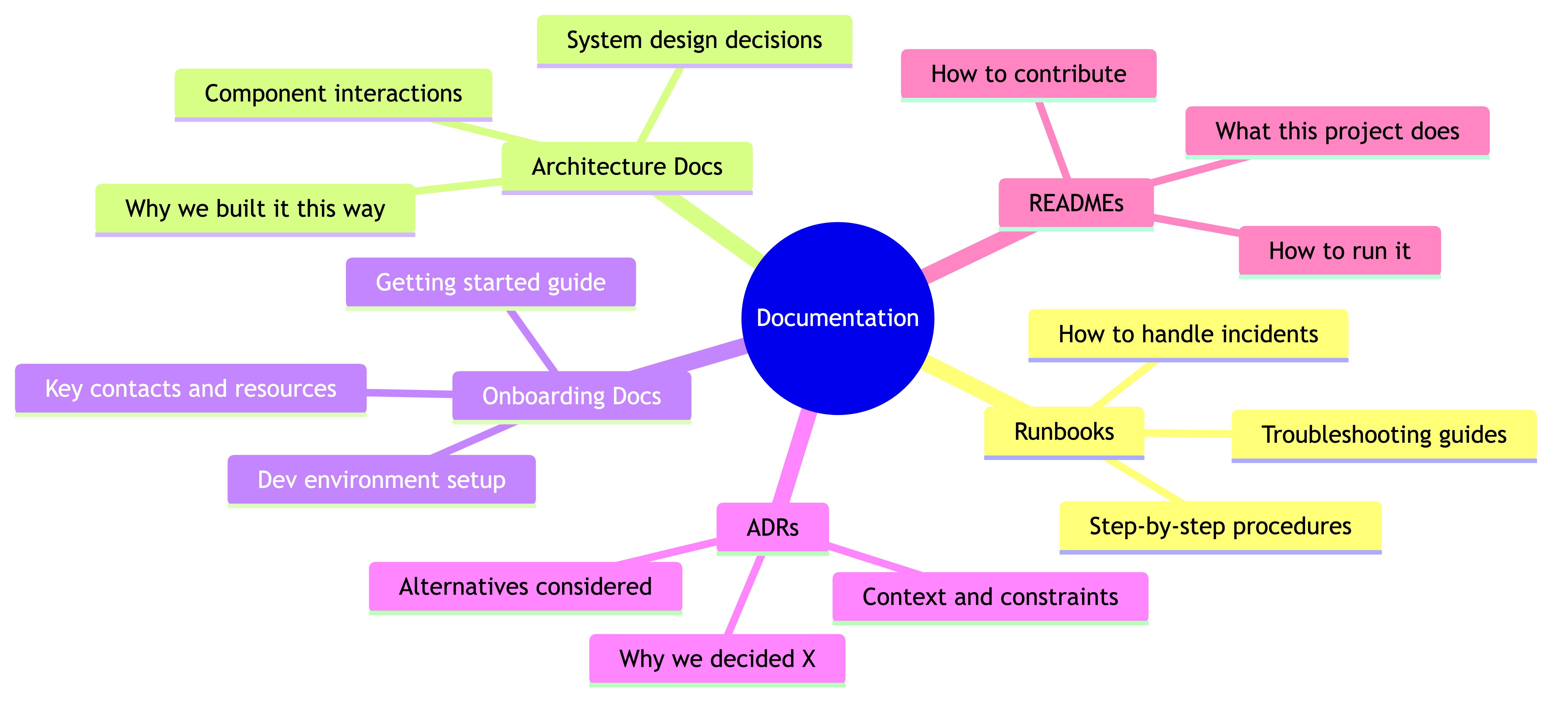
Not all documentation is the same. Different docs serve different purposes, have different audiences, and need different levels of maintenance. Here's the taxonomy that actually matters:
Runbooks
These are your "how to handle X" guides. They're written for the engineer who's on call at 3am, stressed, probably under-caffeinated, dealing with an alert they've never seen before. Runbooks are the most operationally critical docs your team will write. We'll go deep on these in the next section.
Architecture Docs
These answer "why is the system built this way?" — not just what it does, but why it's structured as it is. What were the constraints? What alternatives were considered? What trade-offs were made? These are invaluable when someone joins the team and wants to understand the system without spending weeks reading code. They're also invaluable when you need to decide whether to extend the current architecture or rethink it.
A good architecture doc includes a high-level diagram (keep it simple — boxes and arrows), the key components and how they interact, the important trade-offs and constraints, and what the known limitations are.
Onboarding Docs
These are your "getting started" guides. What does a new engineer need to set up their development environment? How do they get access to the tools and systems they need? What should they read first? Who should they talk to? A good onboarding doc saves weeks of ramp-up time and makes new hires feel competent faster, which matters a lot for retention.
Architecture Decision Records (ADRs)
ADRs are short documents that capture a specific decision: what was decided, what the context was, what alternatives were considered, and what the consequences are. They're like a changelog for your architecture. Six months from now, when someone asks "why don't we just use Kafka for this?" the ADR explains exactly why you chose RabbitMQ instead, what the trade-offs were, and what would need to change if you revisited the decision.
The format is dead simple: Title, Date, Status (proposed/accepted/deprecated), Context, Decision, Consequences. One page max. The value is enormous relative to the effort.
READMEs
Every repository, every service, every significant module should have a README that answers three questions: What is this? How do I run it? Who owns it? That's the minimum. Ideally, it also covers how to deploy, how to test, and where to find more detailed docs. Think of READMEs as the front door to your code — they should tell visitors where to go.
Writing Useful Runbooks
Runbooks deserve their own deep dive because they're the docs most likely to be used under pressure. And documentation used under pressure has very different requirements than documentation read casually.
Assume the reader is stressed. They're dealing with a production incident. It might be 3am. They might be a junior engineer handling their first on-call rotation. They might be a senior engineer who's never seen this particular failure mode. Write for the worst case. Clear, simple, step-by-step.
Here's what a good runbook contains:
Title and summary. What is this runbook for? A one-line description. "How to handle database connection pool exhaustion in the Orders service."
When to use this. What alert, symptom, or situation should trigger someone to reach for this runbook? Be specific. "Use this when you see the orders-db-pool-exhausted alert in PagerDuty, or when the Orders service is returning 503 errors and the database connection metrics show pool utilization above 95%."
Prerequisites. What access, tools, or permissions does the reader need before they can start? Don't make them discover halfway through that they need VPN access they don't have. List it upfront.
Steps. Numbered, sequential, unambiguous. Each step should be one action. Include the exact commands to run, not paraphrased descriptions. Don't write "restart the service" — write the exact command: kubectl rollout restart deployment/orders-service -n production. If there are branching paths ("if X, do A; if Y, do B"), make them explicit and clearly formatted.
Expected outcomes. After each major step or at the end, tell the reader what they should see if it worked. "After restarting, the pod should reach Ready status within 60 seconds. Connection pool utilization should drop below 50% within 2 minutes." This is crucial — without expected outcomes, the reader doesn't know if their actions actually fixed anything.
Troubleshooting. What if the standard steps don't work? What are the common reasons the fix might fail? "If the pod doesn't reach Ready status, check the logs for OOMKilled — the memory limit may need to be increased temporarily."
Escalation. When should the reader stop trying to fix it themselves and call for help? Who should they contact? What information should they have ready when they escalate? "If the issue persists after 15 minutes, escalate to the Database team via their PagerDuty service. Include the current connection pool metrics and any recent deployment history."
A practical example:
Here's the skeleton of a runbook done right:
# Runbook: Orders Service — Database Connection Pool Exhaustion

## When to use
- Alert: `orders-db-pool-exhausted` fires in PagerDuty
- Symptom: Orders API returning 503, DB pool utilization > 95%

## Prerequisites
- kubectl access to the production cluster
- Access to Grafana dashboards (Operations > Orders Service)

## Steps

1. Confirm the issue:
   kubectl top pods -n production -l app=orders-service
   Check Grafana dashboard: Operations > Orders Service > DB Connections

2. Check for recent deployments:
   kubectl rollout history deployment/orders-service -n production
   If a deployment happened in the last hour, consider rolling back (Step 5).

3. Restart the service (resolves transient connection leaks):
   kubectl rollout restart deployment/orders-service -n production

4. Verify recovery:
   Watch pod status: kubectl get pods -n production -l app=orders-service -w
   Expected: New pods reach Ready within 60 seconds.
   Check Grafana: Pool utilization should drop below 50% within 2 minutes.

5. If caused by recent deployment — roll back:
   kubectl rollout undo deployment/orders-service -n production
   Monitor as in Step 4.

## If this doesn't work
- Check for database-side issues (max connections limit on RDS)
- Look for long-running queries: connect to read replica and run
  SELECT * FROM pg_stat_activity WHERE state != 'idle' ORDER BY duration DESC;

## Escalation
If unresolved after 15 minutes:
- Page the Database team: [PagerDuty service link]
- Include: current pool metrics, recent deployments, any long-running queries found
- Notify your team lead and update the #incidents Slack channel

Last verified: 2026-01-15 by @jchen
Notice a few things about that example. The steps are concrete commands, not vague instructions. There's a clear progression from "confirm the problem" to "try the simple fix" to "try the harder fix" to "escalate." The expected outcomes are explicit. And there's a "last verified" date so you know how much to trust it.
Keeping Docs Alive
Here's the hard truth about documentation: writing it is the easy part. Keeping it accurate over time is where most teams fail.
Stale documentation is genuinely worse than no documentation. When a doc doesn't exist, the engineer knows they don't know and will investigate carefully. When a stale doc exists, the engineer trusts it, follows incorrect steps, and makes things worse. During an incident, a stale runbook can turn a manageable problem into a disaster.
So how do you keep docs alive?
Review on rotation. Assign documentation review to your regular on-call rotation or sprint duties. Each rotation, the on-call engineer reviews one or two runbooks and confirms they're still accurate. This distributes the work and ensures docs get regular attention.
Update when you use. This is the single most effective strategy. Every time someone uses a doc and finds something inaccurate, incomplete, or confusing, they update it right then. Not "I'll file a ticket to update it later." Right now, while the gap is fresh. Make this a team norm. Using a runbook during an incident? The post-incident action items should include updating any runbook that was wrong or missing steps.
Tag with a last-verified date. Every doc should have a "last verified" date and the name of who verified it. If you're looking at a runbook that was last verified 18 months ago, you know to treat it with healthy skepticism. This is a simple metadata practice that pays huge dividends in trust.
Delete what's obsolete. This is the one nobody wants to do. We're hoarders by nature — "what if someone needs this?" But a doc for a service that was decommissioned a year ago is just noise. It clutters search results and erodes confidence in your doc library. If something is no longer relevant, archive it or delete it. Be ruthless.
Own your docs. Every doc should have a clear owner — usually the team that owns the system it describes. Unowned docs are guaranteed to go stale. If nobody's responsible, nobody updates.
Making Documentation a Habit
The biggest challenge with documentation isn't the writing itself — it's making it a consistent practice. Left to their own devices, most engineers will skip the doc and move on to the next feature. Not because they're lazy, but because there's always something more urgent. Documentation is important but rarely urgent, and that combination means it perpetually loses the priority battle.
You have to build it into the system so it happens by default, not by heroic individual effort.
Build it into your Definition of Done. A feature isn't done when the code is merged. It's done when it's deployed, monitored, and documented. If your team's Definition of Done includes "relevant documentation updated," then documentation stops being optional and becomes part of the work.
Make it a PR review question. Add "Is this documented?" or "Does this change require a doc update?" to your PR review checklist. It's a simple prompt, but it catches a lot. New API endpoint? README should be updated. Changed the deployment process? Runbook needs updating. New configuration option? It should be documented somewhere.
Praise people who write docs. This matters more than you think. Engineers tend to value what gets recognized. If writing great docs gets a shoutout in the team meeting, if it's mentioned in performance reviews, if the team lead says "hey, that runbook you wrote saved us during last night's incident" — people will write more docs. If only feature work gets praised, documentation will always be an afterthought.
Lower the barrier. Don't require perfect docs. A rough doc that exists is infinitely more valuable than a perfect doc that doesn't. Use templates to make it easy to start. Keep your doc tools simple — if writing a doc requires learning a complex tool or navigating a maze of folders, people won't do it.
Allocate time. Explicitly. If your sprint planning never includes documentation tasks, you're implicitly saying docs aren't real work. They are. Budget time for them. Some teams dedicate a few hours per sprint specifically to documentation. It doesn't have to be a lot — consistency beats volume.
Documentation as Onboarding Accelerator
Good documentation has many benefits, but the one that's most immediately visible and measurable is its impact on onboarding.
Without documentation, onboarding a new engineer to your team looks like this: weeks of shadowing, asking questions, getting pointed to the right person, waiting for that person to be available, getting half-answers because the expert is busy, slowly piecing together an understanding through trial and error. It's frustrating for the new hire and expensive for the team, because every question they ask costs someone else's productivity.
With good documentation, onboarding looks radically different. The new hire has a clear starting path. They can read the architecture docs to understand the system. They can follow the onboarding guide to set up their environment. They can read the ADRs to understand why things are built the way they are. They still ask questions — of course they do — but the questions are higher-quality, more specific, and less frequent.
The "new hire test." Here's a practical way to evaluate your docs: when a new person joins the team, have them follow the onboarding documentation without any hand-holding. Where do they get stuck? Where do they have to ask for help? Every place they get stuck is a gap in your documentation. After they're onboarded, have them update the docs to fill those gaps. They're the perfect person to do it because they just experienced exactly where the docs fell short.
This creates a virtuous cycle: every new hire makes the onboarding docs better, which makes the next new hire's experience smoother, and so on. The teams that do this consistently end up with onboarding docs that are remarkably good, because they've been refined by every person who used them.
I've seen teams go from a 3-month ramp-up time to 3 weeks — not by changing their architecture or their tech stack, but by investing in documentation. The new hire who used to spend their first month just figuring out how to run the system locally can now do it on day one and start contributing meaningful code by week two.
Real-World Examples
Incident: The Team With Docs vs. The Team Without
Team A: Good documentation. Friday night, 11pm. The payment-gateway-timeout alert fires. The on-call engineer, who joined the team two months ago, gets paged. She pulls up the runbook. Step 1: check the payment provider's status page. It's green. Step 2: check the connection pool metrics. Pool utilization is at 98%. Step 3: restart the payment gateway pods. She runs the command from the runbook. Step 4: verify recovery. Pool drops to 30% within a minute. Transactions are flowing again. Total downtime: 8 minutes. She updates the runbook with a note about checking the recent release history as an additional diagnostic step, because she noticed a deploy had happened an hour earlier and wanted to rule that out. Done.
Team B: No documentation. Same scenario, same alert. The on-call engineer, also relatively new, gets paged. He knows the payment gateway exists but has never debugged it. He Slacks the senior engineer who built it — no response (it's Friday night). He tries Slack-searching for any past discussion about this alert — finds some fragments, nothing actionable. He SSHs into a box and starts poking around. Tries restarting a service — wrong one. Checks logs, finds errors he doesn't understand. After 45 minutes, he manages to reach the senior engineer by phone. She walks him through the fix over the phone while half-asleep. Total downtime: 1 hour 12 minutes. No documentation is created afterward because "we should do that but there's a deadline next week."
That's the difference. Same problem. Same general skill level of on-call engineer. Wildly different outcomes. And the gap gets bigger with more complex incidents.
Onboarding: From Three Months to Three Weeks
A team I worked with had a notoriously complex system — a distributed data pipeline with about fifteen microservices, multiple databases, a custom message bus, and years of accumulated quirks. New engineers consistently took about three months before they could independently handle tasks and on-call duties.
The team lead decided to invest. Over about six weeks, the team spent a portion of each sprint writing and reviewing documentation: architecture overview, service-by-service guides, runbooks for the top ten most common incidents, and a step-by-step onboarding guide. It wasn't a massive time investment — maybe 10-15% of the team's capacity over those six weeks.
The next new hire who joined had a completely different experience. She had her local environment running on day one. She understood the high-level architecture by end of week one. She was making small but meaningful code changes by week two. She handled her first on-call shift, with backup, in week three. Not because she was an exceptional engineer (though she was good) but because the documentation gave her a foundation that previous new hires had to build from scratch.
Three months down to three weeks. For every subsequent hire. The math on that investment is obvious.
The Over-Documentation Trap
One more example, because this mistake is common too. A well-intentioned team lead mandated that every function, every API call, every configuration change be documented in a team wiki. The team dutifully complied. Within three months, they had hundreds of pages of documentation. Within six months, most of it was outdated. Engineers stopped trusting the wiki because they'd been burned too many times by inaccurate docs. The search results were flooded with irrelevant pages. The wiki became a graveyard of good intentions.
The fix wasn't more documentation — it was less. They pruned aggressively, deleting about 70% of the pages. They kept the runbooks, the architecture docs, the ADRs, the onboarding guide. Everything else went. The remaining docs got reviewed and updated. Suddenly the wiki was useful again because when you found a doc, you could actually trust it.
Common Mistakes
Writing docs nobody reads. If you write documentation but nobody knows where it is or when to use it, it might as well not exist. Discoverability matters. Keep docs close to where they're needed — runbooks linked from alerts, architecture docs linked from repo READMEs, onboarding docs sent on day one.
Not updating. The most insidious failure mode. The doc was accurate when it was written. Then someone changed a configuration, someone else refactored a service, a third person updated the deployment process. Nobody updated the doc. Now it's a trap. New leaders need to treat doc maintenance as seriously as code maintenance.
Over-documenting. As in the example above, more docs aren't always better. Every doc you create is a doc you need to maintain. Be intentional about what you document. If you wouldn't commit to keeping a doc updated, don't write it.
Docs scattered everywhere. Half in Confluence, a quarter in Google Docs, some in Notion, some in README files, one critical runbook in a Slack message that someone pinned eight months ago. Pick a canonical location for each type of doc and stick to it. It's fine to have READMEs in repos and runbooks in a wiki — just be consistent so people know where to look.
No ownership. When everyone is responsible for documentation, nobody is. Every doc should have an owner — a person or team who's accountable for keeping it accurate. This doesn't mean they do all the writing, but they make sure it gets done.
Writing for the wrong audience. A runbook written for the person who built the system is useless for the person who didn't. Write for the least-experienced person who might need to use the doc. If they can follow it, everyone can.
Treating docs as a one-time effort. "Let's do a documentation sprint!" Great, you'll produce a lot of docs in two weeks. And in six months they'll all be stale because you went back to ignoring documentation. Documentation needs to be a continuous practice, not a periodic project.
Business Value
If you need to make the case for investing in documentation — to your own leadership, to your team, or even to yourself when sprint priorities are tight — here's how to frame it:
Onboarding time reduction. Quantify it. If your current onboarding takes 3 months and good docs can cut it to 3 weeks, that's roughly 9 weeks of productivity gained per new hire. At an average engineering salary, that's a significant dollar amount. Multiply by the number of hires per year and the ROI is hard to argue with.
Incident response speed. Track your MTTR (mean time to recovery) for incidents where a runbook was used versus incidents where one wasn't. The difference is usually dramatic — 2-3x faster resolution is typical. Faster resolution means less downtime, which directly translates to revenue protection and customer trust.
Knowledge preservation. Every person who leaves your team takes knowledge with them. Documentation is how you capture that knowledge before they go. The cost of losing undocumented tribal knowledge — measured in debugging time, re-investigation, and mistakes — dwarfs the cost of writing it down. One engineer leaving without documenting a critical system can cost the team months of productivity.
Reduced dependency on individuals. When knowledge is documented, you're not dependent on specific people being available. The on-call engineer can handle more situations independently. Team members can take vacations without the team grinding to a halt. People can move to new projects without creating a crisis on the old one. This isn't just an efficiency gain — it's a resilience gain. And it's a quality-of-life gain for the individuals who would otherwise be permanently on the hook.
Decision quality. When past decisions are documented (via ADRs), new decisions are better informed. The team doesn't waste time re-debating settled questions, and they don't accidentally repeat past mistakes. This is hard to quantify but very real — teams with good decision records make faster, more consistent choices.
Where to Start
If your team has minimal documentation today, don't try to boil the ocean. Start here:
-
Write your top 3 runbooks. What are the three most common incidents your team deals with? Write runbooks for those. This delivers immediate value and gives the team a model for what good docs look like.
-
Write a one-page architecture overview. Not a detailed design document — a single page that shows the major components, how they interact, and what the key technologies are. Good enough for a new hire to get oriented.
-
Write the onboarding doc. Have the most recent hire on your team write this, since they remember where they got stuck. Environment setup, access and permissions, key resources, who to ask about what.
-
Start writing ADRs going forward. You don't need to retroactively document every past decision. Just start capturing new ones. In six months you'll have a useful library.
-
Pick a home. Decide where docs live and tell the team. Runbooks in X, architecture docs in Y, ADRs in Z. Consistency matters more than which tool you use.
That's a realistic starting point. You can get all five done in a couple of sprints without derailing your feature work. Once you've got the foundation, building the habit of maintaining and extending it becomes much easier.
The teams that do documentation well aren't the ones with the most docs. They're the ones where documentation is a normal part of how work gets done — not a chore, not an afterthought, just part of the job. That's the culture you're building. And it starts with you writing that first runbook.
Common Pitfalls
- Over-documenting everything and creating an unmaintainable backlog. More docs are not always better. Every doc you create is a doc you need to maintain. If you would not commit to keeping a doc updated, do not write it. A focused, trustworthy set of docs beats a sprawling wiki full of stale information.
- Writing runbooks for the person who built the system rather than the person on call at 3 AM. If the reader needs deep system knowledge to follow the runbook, it fails its purpose. Write for the least experienced person who might need to use it.
- Letting documentation become stale without a review process. Stale docs are worse than no docs because people trust them, follow incorrect steps, and make things worse. Assign review rotations, tag docs with last-verified dates, and update whenever you use a doc and find inaccuracies.
- Scattering documentation across multiple platforms with no consistency. Half in Confluence, some in Google Docs, some in Notion, one critical runbook in a pinned Slack message. Pick a canonical location for each type of doc and stick to it so people know where to look.
- Treating documentation as a one-time sprint project rather than a continuous practice. A two-week documentation sprint produces a lot of docs that are all stale within six months. Documentation needs to be part of the ongoing workflow, built into Definition of Done and PR review checklists.
- Not assigning ownership for documentation. When everyone is responsible, nobody is. Every doc should have a clear owner, a person or team accountable for keeping it accurate, even if they do not do all the writing themselves.
Key Takeaways
- Tribal knowledge is a business risk. Every piece of critical information that lives only in someone's head is a single point of failure that documentation can eliminate.
- Document what is hard to figure out from code alone, what gets asked frequently, what is critical during incidents, and what would be lost if someone left. Skip the obvious, the fast-changing, and what is already captured elsewhere.
- The five types of docs every team needs are runbooks, architecture docs, onboarding docs, Architecture Decision Records (ADRs), and READMEs.
- Runbooks should assume the reader is stressed and unfamiliar. Include when to use it, prerequisites, numbered step-by-step commands, expected outcomes, troubleshooting, and escalation paths.
- Keep docs alive through review rotations, update-on-use norms, last-verified dates, aggressive deletion of obsolete content, and clear ownership.
- Build documentation into your system: make it part of Definition of Done, add it to PR review checklists, praise people who write docs, and allocate sprint time for it explicitly.
- Good documentation is the highest-leverage onboarding accelerator. Teams that invest in it have cut ramp-up time from three months to three weeks, and each new hire who updates the docs makes them better for the next person.