
Vendor Evaluation & Procurement
Why This Matters
At some point in your career as an engineering manager, someone on your team will say, "There is a tool that does exactly this." And they will be right. There is almost always a tool that does exactly what you need. The question is whether you should use it, which one, and how to buy it without getting burned.
Vendor evaluation is not a purchasing department problem. It is an engineering management problem. The tools your team uses shape your architecture, your workflows, your hiring, and your budget. A bad vendor choice does not just waste money — it creates technical debt, frustrates your engineers, and can lock you into decisions that haunt you for years.
Most engineering managers stumble into vendor decisions reactively. Someone finds a cool tool, they start a free trial, it spreads through the team, and suddenly you are negotiating an enterprise contract for something nobody formally evaluated. That is how you end up paying six figures for software that three people actually use.
Let's talk about how to do this deliberately.
1. When to Evaluate Vendors
Vendor evaluation starts the moment your team identifies a gap that existing tools and infrastructure do not fill. Maybe your monitoring is insufficient. Maybe your CI pipeline is painfully slow. Maybe you need a feature flagging system and nobody wants to build one from scratch.
The trigger is usually one of these:
A recurring pain point. Your team keeps complaining about the same thing. Developers are losing hours to a manual process. Something is slow, broken, or missing. When you hear the same frustration three times, it is time to investigate whether someone else has already solved this problem.
A new capability requirement. The product roadmap demands something your team has never built before — real-time analytics, machine learning inference, video processing. You could build it, but the question is whether you should.
Scale pressure. What you built in-house worked fine for ten engineers and a thousand users. Now you have fifty engineers and a hundred thousand users, and your homegrown solution is cracking. Time to evaluate whether a purpose-built vendor solution handles scale better than your duct tape.
An expiring contract. Your current vendor's contract is up for renewal. This is actually the best time to evaluate alternatives, because you have leverage and you have real usage data to compare against.
Do not wait for a crisis to start evaluating. The worst time to pick a vendor is when you desperately need one. You will skip due diligence, accept bad terms, and regret it within six months.
2. Build vs. Buy Framework
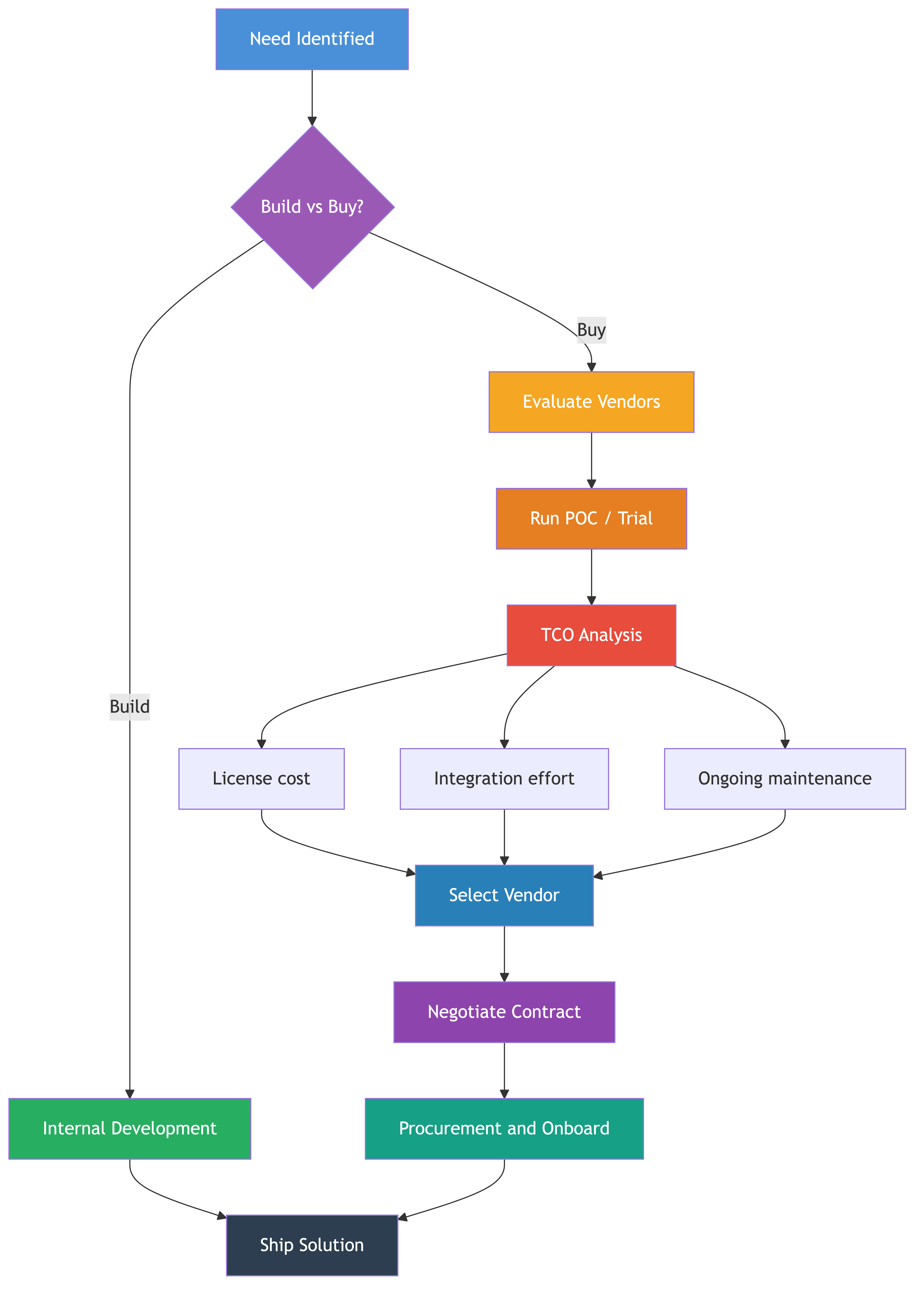
Before you start evaluating vendors, you need to answer a more fundamental question: should you build this yourself or buy it from someone else?
This sounds like a big philosophical debate, but in practice, the framework is straightforward.
Build if it is your core competency. If the capability you need is central to your product's differentiation — the thing that makes customers choose you over competitors — build it. You need full control over the roadmap, the architecture, and the iteration speed. If search is your product, do not outsource your search engine. If payments are your business, own your payment stack.
Buy if it is commodity. If every company in your industry needs this thing and it has nothing to do with why customers choose you, buy it. Authentication, monitoring, CI/CD, error tracking, email delivery — these are solved problems. Your engineers' time is better spent on what makes your product unique, not reimplementing OAuth for the fourth time.
The gray zone. Most decisions fall somewhere in between, and that is where you need a total cost of ownership analysis. Here is a quick framework:
| Factor | Lean Build | Lean Buy |
|---|---|---|
| Strategic importance | High — core differentiator | Low — commodity capability |
| Available expertise | Team has deep domain knowledge | Team would need to learn from scratch |
| Maintenance burden | Willing to own long-term | Want someone else to maintain it |
| Customization needs | Highly specific requirements | Standard requirements |
| Time to value | Can afford to invest 3-6 months | Need it working in weeks |
| Market options | Few good vendors exist | Multiple mature vendors |
Be honest with yourself during this analysis. Engineers love building things. That is literally why they became engineers. But "we could build this" is not the same as "we should build this." Every hour spent building commodity infrastructure is an hour not spent on your product.
A useful gut check: if your CEO asked you to justify why three engineers spent a quarter building an internal tool instead of shipping product features, would you have a compelling answer? If not, buy.
3. Evaluation Criteria
Once you have decided to buy, you need a structured way to compare vendors. Gut feel and a slick demo are not enough. Here are the criteria that actually matter.
Functionality. Does the tool do what you need it to do? Not what it could theoretically do, not what is on their roadmap — what it does today, out of the box. Create a list of must-have features and nice-to-have features before you start looking. Evaluate against that list, not against whatever the vendor's sales team wants to show you.
Cost. What is the pricing model? Per seat, per usage, flat rate? How does cost scale as your team or usage grows? Get specific numbers for your current state and your projected state in one year and three years. Vendors love to quote startup pricing and gloss over what happens when you scale.
Integration effort. How much engineering work does it take to plug this into your existing stack? Does it have APIs? SDKs in your language? Webhooks? Does it integrate with your identity provider, your CI system, your monitoring? A tool that takes two weeks to integrate is very different from one that takes two quarters.
Security. What certifications does the vendor hold? SOC2 Type II? ISO 27001? How do they handle your data? Where is it stored? Who has access? What happens to your data if you leave? If the vendor cannot answer these questions clearly, walk away.
Support. What does support look like? Email with a 48-hour SLA, or dedicated support engineer with a 1-hour SLA? What about on-call for critical incidents? Read their support page, not their marketing page. And ask for references — specifically ask other customers about their support experience.
Scalability. Can the tool handle your growth? Not your current load — your load in two years. Ask for performance benchmarks. Ask what their largest customer looks like. Ask what happens when you hit limits.
Vendor stability. Is this company going to exist in three years? How is their funding? Are they profitable or burning runway? A startup with great technology and six months of cash left is a risky bet. Check Crunchbase, read their blog, talk to other customers.
Lock-in risk. How hard is it to leave? Can you export your data? Are you building on proprietary APIs that have no equivalent elsewhere? Lock-in is not always a deal-breaker, but you need to understand it before you commit.
Weighted Scoring Matrix
Put this into a structured framework. Here is a template:
| Criteria | Weight | Vendor A (1-5) | Vendor B (1-5) | Vendor C (1-5) |
|---|---|---|---|---|
| Functionality | 25% | |||
| Cost (3-year TCO) | 20% | |||
| Integration effort | 15% | |||
| Security & compliance | 15% | |||
| Support quality | 10% | |||
| Scalability | 5% | |||
| Vendor stability | 5% | |||
| Lock-in risk | 5% | |||
| Weighted Total | 100% |
Adjust the weights based on what matters most for your situation. If you are in healthcare, security and compliance might be 30%. If you are a tiny startup, cost might dominate everything. The point is to make your criteria and priorities explicit before you start comparing, so you are not swayed by whichever vendor has the best slide deck.
Involve your team in filling this out. The engineers who will actually use the tool every day have insights you do not.
4. Running a POC/Trial
A demo is not an evaluation. A free tier is not an evaluation. An evaluation is your team using the tool on a real problem with defined success criteria and a hard deadline.
Define success criteria before you start. Write down exactly what "this works" means. Not "it seems good" — specific, measurable criteria. "Reduces deploy time from 45 minutes to under 10 minutes." "Ingests our event stream at 50,000 events per second with no data loss." "Integrates with our SSO provider in under two days of engineering effort." If you cannot define success criteria, you are not ready to run a POC.
Time-box it aggressively. Two weeks is usually enough for most tools. Three weeks if the integration is complex. If a vendor says their tool needs more than a month to evaluate, that is telling you something important about the integration cost. Set a hard end date and stick to it.
Assign an owner. One engineer owns the POC. They are responsible for the integration, the evaluation, and the write-up. Do not let it be a "we will all play with it when we have time" situation — that guarantees it drags on and nobody reaches a conclusion.
Use a real workload. Do not evaluate with toy data and artificial scenarios. Feed it your actual traffic, your actual codebase, your actual use cases. Vendor demos are optimized to look great. Your reality will be messier, and you need to know how the tool handles your mess.
Document what you find. The POC owner should write a brief evaluation document: what worked, what did not, what surprised you, what concerns remain. This becomes invaluable when you need to justify the purchase to finance, or when the next team asks "has anyone looked at Tool X?"
Do not let trials drag on. This is the biggest trap. The free trial expires, so you extend it. Then you extend it again. Then half the team is using the free tier in production and you have created a dependency without making a decision. Set a decision date. On that date, you either commit and buy, or you stop using it. No middle ground.
5. Total Cost of Ownership
License cost is the number that shows up on the invoice. Total cost of ownership is what the tool actually costs your organization. These are very different numbers.
License fees. The sticker price. Per seat, per unit, per month, per year. Understand the pricing model completely. What triggers the next pricing tier? What happens if you go over your quota mid-contract?
Integration cost. How many engineer-weeks does it take to integrate this tool? Be realistic — vendor estimates are always optimistic. If an engineer spends three weeks on integration, that is three weeks they are not building product features. At a fully loaded cost of 12,000 in engineering time alone.
Training cost. How long does it take a new engineer to become productive with this tool? Is there documentation? Is it intuitive, or does it require a certification course? Multiply the ramp-up time by the number of engineers who need to learn it, and by your expected hiring rate.
Ongoing maintenance. Who keeps the integration working when your systems change? When the vendor releases a new version, who upgrades? Who debugs issues at 2 AM when the vendor integration breaks? Every tool you adopt adds a small ongoing maintenance burden. Those burdens add up.
Migration risk. What does it cost to leave this vendor? If you need to switch in three years, how much engineering effort does the migration require? If the answer is "six months of a team's time," you need to factor that into your decision.
Opportunity cost. What could your team be building instead of integrating and maintaining this vendor tool? This is the hardest cost to quantify but often the most significant.
A practical example: a monitoring tool costs 16,000). Training across the team takes another week (8,000 per year). Total first-year cost: roughly 194,000. The sticker price was $150,000 over three years. The real cost is 30% higher.
Do this math before you sign anything.
6. License Management
This is the unglamorous part of vendor management that nobody wants to do and everybody should.
Track what you are paying for. Create a simple spreadsheet or use a SaaS management tool. For every vendor: what do you pay, how many licenses do you have, how many are actually used, when does the contract renew, who owns the relationship. If you cannot produce this list in five minutes, you do not have license management — you have license chaos.
Audit usage regularly. At least quarterly, check actual usage against what you are paying for. You will almost always find waste. That developer tool you bought 50 seats for? Only 30 people use it. Those extra 20 seats are pure waste. Right-size your licenses at every renewal.
Consolidate where possible. It is common for different teams to buy overlapping tools because nobody knew the other team had already solved the problem. When you find overlap, consolidate. One tool used well is better than three tools used poorly.
Set renewal reminders. Auto-renewal is a vendor's best friend and your worst enemy. Set calendar reminders 90 days before every renewal. That gives you time to evaluate whether you still need the tool, negotiate better terms, or switch vendors. If you only notice the renewal after it happens, you have lost all leverage.
Negotiate. Always negotiate. Vendor pricing is almost never final. Multi-year commitments get discounts. Volume discounts exist even when they are not on the price sheet. Paying annually instead of monthly usually saves 10-20%. And if you are a growing company, negotiate pricing that locks in favorable rates as you scale.
One tip that many managers miss: talk to your vendor's competitors before renewal. Even if you are happy with your current vendor, knowing the competitor's pricing gives you real leverage in negotiations. "We are happy with your product, but Competitor X is offering 30% less for equivalent functionality" is a powerful sentence.
7. Vendor Relationships
You are a customer. Act like one.
That does not mean being adversarial. It means being clear about what you need, holding vendors to their commitments, and expecting the same professionalism you provide to your own customers.
Set expectations early. During the sales process, be explicit about what you need: response times for support, uptime SLAs, feature requests, escalation paths. Get these in the contract, not in a verbal promise from the sales rep who will be on a different account in six months.
Have a single point of contact. Designate one person on your side as the vendor relationship owner. This person knows the contract terms, has the vendor's account manager's contact information, tracks support tickets, and manages renewals. Without a single owner, issues fall through cracks and nobody has the full picture.
Hold vendors accountable. If the SLA says 99.9% uptime and they delivered 99.5%, that is a conversation. If support response times are consistently slower than promised, that is a conversation. Document incidents, track patterns, and bring data to these conversations. Vendors respond to data-backed complaints far more than vague dissatisfaction.
Escalate when needed. If your account manager cannot resolve an issue, ask for their manager. If the engineering support team is not responsive, ask your account manager to escalate internally. You are paying for a service. If you are not getting what you paid for, escalate until you reach someone who can fix it.
Build the relationship, do not just manage it. Get to know your account manager. Share your roadmap at a high level so they can flag relevant upcoming features. Attend their user conferences — you will learn things and meet other customers who can share their experiences. Provide honest product feedback. Good vendors value engaged customers and will prioritize your needs.
Know when to walk away. If a vendor consistently fails to meet their commitments, if their product quality is declining, if their pricing becomes unreasonable — start evaluating alternatives. Loyalty is admirable, but not at the expense of your team's productivity.
8. Security and Compliance Review
This is the section that engineers want to skip and absolutely cannot. A vendor with great functionality and terrible security practices is not a viable option. Full stop.
SOC2 Type II. This is the baseline for any vendor that will handle your data. SOC2 Type I means they designed controls. SOC2 Type II means those controls were audited over time and actually work. Ask for the report. Read it, or have your security team read it. If a vendor does not have SOC2 Type II, you need a very good reason to proceed.
Data handling. Where is your data stored? Which region? Is it encrypted at rest and in transit? Who at the vendor can access your data? What is their data retention policy? Can you delete your data on demand? These are not paranoid questions — they are basic due diligence.
GDPR and privacy regulations. If you handle data from EU citizens, your vendors must be GDPR compliant. Do they have a Data Processing Agreement? Do they support data subject access requests? Can they handle right-to-deletion requests? If your vendor is not compliant, you are not compliant. And the fines are not small.
Access controls. Does the vendor support SSO integration? Role-based access control? Audit logging? Multi-factor authentication? If your engineers are logging into a vendor tool with shared credentials and no MFA, your security posture just became that tool's security posture.
Incident response. What happens when the vendor has a security breach? How quickly will they notify you? What is their incident response process? Do they have a bug bounty program? Have they had previous incidents, and how did they handle them?
Involve your security team. If you have a security team, bring them in early. Not after you have already chosen a vendor and just need them to rubber-stamp it — early enough that their concerns can actually influence the decision. Security reviews that happen after the purchase decision are theater. Security reviews that happen during evaluation are due diligence.
Create a vendor security questionnaire. Standardize this process. Have a template of security questions that every vendor must answer before you proceed. This saves time, ensures consistency, and signals to vendors that you take security seriously.
9. Real-World Examples
Good Vendor Selection That Saved Months
A platform team at a mid-size SaaS company needed a feature flagging system. Their homegrown solution was a JSON file in a config repo that required a deploy to change. Engineers hated it. Rolling out features to a subset of users required deploying to specific servers manually.
The engineering manager ran a proper evaluation. Three vendors were shortlisted. Success criteria were defined: must integrate with their identity provider, must support percentage-based rollouts, must have an SDK in Go and TypeScript, must handle 10,000 flag evaluations per second. A two-week POC was run with the top two candidates.
They picked LaunchDarkly. Integration took one engineer four days. Within a month, the team was doing targeted rollouts, running A/B tests on infrastructure changes, and using kill switches to disable problematic features without deploying. A feature that previously took an entire sprint to roll out safely was now done in an afternoon.
The total cost was $24,000 per year. The engineering time saved was estimated at two engineer-months per quarter. The math was not close.
Bad Vendor Lock-In
A data engineering team chose a managed ETL platform because it dramatically simplified their pipeline development. The platform used a proprietary visual workflow language — not SQL, not Python, but a drag-and-drop interface that compiled to their own runtime.
For two years, it was great. Pipelines were easy to build. Non-engineers could create simple data flows. The team was productive.
Then the vendor raised prices by 40%. The data team had 200+ pipelines built on this proprietary platform. Migrating to an alternative would require rewriting every pipeline from scratch — a project estimated at six months of the entire team's time. They had no leverage. They paid the increase.
The following year, the vendor was acquired. The new parent company de-prioritized the product. Feature development stopped. Support quality declined. The data team was stuck on a dying platform with no good migration path.
The mistake was not choosing the vendor. The mistake was choosing a vendor with a proprietary abstraction layer and no data portability, and not recognizing the lock-in risk during evaluation. If the pipelines had been written in standard SQL with a thin vendor integration layer, migration would have been weeks instead of months.
Build vs. Buy Decision That Went Wrong
An engineering team decided to build their own application performance monitoring solution. The reasoning sounded solid: commercial APM tools were expensive, they had specific requirements around custom instrumentation, and they had an engineer who was passionate about observability.
That engineer spent three months building version one. It worked for their primary service. Then the team needed it to support their secondary services, which used different languages and frameworks. Another two months. Then they needed alerting. Another month. Then dashboards. Then distributed tracing. Then the engineer who built it all left the company.
Nobody else understood the system. It broke during an outage — precisely when they needed it most. The on-call engineer spent two hours debugging the monitoring system instead of debugging the production issue.
They eventually bought Datadog. The annual cost was 130,000 in salary alone, not counting the opportunity cost of features that engineer did not build. And the custom solution was worse in every measurable way.
The lesson: monitoring is not a differentiator for most companies. It is commodity infrastructure. They should have bought from day one.
10. Common Mistakes
Not involving the team. The manager picks a tool based on a demo and a sales pitch, then hands it to the team. The team hates it. It does not fit their workflow. Features they need are missing. Features they do not need are everywhere. Always involve the engineers who will use the tool in the evaluation. They will catch things you will not.
Choosing the cheapest option. The cheapest tool is rarely the cheapest total cost. A tool that costs $10,000 less per year but requires twice the integration effort and has worse support will cost you more in the long run. Optimize for total cost of ownership, not sticker price.
No POC. Skipping the proof of concept because the demo looked good and the sales team was persuasive. Demos are scripted. Your environment is not. Things that work perfectly in a demo fail in surprising ways when they hit your actual data, your actual scale, and your actual edge cases.
Ignoring lock-in. Choosing a vendor with a proprietary data format, a proprietary query language, or a proprietary API with no portable alternative. Not because you evaluated the lock-in risk and decided it was acceptable — because you did not think about it at all.
Not negotiating. Accepting the first price offered. Signing a one-year contract when a three-year deal would save 25%. Not asking about startup discounts, volume discounts, or promotional pricing. Vendor pricing has margin built in. You are leaving money on the table if you do not negotiate.
Letting trials become dependencies. Starting a free trial, extending it twice, and then discovering that half the team is using the free tier in production. Now you are negotiating from a position of weakness because the vendor knows you are already dependent on them.
Skipping security review. Particularly common with developer tools. "It is just a code formatting tool, it does not need a security review." Except it has access to your source code repository. And it stores your code on its servers. And its privacy policy says it can use your data for training. Always do the security review.
No exit strategy. Signing a three-year contract without thinking about what happens if you need to leave. Can you export your data? How long does migration take? What does the transition period look like? If you do not plan for exit, you will be at the vendor's mercy when the time comes.
One person making the decision alone. Vendor selection affects multiple stakeholders — engineering, security, finance, sometimes legal. A decision made by one manager in isolation often misses constraints that another stakeholder would have caught immediately.
Confusing vendor enthusiasm for vendor quality. The vendor with the most responsive sales team is not necessarily the vendor with the best product. Sales teams are incentivized to close deals. Evaluate the product on its merits, not on how much you like the people selling it.
Business Value
Everything in this guide comes back to one thing: your team's time is the most expensive resource you have. Every hour your engineers spend fighting with bad tools, integrating poorly chosen vendors, or rebuilding something a vendor could have provided is an hour they are not building your product.
Good vendor evaluation directly impacts your team's velocity. The right tools remove friction, automate toil, and let your engineers focus on what they were hired to do. The wrong tools create friction, introduce new failure modes, and drain engineering capacity on maintenance instead of creation.
Good procurement practices protect your budget. License management, negotiation, and TCO analysis are not exciting, but they are the difference between spending your engineering budget on tools that accelerate your team and tools that sit unused. At scale, vendor spend is one of the largest line items in an engineering budget, second only to headcount. Managing it well frees up money for hiring, infrastructure, and the things that actually move your product forward.
Good vendor relationships create strategic leverage. When you are a well-informed, data-driven customer who knows what you need and holds vendors accountable, you get better pricing, better support, and more influence over the product roadmap. When you are a passive customer who auto-renews without reviewing and never escalates issues, you get whatever the vendor decides to give you.
And perhaps most importantly, good vendor evaluation prevents catastrophic mistakes. A bad vendor choice can set your team back months. Vendor lock-in can constrain your architecture for years. A security incident at a vendor you did not properly vet can compromise your customers' data and your company's reputation.
The time you invest in doing vendor evaluation right is small compared to the cost of doing it wrong. One structured two-week evaluation today saves you from a six-month migration project two years from now. One thorough security review today prevents the "we need to rip out this vendor immediately" fire drill when your security team finally notices.
This is not glamorous work. Nobody gets promoted for running a great vendor POC or maintaining a clean license management spreadsheet. But the engineering managers who do this well build teams that move faster, spend less, and avoid the crises that derail organizations that treat vendor decisions as an afterthought.
Quick Reference Checklist
Before you start evaluating:
- Confirm the build vs. buy decision with your team
- Define your requirements (must-have vs. nice-to-have)
- Set evaluation criteria and weights
- Identify stakeholders (engineering, security, finance)
During evaluation:
- Shortlist 2-3 vendors maximum
- Define POC success criteria
- Time-box the POC (2-3 weeks)
- Assign a POC owner
- Test with real workloads
- Calculate total cost of ownership
Before signing:
- Complete security and compliance review
- Negotiate pricing and terms
- Review contract for auto-renewal clauses
- Confirm data export and portability
- Define exit strategy
- Get stakeholder sign-off
After purchase:
- Track license usage quarterly
- Set renewal reminder 90 days out
- Maintain vendor relationship
- Document integration for onboarding
- Review annually: still the right tool?
Common Pitfalls
- Skipping the proof of concept. Choosing a vendor based on a demo and a sales pitch without testing it against your actual workload, data, and edge cases leads to expensive surprises after the contract is signed.
- Optimizing for sticker price instead of total cost of ownership. The cheapest license is rarely the cheapest overall. A tool that saves $10K per year but requires twice the integration effort and has worse support will cost you more in the long run.
- Ignoring lock-in risk. Choosing a vendor with a proprietary data format, query language, or API without evaluating what it would cost to migrate away gives the vendor all the leverage at renewal time.
- Letting free trials become production dependencies. Starting a trial, extending it twice, and then discovering half the team is using the free tier in production means you are negotiating from a position of weakness because the vendor knows you are already dependent.
- Not involving the engineers who will use the tool. When a manager picks a tool based on a demo and hands it to the team, the team often discovers it does not fit their workflow, is missing critical features, or creates more problems than it solves.
- Skipping the security review for developer tools. "It is just a formatting tool" is not a valid reason to skip security due diligence when the tool has access to your source code, repositories, or production data.
Key Takeaways
- Vendor evaluation is an engineering management problem, not a purchasing department problem. The tools your team uses shape your architecture, workflows, hiring, and budget.
- The build vs. buy decision should be driven by whether the capability is your core differentiator (build) or a commodity problem (buy). Be honest — "we could build it" is not the same as "we should build it."
- Use a weighted scoring matrix with defined criteria (functionality, TCO, integration effort, security, support, scalability, vendor stability, lock-in risk) to compare vendors objectively before being swayed by the best demo.
- Time-box POCs aggressively at two to three weeks, assign a single owner, define measurable success criteria in advance, and test against real workloads — not toy data.
- Total cost of ownership includes license fees, integration effort, training, ongoing maintenance, migration risk, and opportunity cost. The real cost is often 30% or more higher than the sticker price.
- Track license usage quarterly, set renewal reminders 90 days out, and always negotiate. Vendor pricing has margin built in, and talking to competitors before renewal gives you real leverage.
- Build vendor relationships with clear expectations, a single point of contact, and data-backed accountability. Hold vendors to their SLAs and escalate when needed.
- Good vendor evaluation prevents catastrophic mistakes. One structured two-week evaluation today can save you from a six-month migration project two years from now.